• Apple Testing iPhone For T-Mobile With A5 Processor


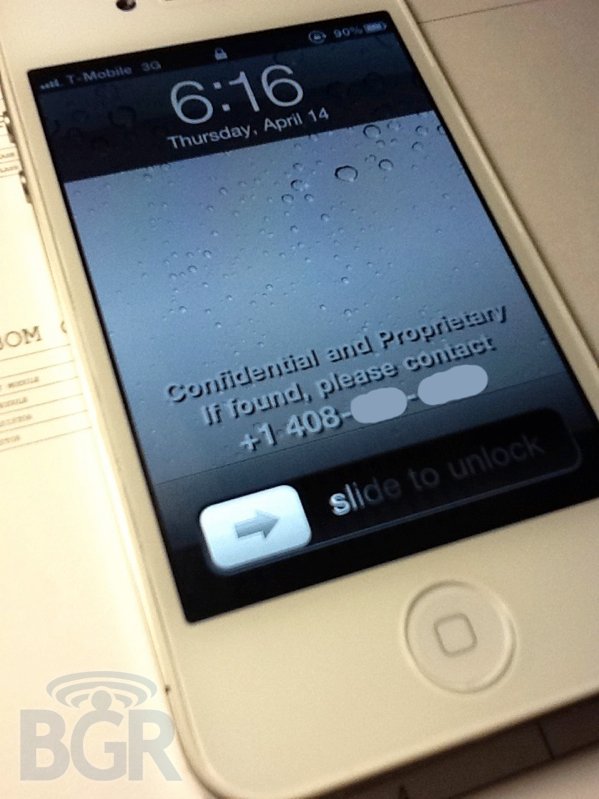
    A bunch of photos surfaced recently by BGR shows an unreleased white iPhone 4 device running on T-Mobile USA network. It looks like an iPhone 4, although, the proximity sensor looks different than the one shown in the final white iPhone 4 that’s been already sold in the UK. The device is running an old and internal test version of iOS 4, confirmed by the several Apple internal and field-testing applications like Radar and Apple Connect or the preference panels to measure the performances of the device.

    That’s right, you’re looking at photos of an iPhone prototype with T-Mobile USA 3G bands. The actual internal model is N94, and if you remember, the Verizon model is N92 while the standard GSM variant is N90. We have verified that the phone itself is running a test version of Apple’s iOS, much like the one we saw in those videos from Vietnam, and it includes internal Apple test apps like Radar and Apple’s employee directory app. Additionally, the front of the white iPhone pictured looks a little different from the photos of the retail white iPhone 4 that surfaced recently — specifically, the proximity sensor has changed on the retail version.

    The model number of this iPhone 4 is N94, its related to the A5 chip — which is implemented on the iPad 2. Remember that there is the prototype iPhone with an A5 processor that game developers are using to prepare their iPhone 5 apps. That sounds a lot like this phone. The only question now is if that is a prototype ’4S’ or ’5′.

  • 64 GB White iPhone 4, Running Unreleased Version of iOS 4, Caught in the Wild


    Vietnamese website Tinhte, which is well known for leaks has released a video of a 64 GB White iPhone 4 running some test of unreleased version iOS 4. The video reveals multitasking and search spotlight features. the news comes from the guys at Engadget:

    We’re looking at a prototype unit and taking us on a tour around its body. A visit to the Settings menu shows a 64GB storage capacity, while app folder creation is also handled a little differently from iOS 4. The presence of the Touch Fighter app on this phone, which Apple built to show off the capabilities of earlier versions of the handset, and other internal-looking software seems to point to this indeed being some form of iOS beta build. Of course, it might not be iOS 5 at all, but simply a never-released version of iOS 4. All we know for sure is that the video’s after the break.

    All indications are that this is indeed an early, unreleased version of iOS 4. Interesting, but probably not something to get your hopes up about.

  • Glasses Free 3D on iPad 2 and iPhone 4 via Head Tracking


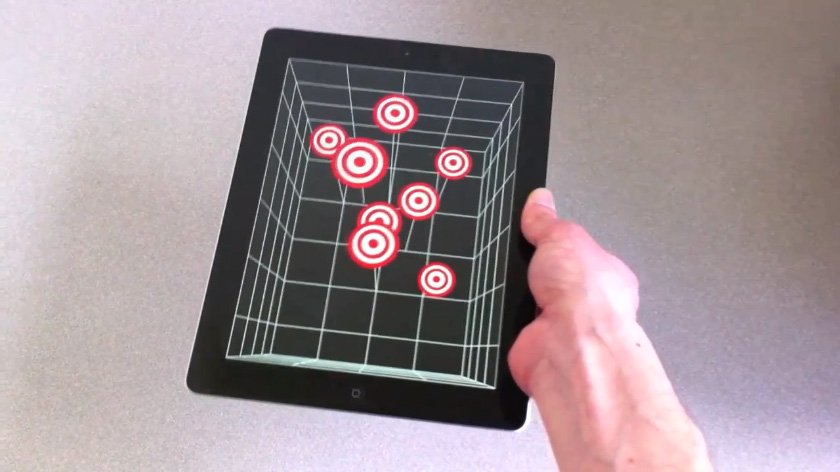
    Jeremie Francone and Laurence Nigay from the Laboratory of Informatics of Grenoble at the EHCI Research Group have created an amazing tech demoes by combining head-tracking technology that uses the iPad’s front facing camera to deliver glasses-free 3D experience that doesn’t require the accelerometer, but it’s entirely based on the camera and the movements of a user’s head in front of the screen. The position of the user will give the illusion of tridimensional objects moving on the display.

    We track the head of the user with the front facing camera in order to create a glasses-free monocular 3D display. Such spatially-aware mobile display enables to improve the possibilities of interaction. It does not use the accelerometers and relies only on the front camera.

    Francone and Nigay were inspired by the work of Johnny Lee who built a similar system using a Wii system.

    Glasses-free 3D has been deployed by Nintendo in its latest 3DS portable gaming console, and a series of reports in the past suggested Apple could implement glasses-free 3D in the future. The app does not yet appear to be available for download.

  • How to Enable Multi-Touch Gestures in iOS 4.3.1 for iPhone 4 Using Cydia Hack


    We have previously showed you a way to enable multitouch gestures in iOS 4.3.1 using a manual method to SSH through the device but thanks to Cydia Hacks that can fix the issue and do all the dirty work on behalves of you. All you need is a jailbroken iPhone and make sure, currently the tweak only works with iPhone 4 and iPod touch 4G.

    Step 1: Search for MT Gestures via ModMyi repo

    Step 2: Install / respring and its done

    You can now do the following three gestures using four or five fingers:

    • Pinch to home screen
    • Swipe up for Multitasking bar
    • Swipe left/right to switch apps.