• Box.net Offers iOS Users 50GB Of Free Cloud Storage


    Box.net offers 50GB of free storage to iOS users

    Box.net has announced they are offering a promotional free 50GB of storage to iOS users, beginning at 12:01 PM PST Friday, October 14th. up to the next 50 days. Cool ha?!

    Follow these steps:

    1. Use your iPhone, iPad or iPod touch to visit the App Store and download the App.
    2. Log in to your account or register for a new one directly from the app.
    3. That’s it

    On top of 50GB of free storage, accounts will receive an increased file size limit of 100MB instead of 25MB. Box.net has over 7 million users, and the app was recently updated to support iOS 5. That means the app supports AirPlay.

    The 50GB of storage is ten times what Apple’s iCloud service offers users for free, and is being offered free with no strings attached. A comparable amount of storage on DropBox would cost $9.99 per month, and a comparable amount of storage through Apple’s iCloud service would cost $100 per year.

    Box.net can be used to store photos, documents, videos, music, or other digital files safely on Box.net’s servers.


  • iOS 5 iPhone, iPad, iPod Touch, Apple TV Direct Download Links Repository


    iOS 5 Release log

    Apple today released the final consumer version of iOS 5, a major and most ambitious upgrade to its mobile operating system yet. Apple has also released Find My Friends and AirPort Utility apps, enabled iCloud accounts for everyone, flipped the switch on the Newsstand Store and rolled out music re-downloading service dubbed iTunes in the Cloud in the U.K., Canada, Australia and other international markets. The iOS 5 packed with over 200 new features.

    You’re advised to perform a full backup of your iOS device in iTunes to restore to in case something goes wrong. Simply connect your device to a computer, launch iTunes 10.5, right click the device in the Devices pane and click the Back Up option.

    Alternatively, copy the backup folder to a safe location, such as an external hard drive or a USB thumb drive. iTunes places the backup files in the following places:

    Mac: ~/Library/Application Support/MobileSync/Backup/

    Windows XP: \Documents and Settings\(username)\Application Data\Apple Computer\MobileSync\Backup\

    Windows Vista and Windows 7: \Users\(username)\AppData\Roaming\Apple Computer\MobileSync\Backup\

    device current version date found
    AppleTV(2G) (AppleTV2,1)
    4.4 (9A334v)
    10/12/2011 13:16:01
    iPad (iPad1,1)
    5.0 (9A334)
    10/12/2011 13:16:01
    iPad2,1 (iPad2,1)
    5.0 (9A334)
    10/12/2011 13:16:01
    iPad2,2 (iPad2,2)
    5.0 (9A334)
    10/12/2011 13:16:01
    iPad2,3 (iPad2,3)
    5.0 (9A334)
    10/12/2011 13:16:01
    iPhone (iPhone1,1)
    3.1.3 (7E18)
    04/08/2010 21:05:48
    iPhone3G (iPhone1,2)
    4.2 (8C148)
    11/22/2010 13:08:57
    iPhone3GS (iPhone2,1)
    5.0 (9A334)
    10/12/2011 13:16:01
    iPhone4 (iPhone3,1)
    5.0 (9A334)
    10/12/2011 13:16:01
    iPhone4(vz) (iPhone3,3)
    5.0 (9A334)
    10/12/2011 13:16:01
    iPhone4,1 (iPhone4,1)
    5.0 (9A334)
    10/12/2011 13:16:01
    iPodTouch(2G) (iPod2,1)
    4.2 (8C148)
    11/22/2010 13:08:57
    iPodTouch(3G) (iPod3,1)
    5.0 (9A334)
    10/12/2011 13:16:01
    iPodTouch(4G) (iPod4,1)
    5.0 (9A334)
    10/12/2011 13:16:01
    last updated: 10/12/2011 13:40:02 EDT
  • iOS 5 Golden Master GM iPhone, iPad, iPod Touch Download Links Repository


    Apple has released iOS 5 Golden Master version for iPhone, iPad and iPod Touch. GM version is similar to the public version. Download links are available below.

    iOS 5 was announced at World Wide Developer Conference this year. iOS 5 betas were intended for developers only but this GM is apparently, as reported by some,will not need devices UDIDs and so you can install it on your device at your risk.

    Download iOS 5 Golden Master Version:

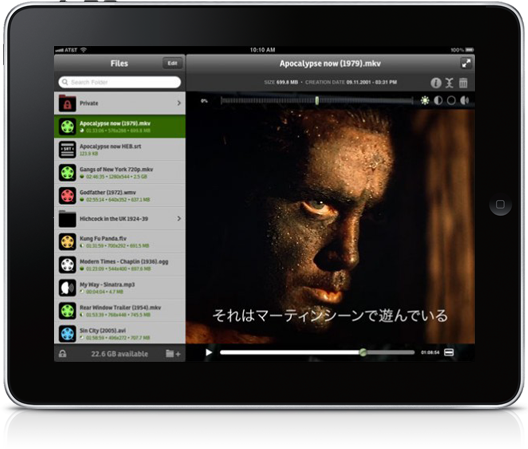
  • Play FLV, AVI, MKV, OGG, WMV, AC3 and Subtitles using ‘It’s Playing 2.0’ on iPad


    A new app called “It’s Playing 2.0.” available for iPad can play FLV, AVI, MKV, OGG, WMV and it does AC3 sound and subtitles. A whole range of features including adjustments for colour, contracts, brightness and sound so you can adjust the playback to suite the video file.

    Play all video and audio formats commonly available on the web — including AVI, RMVB, MKV and FLV (Flash Video)

    — What’s so special about It’s playing —
    iPads, iPhones and iPods have great video capabilities. On latest models you can even shoot and encode high resolution video and stereo sound in real time.
    The problem with most videos available on the Internet – sent by email, or on web sites – is that they don’t use the formats handled natively by iOS (mpeg4 and h264).

    Decoding and playing videos are among the most resource-hungry tasks that computers perform today. When playing high-resolution, high-bit rate movies, devices often lack the necessary resources to decode and show one or more frames on time. These issues can result in noticeable pauses or in desynchronization between sound and image. It really depends on the player you are using.

    What differentiates It’s playing, apart from pricing and the quality of the user interface, is the engine that takes advantage of the outstanding hardware and operating system it runs on.
    AdditionFlow© is our optimized process for making sure that you get more video frames more synchronized with the audio, ensuring the best viewing experience.

    The app costs $1.99/ £1.49 from iTunes