• Apple Hires The Guy Behind MobileNotifier, A Jailbreak-only iOS Notifications System


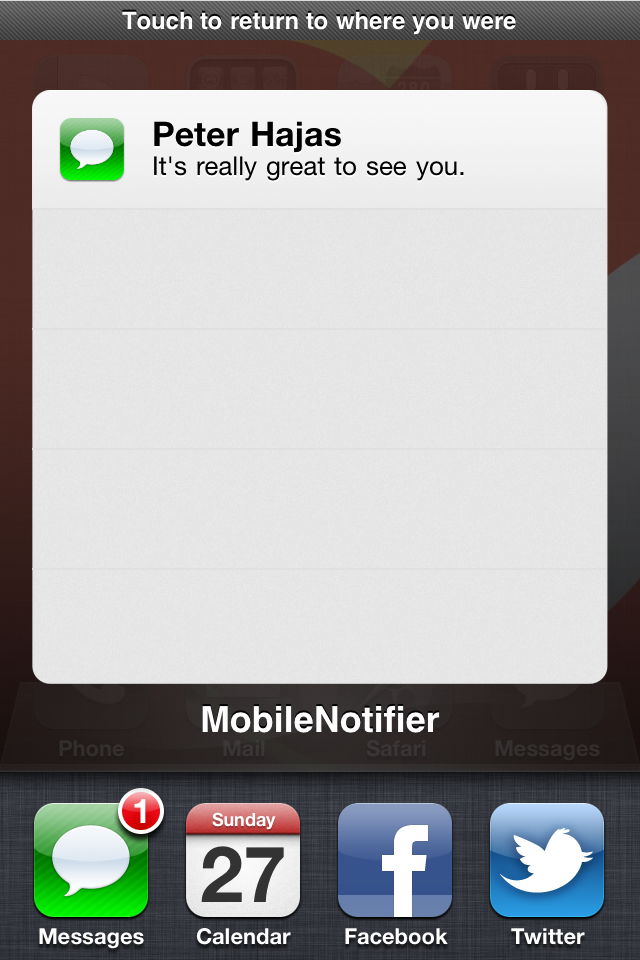
    Developer Peter Hajas has done amazing notification tweak for iOS devices MobileNotifier available in Cydia . The new tweak has soon evolved into a viable notification alternative.

    Recently, out of nowhere, Peter blogged about his departure from MobileNotifier, He said he was taking a break from MobileNotifier effective immediately and couldn’t mention why he was leaving:

    I’m taking a break from MobileNotifier and Widge for a while. I have other opportunities and priorities currently. I won’t be able to do much (if any) work on the projects, and I won’t have time to respond to many Tweets or emails. The project is in capable hands, with Kyle Adams, Tim Novinger and others (like Marc Easen) keeping things going. This is definitely not goodbye.

    I can’t say why, but it’s worth it. Trust me. If you look around hard enough, you’ll probably figure it out.

    I hope you guys understand, and I look forward to bringing you more awesome, great, free open source software in the future. Stay tuned for some amazing things!

    If you absolutely must get in touch with me, send me an email.
    Until then, stay hungry and stay foolish.

    Now, the interesting part of Peter’s post was the cryptic line about why he can’t say why he’s stopping work on MobileNotifier, but if we look around we’ll figure it out. Now, here’s the fun part.

    Steve Jobs’ speech at Standford, where he refers to the farewell message in the last edition of Whole Earth Catalogue, that read:

    Stay Hungry. Stay Foolish.

    By watching the historic video above, around 13:50, this apparently leaves us to think that he was hired by Apple actually.

    Later, the guys at RedmondPie was able to dig up an old deleted tweet by Hajas, that stated he was “off to work in CA at a ‘fruit’ company”.

    @brittaahh I’m glad you like it! I’ll see what I can do 🙂 I will be back for a few weeks, then I’m off to work in CA at a “fruit” company.

    More evidence kept rolling up as finally, Peter’s Facebook had been updated to show his current employment status as an “intern” with Apple Inc. as noticed by CrunchGear

    Peter’s hard work does pay off and got him noticed by Apple, well done.
    [Thanks iphoneincanada]

  • Stream YouTube Videos Faster on iPhone, iPod Touch, iPad with TCP Optimizer Cydia Hack


    TCP Optimizer is a new and free Cydia tweak that modifies your iDevice’s settings to increase streaming speeds and improve its overall internet connection, including Wi-Fi.

    How To install TCP Optimizer:

    • You must have a jailbroken iDevice
    • Add http://cydia.pushfix.info/ repository to Cydia.
    • Search for and install ‘TCP Optimizer‘. No Restart needed.

    This actually will:

    • Increase theTCP Receive Buffer from 131072 to 292000,
    • Disable TCP delayed ACK’s
    • Double the number of possible un-ACK packets from 8 to 16 packages
    • Increase the size of un-ACK packets

    TCP Optimizer is compatible with iPhone, iPod touch and iPad, running iOS 3.1.2 or above; however, Its not recommended to be used on second generation Apple TVs.

  • RecognizeMe Brings Facial Recognition Unlock to iPhone, Now Available in Cydia


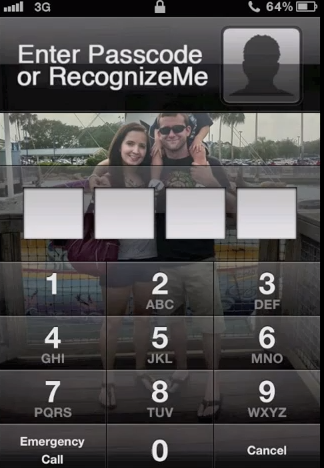
    A new Cydia tweak RecognizeMe, allows you to use facial recognition to unlock your iPhone. The tweak is now available in Cydia Store for download for $6.99 via the BigBoss repository.

    RecognizeMe does a pretty good job at facial recognition, it sits on the iPhone passcode screen, so it serves as an alternate to, rather than a replacement for the passcode. Check this video out:

  • A Simple Hack Lets Original iPad Owners Enjoy Smart Covers Too


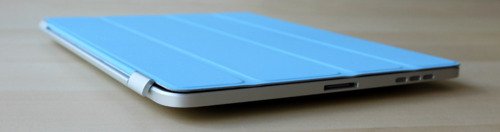
    Original iPad owners can also use Apple’s revolutionary Smart Cover on their tablet. This news comes directly from the hack’s developer, Dan Provost, who posted directions on The Russians Used A Pencil blog.

    The Smart Cover line, like the iPad 2 itself, is fast becoming one of the top tech stories of 2011. Simple in design, the Cover protects the tablet’s glass front, while also serving as something of an on/off switch, thanks to its inclusion of 31 magnets.

    Out of the box, a Smart Cover will not work on an original iPad, since the first generation iDevice doesn’t come with magnets. However, using $.20 block magnets, 3/8” x 3/16” x 1/32” (found here), Provost was able to create a perfect fix.

    Here are the directions:

    To place the magnets, I stuck them first to the magnetized hinge of the Smart Cover. I slid them around until they became locked into a position. This ended being asymmetrical, but I didn’t mind. I then lined up the cover with the iPad and used masking tape to mark where the magnets should be placed. I wanted this to be a somewhat permanent solution, so I used super glue to affix the magnets to the iPad. If you are not so daring, or want to test it out to make sure you like it, just use transparent tape. Even though the super glue keeps the magnets secure and in place, they are actually pretty easy to remove by just “chipping” them off with a flathead screwdriver and a very light tap of the hammer.

    Here is the finished product:

    [via AppAdvice]