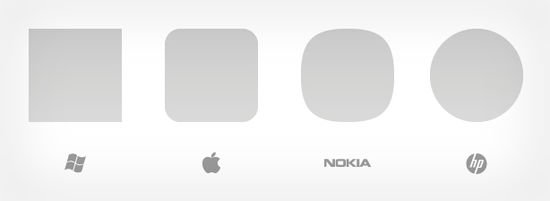
• Microsoft is Square, Apple is Roundrect, Nokia is Squircle, Google is…?


    Clayton Miller’s Interuserface takes a look at the iconic shapes behind today’s biggest mobile companies, and while Apple, iPhone, and iPad are obviously roundrects (rounded rectangles), their competition is just as geometrically aligned:

    Microsoft’s Metro UI owns the square. Apple has a corner on the roundrect, from the Springboard launcher to the iPhone hardware itself. Nokia, despite its late entry with MeeGo’s Harmattan UI, found the squircle unclaimed and ran with it beautifully. Palm has used the circle from the early days of PalmOS, and in WebOS, HP continues the tradition with care (one might even note that both Palm and HP structure their wordmarks around the circle).

    The power of shapes:

    Like color, which also despite limitless associations has a history of strong associations within a market, shape is a powerful, yet subtle differentiator. Owning a shape isn’t easy – by itself, as demonstrated by Samsung and RIM, a shape is hardly potent. Those who have successfully laid claim to a shape have used it as a building block rather than as window dressing. Use the power of shape to reinforce good design with coherence and identity – and that shape may one day be yours.

    Zune, obviously, couldn’t hold the squircle, and neither Bada nor RIM could take the square or roundrect as their own. Interestingly, Google’s Android has no iconic hold on any simple shape (nor do Facebook or Amazon for that matter, who have elected to stick with letters).

  • Gmail Has Got a New UI Look and You Can Try it NOW


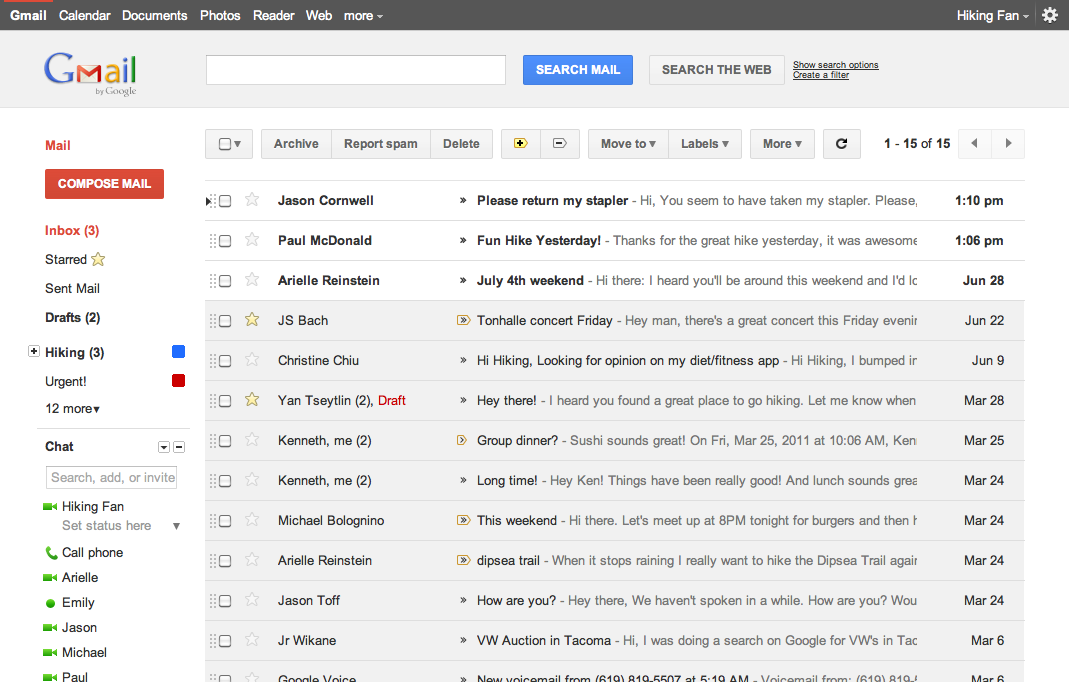
    Google has rolled out a lot of redesigning work this week starting from the new black bar and Google search page new UI, some Gmail tweaks and introducing Google+. The Gmail, in particular, is about to get a new theme and you can try it right now. Here is what Google says about the matter:

    … we’re embarking on a series of interface updates to help strip out unnecessary clutter and make Gmail as beautiful as it is powerful. This is part of a Google-wide effort to bring you an experience that’s more focused, elastic, and effortless across all of our products. The changes are not going to happen all at once. We know that you love and care about Gmail as much as we do, and we’ll be working on these upgrades gradually over the next few months to allow plenty of time to understand and incorporate your feedback into the evolving design.

    How to get the new Theme:

    Simply go to Gmail Settings, click over to the Themes tab and select “Preview” or “Preview (Dense)” as your theme to try this yourself. Google has provided two themes because the end result is an elastic responsive design that shifts its information density to accomodate your screen size, but for now, you need to pick based on the density you prefer

    We’re kicking things off with two new themes for you to try out as a sort of sneak peek at what we’re up to. Starting today, you’ll see the “Preview” and “Preview (Dense)” themes in the Themes tab in Gmail Settings. Why two themes? Our new interface will eventually expand dynamically to accommodate different screen sizes and user preferences, but until then you can pick the information density that you prefer.

  • Google+ Invites Giveaway: Get Google Plus Free Invites Now


    Google is rolling out its social network, Google+, to the masses, and as the service currently invite-only, we have a bunch of invites to give away.

    How to get invited?

    Important Note: Google seems to be shutting down the chance for getting invites .. however until we find another back door or workaround to send invites or Google opens up the invitation again … sorry guys

    follow the easy simple steps below:

      1. Follow @iGradly on twitter or like the Facebook Page and share this on Facebook.
      2. Tweet the post in the format given below with the username.

    Get Free Google plus, Google+ invites Giveaway – http://t.co/SbEppS4 @iGradly #Giveaway

    1. After you done with the 2 steps , don’t forget to leave your comment on why you want to join Google plus along with your email address , so that i can send you the invite to Google plus.

    Google+ was unveiled as the company’s answer to Facebook. It has features common to Facebook like news streams and photo albums, but also includes unique features such as Hangouts, which lets up to 10 people enter a simultaneous group video chat.

    Originally, Google only let a small number of test users into its social network, however users who are on Google+ can invite others.

    Update #1:

    Google seems to be shutting down the chance for getting invites .. however until we find another back door or workaround to send invites or Google opens up the invitation again … sorry guys

    Update #2:

    There is a another workaround that may work for people. anybody try it please and let us know

    • Update your Google Profile and Link Picasa to your profile. Your link should now work and allow you to jump right into Google+.
    • From your Gmail page in the upper right hand corner there is a drop down box next to your name. Click the View Profile option there. From there you can choose to edit your profile. After your done editing your profile it should automatically ask you to link your Picasa to your google account. After you do that you should be able to use the invite that someone sent you.

    Hopefully this will help people having the problem where you click the “Join Google +” and it re-directs you to the tour / try later page.

    Update #3:

    The invites are working now please check your emails and visit the links.

  • Google Announces Swiffy, SWF to HTML5 Conversion Tool


    An engineering intern at Google has created a tool that allows SWF (Flash) files to be converted to HTML5. The project is centered around advertisements, but many different types of SWF content, like some games and animations, are able to be converted. Adobe announced a similar project, named “Wallaby“, a few months ago, but it is designed primarily to publish Flash code to HTML5, not convert existing SWF files.

    Today we’re making the first version of Swiffy available on Google Labs. You can upload a SWF file, and Swiffy will produce an HTML5 version which will run in modern browsers with a high level of SVG support such as Chrome and Safari. It’s still an early version, so it won’t convert all Flash content, but it already works well on ads and animations. We have some examples of converted SWF files if you want to see it in action.

    Swiffy-converted files will work in Chrome and Safari (both desktop and mobile), so iOS users will benefit from the additional content. Of course, this also means that ads will be easier to display on iDevices. If you have a SWF file that you would like converted, head over to the Google Labs page.