• How To Unlock iPhone 4, 3GS on iOS 4.3.1 with Ultrasn0w 1.2.1


    iPhone Dev Team has released Ultrasn0w 1.2.1 unlock for iOS 4.3.1. The unlock tool can be used with iPhone 4 and iPhone 3GS. Its not a new unlock, it can only unlock lower basebands whose unlock was already possible but broken on iOS 4.3.1. Ultrsn0w 1.2.1 WILL NOT unlock higher basebands whose unlock is not possible right now.

    If you have upgraded to iOS 4.3.1 firmware and jailbroken you device with PwnageTool 4.3 or Sn0wbreeze 2.5 and requires an unlock then you can use Ultrasn0w 1.2.1.

    Compatible basebands with Ultrasn0w 1.2.1:

    iPhone 4: 01.59.00
    iPhone 3GS: 04.26.08 / 05.11.07 / 05.12.01 / 05.13.04 / 06.15.00

    DO NOT USE WITH the following basebands:

    iPhone 4: 02.10.04 / 03.10.01 / 04.10.01
    iPhone 3GS: 05.14.02 / 05.15.04 / 05.15.04 / 05.16.01 / 05.16.02

    Remember you need to have a jailbroken device with PwnageTool 4.3 and Sn0wbreeze 2.5.

    How To Guides for Untethered 4.3.1 Jailbreak on Windows & Mac
    How To Guides for Untethered 4.3.1 Jailbreak on Windows & Mac

    Step 1: You have to jailbreak your iPhone 4 / 3GS on iOS 4.3.1 with preserving your old baseband, follow this guide (PwnageTool 4.3 for Mac) or (Sn0wbreeze 2.5 Windows)

    Step 2: Once you jailbreak yoour device, you can now unlock your iPhone 4 / 3GS with Ultrasn0w 1.2.1 from Cydia. To do so, follow the steps below:

    • Press to launch Cydia Installer from your SpringBoard.
    • Press to select the Manage tab at the bottom of the screen.
    • Press to select the Sources button.
    • Now touch on Edit and then on Add. You will be prompted to enter the URL of the source. Type http://repo666.ultrasn0w.com and touch on Add Source to add this repository.

    Cydia will now automatically update your sources by following a series of automated steps.

    • After installation is completed. Search for “ultrasn0w 1.2.1” in Cydia and install this application. This app will automatically unlock your iPhone so that you can use it with any carrier.

    Step 3: Almost done, now simply reboot your iPhone and you should have a fully unlocked iPhone 3GS / 4 on iOS 4.3.1.
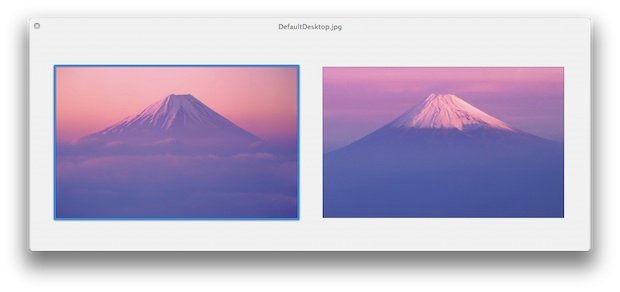
  • New Fuji Mountain Wallpaper in Mac OS X Lion Hints at Future Retina Displays Mac


    The new default wallpaper on OS X 10.7 Lion Developer Preview 2 featuring Fuji Mountain has a whopping size of 3200×2000 pixels as noted by the guys at osxdaily.com.

    Click here to download the full version, [3200×2000 pixels.]

    However, 3200×2000 pixels is significantly larger than any existing resolution offered by Apple displays, including the 27″ and 30″ Apple Cinema Displays. Furthermore, the default wallpaper size in Mac OS X 10.6 is 2560×1600, which is exactly the maximum resolution of Apple’s 30″ Cinema Display. Is it just coincidence that Apple is bundling an ultra high resolution image in Lion as the new default wallpaper, or does this suggest that higher resolution Macs, possibly with retina displays, are coming sometime in the future?

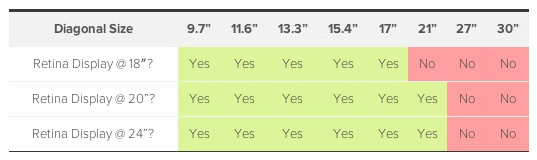
    Here’s a nice chart that shows what screen size at what viewing distance with that resolution would be considered a retina display:

    Notice that even for the closest viewing distance of 18 inches, a 3200 x 2000 resolution represents a Retina Display for display sizes up to and including 17 inches. And of course, that covers the entire range of Apple laptops on the market today.

    And smaller displays wouldn’t need a resolution that high to be considered retina:

    A 13.3” MacBook Air, for example, would need a screen providing approximately 2200 x 1375 pixels (191 dpi) to be considered a Retina Display at an 18-inch viewing distance.

    To help understand what a “Retina Display” means. Steve Jobs, at the announcement of the iPhone 4, had this description:

    It turns out there’s a magic number right around 300 pixels per inch, that when you hold something around to 10 to 12 inches away from your eyes, is the limit of the human retina to differentiate the pixels.

    Other than providing dramatically improved display clarity on a Mac, the other reason a Mac with a 3200×2000 pixel resolution makes sense is for iOS developers. So what does this have to do with iPad 3?

    … according to an analyst cited by AppleInsider, the high resolution retina display will come to iPad 3 in the form of a whopping 2048×1536 resolution display. If this happens, you’d expect similar displays to come to the Mac platform so that developers can accurately produce and test apps for the ultrahigh resolution.

    Indeed, 3200×2000 would be such an ultrahigh resolution for a Mac, and it would be more than adequate to develop for a 2048×1536 pixel iPad 3 display.

    Sure, this is speculation based on a new wallpaper in a developer preview OS, but who knows what Apple is prepping for us.

  • Apple Blows us Away with Smart Illuminated Bezel Details!


    Smart bezel patents from Apple are old news, but Patently Apple has discovered some blow-away details. Put simply, Apple is proposing a bezel that doubles as a secondary display built around a printed segmented electroluminescence technology:

    Apple intends to use the secondary display to introduce a set of new illuminated indicators that are able morph into various controls for work and play. Illuminated gaming and productivity controls could be built into the face-side of the bezel and/or selected back-side areas of iOS devices like the iPad.

    This opens up a whole new world of creative possibilities…

    The bezel running around iOS gadgets could be made touch sensitive, allowing users to tap the illuminated control to access common features such as media playback and game controls.

    The new smart bezel may not have a traditional home button. Well, below is an example of how that could look like using Apple’s display. Apple could create a very simple yet very cool illuminated home button that only appears when your hand approaches the home button area as shown below in a generic example that shows off this technology.

    If this patent ends up used in future iOS gadgets, expect easier, more convenient handling of everyday tasks. It’s sexy, there’s a substantial wow factor involved and it enhances the user experience in a Star Trek manner.

  • iPad 2 Expected 2.6 Million Units Shipped in March?


    According to Digitimes, Apple shipped between 2.4 and 2.6 million iPads during the month of March. Shipments are set to nearly double during the second quarter, according to a conservative estimate by a source:

    Sales of iPad 2 are running at a rate faster than its predecessor, and Apple took delivery of 2.4-2.6 million units in March. Apple is likely to take delivery of 4-4.3 million units a month, or a total of over 12 million units, of iPad 2 tablets in the second quarter, said the sources.

    Apple is likely to take delivery of 4-4.3 million units a month, or a total of over 12 million units, of iPad 2 tablets in the second quarter, said the sources.

    Taiwan-based TPK Touch Solutions, G-Tech Optoelectronics, HannStar Display, Chunghwa Picture Tubes (CPT), Wintek and other touch panel makers are all expanding or looking to expand their manufacturing capacities in the wake of strong iPad 2 sales.