• Did Apple ‘Borrow’ The Smart Cover Idea From Incase?


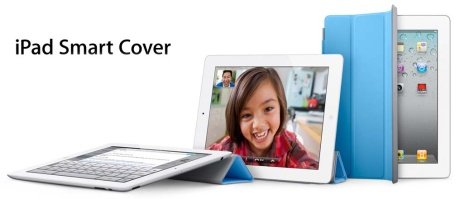
    Apple has really blown our minds away with their latest and greatest Smart Cover revelation, yesterday morning. Designed specifically for iPad 2 devices, the fabulous and colorful covers – soon to be offered in polyurethane or leather flavors – Are made of durable materials and features clean design, elegant simplicity, and convenient use. Just snap-on the magnetic attachment, fold it to a triangle stand or get a full iPad protection cover in the most efficient way.

    So far so good, right? well, not exactly. To put things in the proper context, it looks like Apple didn’t really come up with the Smart Cover idea first. So who did?

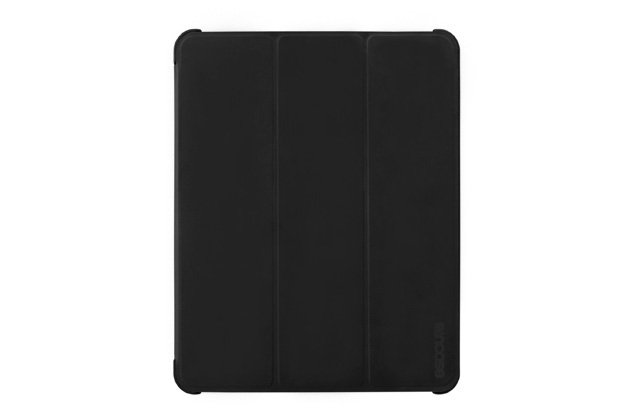
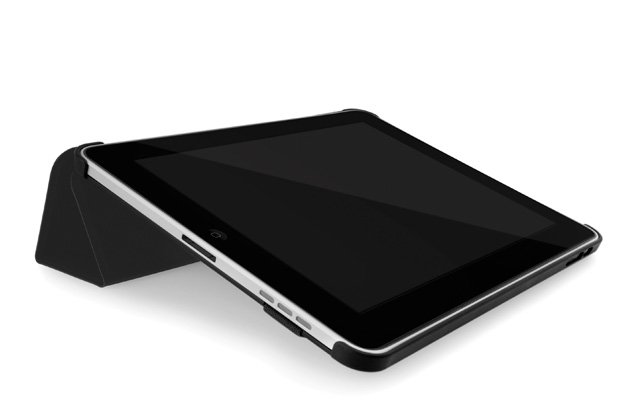
    It was technology protection accessories leader, Incase, that brought it up with its wonderful iPad Convertible Magazine Jacket. Shocking! This isn’t Apple’s original idea, and all that’s left is to figure out whether the Cupertino designing division got permission to use Incase design, got inspired from it, or just “borrowed” the idea without even asking. A few pictures of Incase’s Convertible Magazine Jacket after the break. What do you think?
  • Apple is Fortune’s Most Admired Company… again !!


    For the fourth year in a row, Apple is Fortune’s “Most-Admired” company. ”The company’s blistering pace of new product releases,” writes Shelley DuBois, “has continued to set the bar high for tech companies across the board.”  This follows winning the past three years:

  • What Do We Expect in iPad 2?


    There are a lot of expectations for iPad 2 hardware out there but ours largely falls in line with AllThingsD:

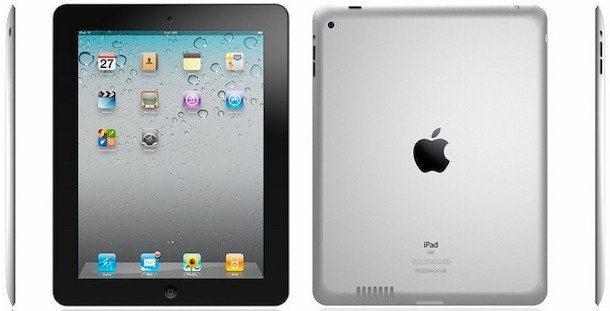
    Aesthetically, the iPad 2 is expected to be slimmer and lighter than its predecessor, with a larger speaker and an improved display designed to deliver a better experience in bright sunlight. It will likely run on a 1.2GHz, dual-core, ARM Cortex-A9 chip and Imagination’s SGX543 GPU architecture–a big improvement over the SGX535 Apple uses today. A Qualcomm multimode chip will allow it to run on both GSM- and CDMA-based networks around the world. And it will have double the RAM–512MB, same as the iPhone 4. Finally, it will feature those front- and back-facing cameras we’ve been hearing about for some time now–one for FaceTime and Photo Booth, the other for POV FaceTime and shooting photos and video.

    The star of the show might be iOS 5 preview which will likely showcase new voice navigation features with Siri’s AI, perhaps a new maps application and certainly Cloud/MobileMe/iWork/iLife integration.  And notifications have to be getting updated.

    We’re getting pumped.  12 hours to go.

  • Play PS3 Games on iPhone, iPod Touch with everyAir


    New hackers and developers called “pandaelf” was able to find a way to play PS3 Games on your iPhone, iPod touch and iPad. With a little wrangling of simple hardware and everyAir, the developers have successfully made it possible to play PS3 games on any iOS device.

    Q&A:

    Q: What’s the overall picture for how this works?
    A: The trick is to connect a capture device and a USB mouse/keyboard device to the PS3. The capture device sends video data to the PC, and the USB keyboard/mouse sends the button presses. On the PC itself, you run a custom build of everyAir which understands custom gestures and pipes the input to the PC which then sends it to the PS3 via the input interpreter.

    Q: What were some of the hurdles?
    A: There are two problems to solve: sending the video signal to the iOS device and sending back input from the iOS device. Sending the video signal is solved by using an off the shelf capture device, and then sending back the input is a combination of a custom build of everyAir with an off the shelf mouse/keyboard device that connects to the PS3.

    Q: How do you send input to the PS3?
    A: Using one of those USB Keyboard/Mouse devices. For example, Eagle Eye (search for it on Amazon).

    Q: How do you get the video signal from the PS3 to the iOS device?
    A: We do this by using an off the shelf capture device. The capture device connects to the PC, TV, and to the PS3. The result is that a livestream of the PS3’s video signal ends up on the PC.

    Q: How do you connect to the PC from the iOS device?
    A: Using everyAir – our remote desktop application.

    Q: How does everyAir understand the game gestures?
    A: We’re using a custom build of everyAir, and it’s hardcoded to understand these gestures. Additionally, it knows how to pipe input to the mouse/kb device in a way that it expects.

    Q: Will this be publicly available?
    A: We plan to release a fully customizable version at some point in the future.

    As you read on the above quotation, till now there is no ETA for this cool idea, as usual I will let you informed with any updates, stay tuned.

    [via GadgetsDNA & pandaelves]