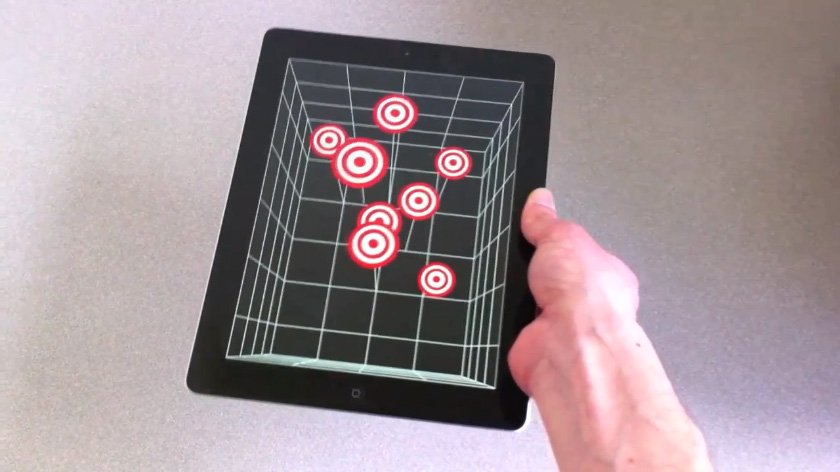
• Glasses Free 3D on iPad 2 and iPhone 4 via Head Tracking


    Jeremie Francone and Laurence Nigay from the Laboratory of Informatics of Grenoble at the EHCI Research Group have created an amazing tech demoes by combining head-tracking technology that uses the iPad’s front facing camera to deliver glasses-free 3D experience that doesn’t require the accelerometer, but it’s entirely based on the camera and the movements of a user’s head in front of the screen. The position of the user will give the illusion of tridimensional objects moving on the display.

    We track the head of the user with the front facing camera in order to create a glasses-free monocular 3D display. Such spatially-aware mobile display enables to improve the possibilities of interaction. It does not use the accelerometers and relies only on the front camera.

    Francone and Nigay were inspired by the work of Johnny Lee who built a similar system using a Wii system.

    Glasses-free 3D has been deployed by Nintendo in its latest 3DS portable gaming console, and a series of reports in the past suggested Apple could implement glasses-free 3D in the future. The app does not yet appear to be available for download.

  • How To Unlock iPhone 4, 3GS on iOS 4.3.1 with Ultrasn0w 1.2.1


    iPhone Dev Team has released Ultrasn0w 1.2.1 unlock for iOS 4.3.1. The unlock tool can be used with iPhone 4 and iPhone 3GS. Its not a new unlock, it can only unlock lower basebands whose unlock was already possible but broken on iOS 4.3.1. Ultrsn0w 1.2.1 WILL NOT unlock higher basebands whose unlock is not possible right now.

    If you have upgraded to iOS 4.3.1 firmware and jailbroken you device with PwnageTool 4.3 or Sn0wbreeze 2.5 and requires an unlock then you can use Ultrasn0w 1.2.1.

    Compatible basebands with Ultrasn0w 1.2.1:

    iPhone 4: 01.59.00
    iPhone 3GS: 04.26.08 / 05.11.07 / 05.12.01 / 05.13.04 / 06.15.00

    DO NOT USE WITH the following basebands:

    iPhone 4: 02.10.04 / 03.10.01 / 04.10.01
    iPhone 3GS: 05.14.02 / 05.15.04 / 05.15.04 / 05.16.01 / 05.16.02

    Remember you need to have a jailbroken device with PwnageTool 4.3 and Sn0wbreeze 2.5.

    How To Guides for Untethered 4.3.1 Jailbreak on Windows & Mac
    How To Guides for Untethered 4.3.1 Jailbreak on Windows & Mac

    Step 1: You have to jailbreak your iPhone 4 / 3GS on iOS 4.3.1 with preserving your old baseband, follow this guide (PwnageTool 4.3 for Mac) or (Sn0wbreeze 2.5 Windows)

    Step 2: Once you jailbreak yoour device, you can now unlock your iPhone 4 / 3GS with Ultrasn0w 1.2.1 from Cydia. To do so, follow the steps below:

    • Press to launch Cydia Installer from your SpringBoard.
    • Press to select the Manage tab at the bottom of the screen.
    • Press to select the Sources button.
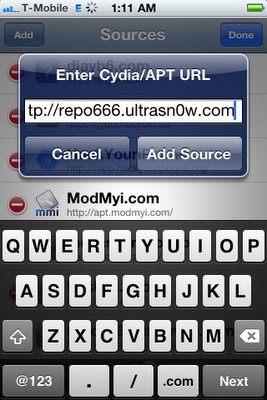
    • Now touch on Edit and then on Add. You will be prompted to enter the URL of the source. Type http://repo666.ultrasn0w.com and touch on Add Source to add this repository.

    Cydia will now automatically update your sources by following a series of automated steps.

    • After installation is completed. Search for “ultrasn0w 1.2.1” in Cydia and install this application. This app will automatically unlock your iPhone so that you can use it with any carrier.

    Step 3: Almost done, now simply reboot your iPhone and you should have a fully unlocked iPhone 3GS / 4 on iOS 4.3.1.

  • How to Enable Multi-Touch Gestures in iOS 4.3.1 for iPhone 4 Using Cydia Hack


    We have previously showed you a way to enable multitouch gestures in iOS 4.3.1 using a manual method to SSH through the device but thanks to Cydia Hacks that can fix the issue and do all the dirty work on behalves of you. All you need is a jailbroken iPhone and make sure, currently the tweak only works with iPhone 4 and iPod touch 4G.

    Step 1: Search for MT Gestures via ModMyi repo

    Step 2: Install / respring and its done

    You can now do the following three gestures using four or five fingers:

    • Pinch to home screen
    • Swipe up for Multitasking bar
    • Swipe left/right to switch apps.
  • Apple Blows us Away with Smart Illuminated Bezel Details!


    Smart bezel patents from Apple are old news, but Patently Apple has discovered some blow-away details. Put simply, Apple is proposing a bezel that doubles as a secondary display built around a printed segmented electroluminescence technology:

    Apple intends to use the secondary display to introduce a set of new illuminated indicators that are able morph into various controls for work and play. Illuminated gaming and productivity controls could be built into the face-side of the bezel and/or selected back-side areas of iOS devices like the iPad.

    This opens up a whole new world of creative possibilities…

    The bezel running around iOS gadgets could be made touch sensitive, allowing users to tap the illuminated control to access common features such as media playback and game controls.

    The new smart bezel may not have a traditional home button. Well, below is an example of how that could look like using Apple’s display. Apple could create a very simple yet very cool illuminated home button that only appears when your hand approaches the home button area as shown below in a generic example that shows off this technology.

    If this patent ends up used in future iOS gadgets, expect easier, more convenient handling of everyday tasks. It’s sexy, there’s a substantial wow factor involved and it enhances the user experience in a Star Trek manner.