• Apple Blows us Away with Smart Illuminated Bezel Details!


    Smart bezel patents from Apple are old news, but Patently Apple has discovered some blow-away details. Put simply, Apple is proposing a bezel that doubles as a secondary display built around a printed segmented electroluminescence technology:

    Apple intends to use the secondary display to introduce a set of new illuminated indicators that are able morph into various controls for work and play. Illuminated gaming and productivity controls could be built into the face-side of the bezel and/or selected back-side areas of iOS devices like the iPad.

    This opens up a whole new world of creative possibilities…

    The bezel running around iOS gadgets could be made touch sensitive, allowing users to tap the illuminated control to access common features such as media playback and game controls.

    The new smart bezel may not have a traditional home button. Well, below is an example of how that could look like using Apple’s display. Apple could create a very simple yet very cool illuminated home button that only appears when your hand approaches the home button area as shown below in a generic example that shows off this technology.

    If this patent ends up used in future iOS gadgets, expect easier, more convenient handling of everyday tasks. It’s sexy, there’s a substantial wow factor involved and it enhances the user experience in a Star Trek manner.

  • How to Enable Multi-Touch Gestures in iOS 4.3.1 for iPhone 4, iPod Touch and iPad


    Remember the four and five finger multi-touch gestures shown off by Apple in the iOS 4.3 Beta for iPad. However, these features were only meant for the developers and never made it to the final public release of iOS 4.3.

    Now, there is a way to enable multitouch gestures in iOS 4.3.1. All you need is a jailbroken iPhone 4/3GS, iPod Touch or iPad running iOS 4.3.1 and some tweaking.

    We will be editing some plist files in this tutorial. Windows users can use plist editor while Mac users can use TextWrangler. If you have Xcode installed then no need for an additional application. I’ll be using iFile app which is available on Cydia.

    There is a simple tweak available in Cydia which you can simply search for and run check it out here

    Instructions:

    Step 1:

    Navigate to Root > var > mobile > Library > Preferences > com.apple.springboard.plist

    Copy this file to your computer and add the following two lines of code:

    <key>SBUseSystemGestures</key>
    <true/>

    Step 2:

    Navigate to Root > System > Library > CoreServices > SpringBoard.app > N90AP.plist

    Update: N90AP.plist exists on iPhone 4 only. The corresponding file for iPhone 3GS is N88AP.plist, iPod Touch is N81AP.plist and for iPad K48AP.plist. Usually, there’s just one of this file’s kind in the specified folder, so it should not be very difficult to identify.

    Add the following two lines:

    <key>multitasking-gestures</key>
    <true/>

    That’s it. We’re done. After you have saved these edit files put them back in their locations and restart or respring your iOS device for the changes to take effect.

    You can now do the following three gestures using four fingers, though in my opinion the iPhone or iPod Touch screens are too small for these many fingers.

    • Pinch to home screen
    • Swipe up for Multitasking bar
    • Swipe left/right to switch apps.
  • iPad 2 Expected 2.6 Million Units Shipped in March?


    According to Digitimes, Apple shipped between 2.4 and 2.6 million iPads during the month of March. Shipments are set to nearly double during the second quarter, according to a conservative estimate by a source:

    Sales of iPad 2 are running at a rate faster than its predecessor, and Apple took delivery of 2.4-2.6 million units in March. Apple is likely to take delivery of 4-4.3 million units a month, or a total of over 12 million units, of iPad 2 tablets in the second quarter, said the sources.

    Apple is likely to take delivery of 4-4.3 million units a month, or a total of over 12 million units, of iPad 2 tablets in the second quarter, said the sources.

    Taiwan-based TPK Touch Solutions, G-Tech Optoelectronics, HannStar Display, Chunghwa Picture Tubes (CPT), Wintek and other touch panel makers are all expanding or looking to expand their manufacturing capacities in the wake of strong iPad 2 sales.

  • Unlock iOS 4.3.1 On iPhone 4 and 3GS With Ultrasn0w Fixer


    Ultrasn0w fixer for iOS 4.3.1 unlock on iPhone 4 and iPhone 3GS on older basebands. The fix is developed by msft_guy and iH8sn0w.

    Ultrasn0w was previously unable to unlock iPhone 4 and 3GS devices after untethered iOS 4.3.1 jailbreak. But now you can use Ultrasn0w 4.3.1 fixer to unlock your device. DO NOT take it as a new unlock tool, it can ONLY UNLOCK basebands 01.59.00 / 04.26.08 / 05.11.07 / 05.12.01 / 05.13.04 / 06.15.00.

    How to Guide To Use Ultrasn0w fixer for iOS 4.3.1 to Unlock iPhone 4 and 3GS:

    Step 0: You need to have a jailbroken iOS device in order for iOS 4.3.1 unlock to work. You can jailbreak your device using Redsn0w 0.9.6 RC9, PwnageTool 4.3 or Sn0wbreeze 2.5.

    Step 1: Launch Cydia in your jailbroken iPhone 4 or iPhone 3GS

    Step 2:  Navigate to “Manage” and then “Sources”

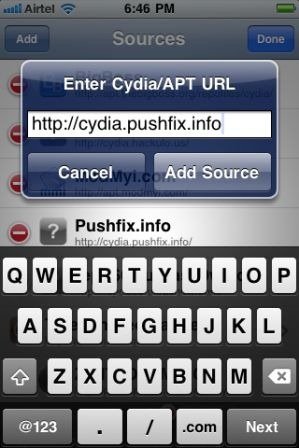
    Step 3: “Add” the repo: “http://cydia.pushfix.info”

    Step 4: Now press “Done”.

    Step 5: Now select  ”Pushfix.info” to Install it.

    Step 6: Once its done with installation. Go to Pushfix.info. Scroll down to find “Ultrasn0w fixer for 4.3.1”. Select and to install the package. After that it will restart your device.

    Your device is now unlocked on iOS 4.3.1 on basebands 01.59.00 / 04.26.08 / 05.11.07 / 05.12.01 / 05.13.04 / 06.15.00. DO NOT use it other than the mentioned basebands.