• Apple Preparing Thinner and Lighter iPhone 5 to Launch This Fall


    Citing a new report from WSJ today indicates that Apple is indeed gearing up with a new iPhone for a launch this fall, with an initial production target of 25 million units through the end of the year.

    “Apple’s sales estimates of the new iPhone is quite aggressive. It told us to prepare to help the company meet its goal of 25 million units by the end of the year,” said another person at one of Apple’s suppliers. “The initial production volume will be a few million units… we were told to ship the components to assembler Hon Hai in August.”

    The various iPhone 5 rumors have been going back and forth on whether or not a significant redesign is coming, but the new report seems to suggest that iPhone 5 will have a completely redesigned case after all:

    According to some suppliers of components to Apple, the new version of the iPhone is expected to be thinner and lighter than the iPhone 4 and sport an 8-megapixel camera. One person said the new iPhone will operate on Qualcomm Inc.’s wireless baseband chips.

    Apple’s manufacturing partner Foxconn/Hon Hai is said to be having difficulties with the new device due to it being “complicated and difficult to assemble.

    Two of the people, however, cautioned that shipments of the new iPhone could be delayed if Hon Hai can’t improve its yield rate as the new iPhone is “complicated and difficult to assemble.”

    Reports over the past few months have been pointing to a September release for the next-generation iPhone, carrying Apple’s A5 processor with an 8-megapixel rear camera, and a Qualcomm baseband chip for both GSM and CDMA networks. iOS 5 and iCloud are also to be released this fall as well.
  • Jailbreak iOS 4.3.3 on iPad 2, iPhone, and iPod Touch Using JailbreakMe 3.0 Guide


    These are instructions on how to jailbreak your iPad 2, iPad, iPhone or iPod Touch on iOS 4.3.3 using the just released JailbreakMe 3.0 by @comex.

    A step by step guide on how to jailbreak iOS 4.3.3 untethered using jailbreakMe 3.0

    Note: This is the easiest jailbreak in existence and it’s the first official iPad 2 jailbreak available, but also works on all other hardware capable of running iOS 4.3.3, including iPad, iPad 2, iPhone 3GS, iPhone 4, iPod touch 3rd gen, iPod touch 4th gen.

    A video available in the bottom showing the steps as well

    1. Make sure your iPad 2 is running iOS 4.3.3, you can download all iOS fro all your devices from here.
    2. Press to launch Safari.
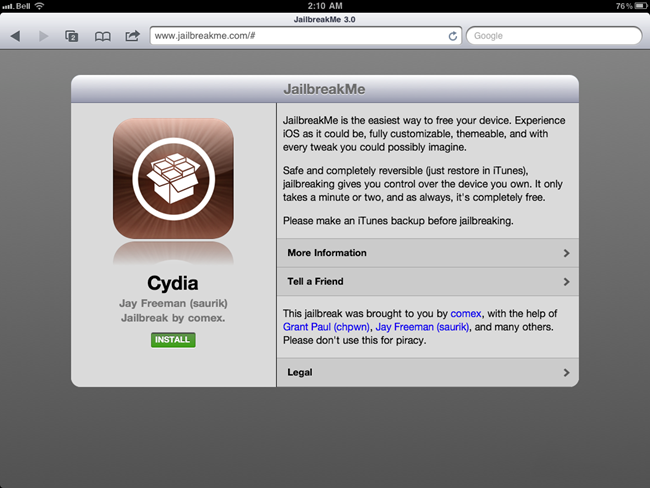
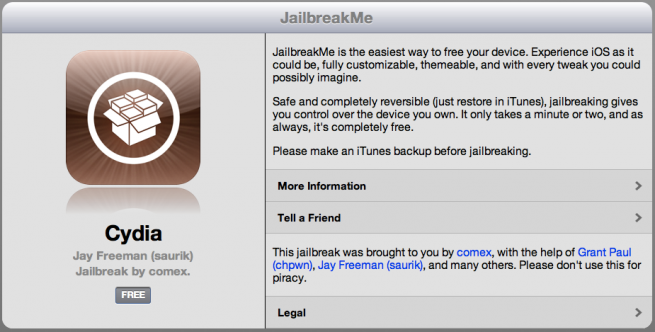
    3. Navigate to http://www.jailbreakme.com and press the Free button.
    4. Press the Install button.
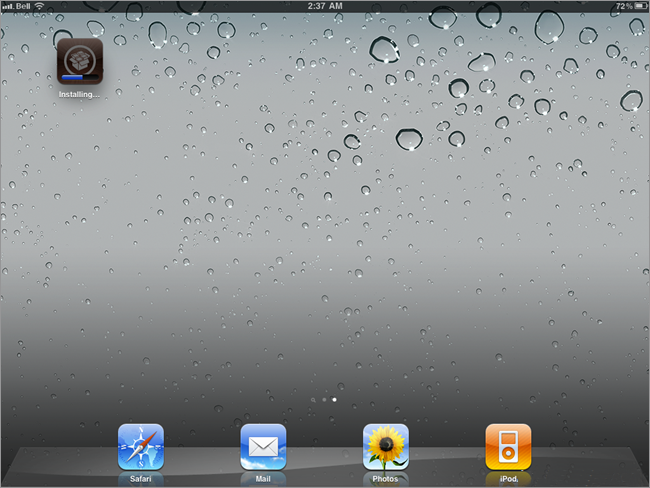
    5. Safari will now close and Cydia will download and install.
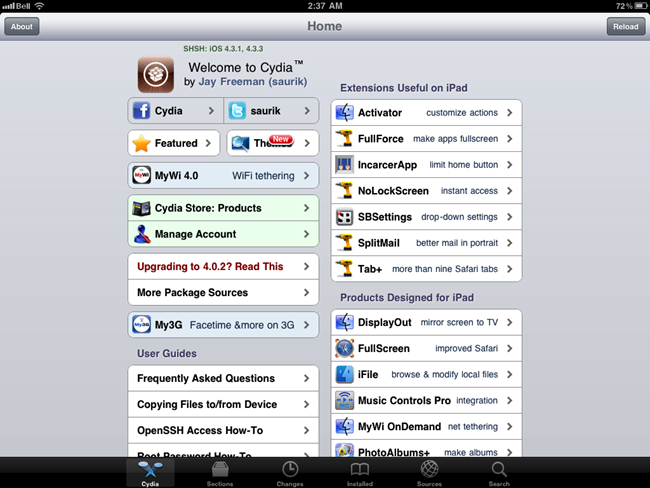
    6. Press to launch Cydia and enjoy your jailbroken iPad!

    Required Downloads:

  • JailBreakMe 3.0 Officially Goes Live, Jailbreak iPad 2 Now


    JailbreakMe.com has officially returned after a series of promises, delays and leaks. The jailbreak, which was leaked this past weekend, promises to hack any iOS 4.3.3 including the infamous iPad 2 device with the touch of a button in iOS Safari.

    This is the easiest jailbreak in existence and it’s the first official iPad 2 jailbreak available, but also works on all other hardware capable of running iOS 4.3.3, including iPad, iPad 2, iPhone 3GS, iPhone 4, iPod touch 3rd gen, iPod touch 4th gen.

    How to Jailbreak iPad 2, iPhone, & iPod touch with iOS 4.3.3 using JailbreakMe 3.0

    • Visit JailbreakMe.com from your compatible iPhone, iPad, or iPod touch
    • Tap on the “Free” button and then tap on “Install”
    • Safari will quit and you will see the brown Cydia icon loading on your home screen
    • When Cydia is done downloading, your jailbreak is complete

  • Jailbreak iPad 2 with iOS 4.3.3 by Creating a Local Web Server


    Want to jailbreak your iPad 2 running iOS 4.3.3? As you cannot wait for JailbreakMe 3.0 to be released? You can jailbreak your iPad 2 right now running iOS 4.3, iOS 4.3.1, iOS 4.3.2 and iOS 4.3.3 by creating your own local web server. No, it doesn’t have the ease or beauty of the expected JailbreakMe 3.0 release, and it’s not as simple as clicking on someone else’s hosted PDF files, but it works and it’s pretty fast thanks to python and thanks to OSXDaily for providing this method:

    Warning: this is using the same experimental leaked beta iPad 2 jailbreak, there could be bugs and other issues with this method. This is not recommended for novice users, and it is advised to wait for comex to release his official jailbreak for iPad 2. Always backup your data, and proceed at your own risk.

    Please if you don’t know what is going on below then do NOT try it.

    Its better to wait for the official release of JailbreakMe 3.0 as it seems imminent.

    Here’s what you need to do:

    • Create a simple index.html file that holds links to the leaked jailbreakme beta PDF’s that correspond to your iOS version
    • Download the jailbreak PDF files from here
    • Create a local webserver on a Mac (or linux machine)
    • Access that webserver from the iPad 2

    After you’ve downloaded the PDF rar file and created a simple ‘index.html’ file linking to the corresponding iOS device and version you want to jailbreak, use python to create an instant web server by entering the following command in the Terminal:

    python -m SimpleHTTPServer

    That will automatically publish whatever is labeled as index.html in the directory it is launched from. Now all you need to do is pull up your Mac’s (or linux box) IP address from Safari on the iPad 2 and click on the PDF file you embedded, it will look something like this:

    The jailbreak then proceeds to close Safari, and a Cydia icon will appear on the iPad homescreen. Once the Cydia icon disappears, reboot your iPad 2 to enjoy the jailbreak. Remember, this is a beta version of jailbreakme, and could come with various bugs or have unexpected results.

    This is based on the guide from Ryan Vanniekerk’s posted on his posterous page as he grabbed those PDF files from Comex’s server and put up a very lengthy and complete how-to guide on his personal blog which you can find here. The main difference is that instead of going through Mac OS X System Preferences to setup web sharing, this uses python for an instant web server. It’s faster, less configuration, all around easier, and it works, try it yourself.