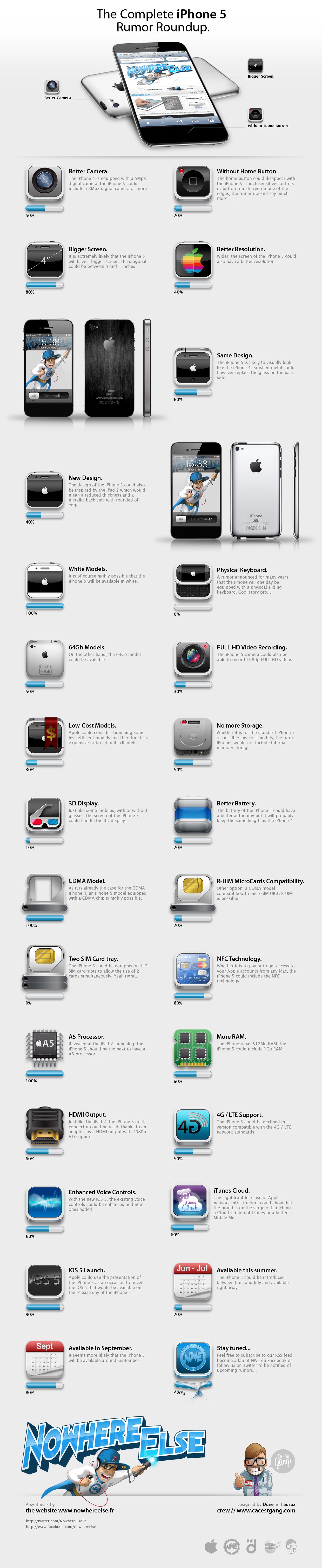
After all the rumors on the iPhone 5, a French site NowhereElse has created a wonderful infographic of all the iPhone 5 rumors that we’ve seen over the period of last few months. All the rumors have different probability gauges of each one next to them.
Here’s the complete infographic of all the iPhone 5 rumors:
With the iPad 2 set to launch internationally on Friday, it’s time to set our eyes upon the next big thing, the iPhone 5′s debut in June or July. China Times is reporting that the iPhone 5 has entered trial production and is scheduled for wide scale release in Q3 of this year, which aligns with the iPhone’s traditional late June / early July release date.
As for what the iPhone 5 will look like, the latest report supports rumors suggesting that the iPhone 5 will mostly be similar to an iPhone 4s, with the major differences being a slightly larger 4-inch touchscreen in the same form factor (accomplished by having less room between the side bezels of the device), as well as a metal chassis (Liquid Metal?) to make the device lighter and improve antenna sensitivity.
Coupled with an A5 processor and a new aluminum back plate, it sounds like the iPhone 5 — while not quite the evolutionary leap that the iPhone 4 was — will be a bit more than just the iPhone 4s many people anticipated this generation.
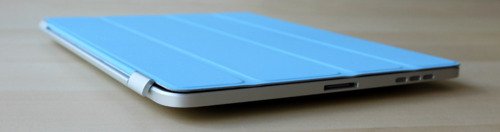
Original iPad owners can also use Apple’s revolutionary Smart Cover on their tablet. This news comes directly from the hack’s developer, Dan Provost, who posted directions on The Russians Used A Pencil blog.
The Smart Cover line, like the iPad 2 itself, is fast becoming one of the top tech stories of 2011. Simple in design, the Cover protects the tablet’s glass front, while also serving as something of an on/off switch, thanks to its inclusion of 31 magnets.
Out of the box, a Smart Cover will not work on an original iPad, since the first generation iDevice doesn’t come with magnets. However, using $.20 block magnets, 3/8†x 3/16†x 1/32†(found here), Provost was able to create a perfect fix.
Here are the directions:
To place the magnets, I stuck them first to the magnetized hinge of the Smart Cover. I slid them around until they became locked into a position. This ended being asymmetrical, but I didn’t mind. I then lined up the cover with the iPad and used masking tape to mark where the magnets should be placed. I wanted this to be a somewhat permanent solution, so I used super glue to affix the magnets to the iPad. If you are not so daring, or want to test it out to make sure you like it, just use transparent tape. Even though the super glue keeps the magnets secure and in place, they are actually pretty easy to remove by just “chipping†them off with a flathead screwdriver and a very light tap of the hammer.
There are many reasons one would give when returning an iPad 2. However, telling Apple it was because of a spouse is probably not an answer often heard. Until now.
According to MacRumors, Apple is paying close attention to all iPad 2 returns during the first few weeks to make sure there are no major production defects. This policy has led to an amusing story that we thought was entertaining enough to share.
The story comes by way of an individual close to Apple:
[Apple’s] focus this week has been to troubleshoot all the iPad 2s that customers are returning to the stores. One iPad came back with a post it note on it that said “Wife said no.” It was escalated as something funny, and two of the VPs got wind of it. They sent the guy an iPad 2 with a note on it that said “Apple said yes.“
We’re guessing a free iPad satisfied any objection the customer’s wife might have had.