• Sony’s Crackle for iOS App is Now Live in the App Store


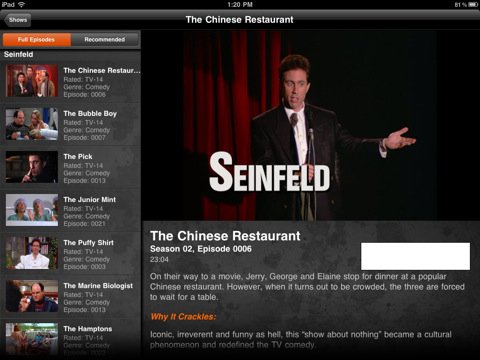
    Sony has just released their official Crackle app for iOS devices, the app provides access to tons of movies and television shows that can be streamed to the iPhone, iPod touch and iPad via 3G cellular connection and WiFi networks.

    It’s a US-only service, with a limited selection of content available to users from Canada, Australia and UK. Available movies and television shows include a selection from Sony Columbia Pictures and Sony Pictures Classics studios.

    Download from here here

  • Apple Sues Samsung Over Galaxy Look & Feel


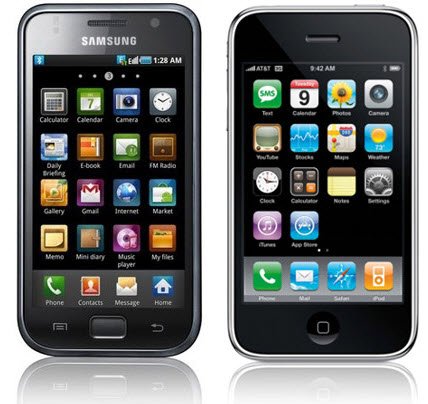
    The Wall Street Journal reports that Apple has filed a lawsuit against Samsung over the “look and feel” of Samsung’s Galaxy series. The Galaxy series includes the popular Galaxy S smartphone line – Nexus S, Galaxy S 4G, Epic 4G – in addition to the Samsung Galaxy Tab tablet device.

    Rather than innovate and develop its own technology and a unique Samsung style for its smart phone products and computer tablets, Samsung chose to copy Apple’s technology, user interface and innovative style in these infringing products, the lawsuit said.

    Samsung supplies many flash components and the basis of Apple’s A4 and A5 processors, Samsung also manufactures RAM modules and display technology for Apple.

    Mobilized has this comment from Apple:

    “It’s no coincidence that Samsung’s latest products look a lot like the iPhone and iPad, from the shape of the hardware to the user interface and even the packaging,” an Apple representative told Mobilized. “This kind of blatant copying is wrong, and we need to protect Apple’s intellectual property when companies steal our ideas.”

  • TinyUmbrella 4.3.2 Released with iOS 4.3.2 Support


    TinyUmbrella 4.3.2 has been released, it allows you to save your existing iOS 4.3.1 and iOS 4.3.2 SHSH blobs from iOS 4.3.2 or iOS 4.2.7 for CDMA devices.

    SHSH blobs are important to save for jailbreaking and iPhone unlocking because having them stored allows you to revert to previous firmware versions.

    Download TinyUmbrella for iOS 4.3.2

    Versions are available for both Mac OS X and Windows

  • Unlock iOS 4.3.2 On iPhone 4, 3GS With Ultrasn0w Fixer for 4.3.2


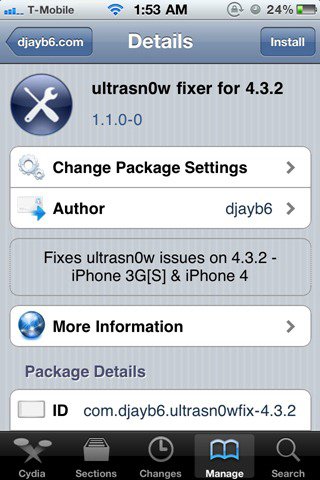
    DjayB6 has released a new version of his “Ultrasn0w Fixer For 4.3.2” to make Ultrasn0w 1.2.1 unlock for both iPhone 4 and 3GS (old basebands only) compatible with the latest iOS 4.3.2 firmware.

    Important Notes:

    • There is no unlock for the new baseband on iOS 4.3.2. If your iPhone relies on a carrier unlock, DO NOT update to stock iOS 4.3.2.
    • Ultrasn0w Fixer for 4.3.2 supports unlock for basebands (01.59.00 / 04.26.08 / 05.11.07 / 05.12.01 / 05.13.04 / 06.15.00)
    • Ultrasn0w Fixer for 4.3.2 is NOT compatible with the following basebands (02.10.04 / 03.10.01 / 04.10.01 / 05.14.02 / 05.15.04 / 05.16.02)
    • iPhone 3GS users can upgrade to iPad’s 06.15.00 baseband to unlock on 4.3.2.
    • Upgrading iPhone 3GS baseband to the 06.15.00 iPad baseband to unlock MAY cause you to lose your GPS.

    Ultrasn0w 1.2.x unlocking requires that your iPhone 3GS is jailbroken with 06.15.00 baseband.

    Step 1: First, you will have to jailbreak your iPhone 4 or 3GS on the latest iOS 4.3.2 firmware.

    Note: DO NOT use Redsn0w. Doing so will result in updating of your iPhone’s baseband, in the process losing unlock, probably forever.

    Step 2: Once done, you can now unlock your iPhone on the supported basebands using Ultrasn0w Fixer for 4.3.2 from Cydia. To do this:

    • Start “Cydia” on your iPhone.
    • Touch on “Manage” tab on the bottom.
    • Now touch on “Sources” as seen in the screenshot below
    • Touch on “Edit” and then on “Add”. You will be prompted to enter a url source as seen in the screenshot below. Type “http://djayb6.com” and touch on“Add Source” to add this repo if you haven’t already.
    • Cydia will now automatically update your sources by following a series of automated steps.
    • After installation is completed. Search for “ultrasn0w fixer for 4.3.2” in Cydia and install this application. This app will automatically unlock your iPhone so that you can use it with any carrier.

    Step 3: Now simply restart your iPhone and you should now have a fully unlocked iPhone 4 or 3GS, running iOS 4.3.2.