• Twitter Gets an Overhaul with New Faster, Simpler, Cleaner Interface [Updated]


    Twitter New UI

    Do you find Twitter so darn complicated to use? Well, Its time to change your mind, because the guys behind the service has just done a redesign of its web portal and mobile apps. You can update iPhone app right away.

    Today we introduce a new version of Twitter. We’ve simplified the design to make it easier than ever to follow what you care about, connect with others and discover something new. You’ll see this new design both on Twitter.com and mobile phones, so that you’ll have a familiar experience any time, anywhere. We’ve also updated TweetDeck to be consistent with this new version.

    Four new tabs bring you instantly closer to everything you care about, “Home“, “Connect“, “Discover” and “Me“.

    We’ll be rolling out the redesigned Twitter over the next few weeks. You can see it immediately on the just-updated versions of mobile.twitter.com, Twitter for iPhone, and Twitter for Android. You can get early access on your computer by downloading and logging into Twitter for iPhone or Twitter for Android. We’re working on updates for other apps, such as Twitter for iPad, and will share news as they become available.

    How To Get The New Twitter Web Interface Right Now

    Simply, install the Twitter for iPhone or Android app, sign-in and ta da! You will automatically get the new Twitter web-interface.

    Visit fly.twitter.com to learn more about the changes.

  • Facebook Acquires Interactive iPad Book Maker: Push Pop Press


    Facebook has acquired Push Pop Press, the company behind iPad app “Our Choice,” based on a book by Al Gore. The company was co-founded by former Apple designer Mike Matas who was a lead designer of both the original iPhone and iPad interfaces. Facebook does not plan to sell interactive iPad books, but the technology and design talent will be used in Facebook’s future.

    Mike Matas demoed “Our Choice” at the TED conference this year to rave reviews.

    Statement from Facebook:

    We’re thrilled to confirm that we’ve acquired Push Pop Press, a startup whose groundbreaking software changes the way people publish and consume digital content. We can’t wait for co-founders Mike Matas and Kimon Tsinteris to get started, and for some of the technology, ideas and inspiration behind Push Pop Press to become part of how millions of people connect and share with each other on Facebook.


    [via allthingsd]

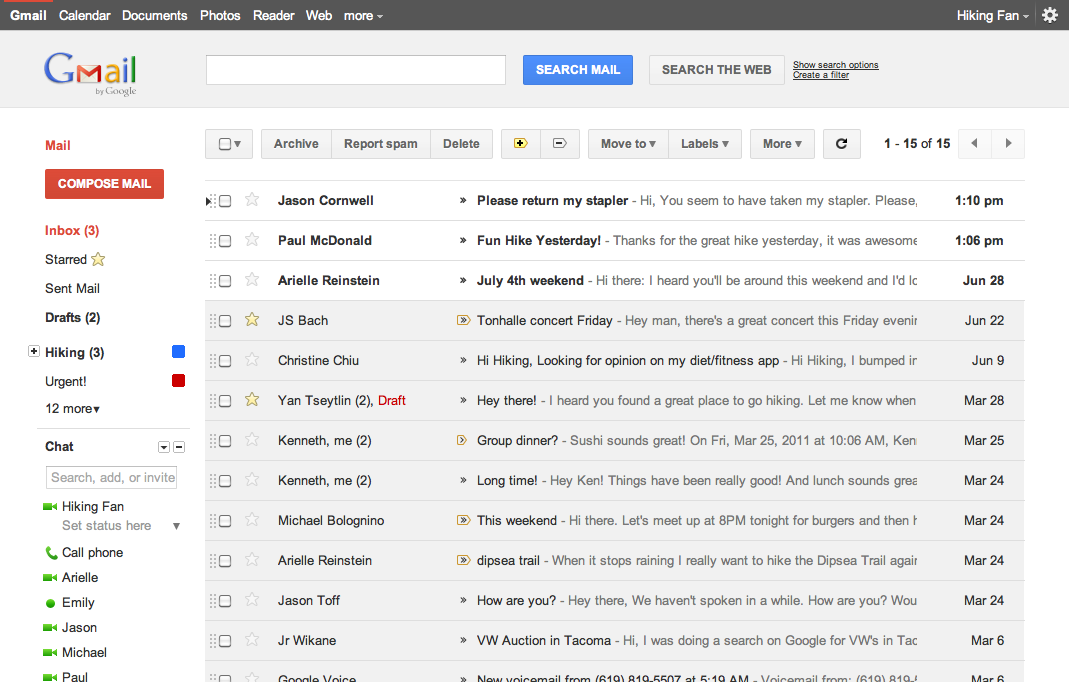
  • Gmail Has Got a New UI Look and You Can Try it NOW


    Google has rolled out a lot of redesigning work this week starting from the new black bar and Google search page new UI, some Gmail tweaks and introducing Google+. The Gmail, in particular, is about to get a new theme and you can try it right now. Here is what Google says about the matter:

    … we’re embarking on a series of interface updates to help strip out unnecessary clutter and make Gmail as beautiful as it is powerful. This is part of a Google-wide effort to bring you an experience that’s more focused, elastic, and effortless across all of our products. The changes are not going to happen all at once. We know that you love and care about Gmail as much as we do, and we’ll be working on these upgrades gradually over the next few months to allow plenty of time to understand and incorporate your feedback into the evolving design.

    How to get the new Theme:

    Simply go to Gmail Settings, click over to the Themes tab and select “Preview” or “Preview (Dense)” as your theme to try this yourself. Google has provided two themes because the end result is an elastic responsive design that shifts its information density to accomodate your screen size, but for now, you need to pick based on the density you prefer

    We’re kicking things off with two new themes for you to try out as a sort of sneak peek at what we’re up to. Starting today, you’ll see the “Preview” and “Preview (Dense)” themes in the Themes tab in Gmail Settings. Why two themes? Our new interface will eventually expand dynamically to accommodate different screen sizes and user preferences, but until then you can pick the information density that you prefer.

  • Latest Windows Phone Commercial Shows off UI Eye Candy


    The commercial  is entitled “Everything a smartphone should be” and uses quotes from ordinary users and sites to demonstrate SMS, Live Tiles, Outlook, Calendar, Office, Zune, Xbox LIVE integration and a few choice applications like Netflix and Amazon’s Kindle. The commercial features AT&T’s Samsung Focus device.