• Adobe Photoshop Touch for iPad Now Available on the App Store


    Adobe Photoshop Touch for iPad

    Adobe Photoshop Touch for iPad

    Adobe has announced the latest addition to its iOS software lineup. Photoshop Touch app for the iPad hit the App Store early before being pulled, and now its back. Don’t expect the App to be robust as Photoshop for desktop, but it has some neat features and editing capabilities, like layer support, extract objects and others.

    Photoshop Touch for the iPad is available for $9.99.

    Adobe’s full press release:

    Adobe Photoshop Touch Now Available for iPad

    Highly Anticipated App Brings Image-editing Power of Photoshop to Apple iPad 2

    BARCELONA, Spain — Feb. 27, 2012 — At Mobile World Congress, Adobe Systems Incorporated (Nasdaq: ADBE) today announced that Adobe® Photoshop® Touch is now available for iPad 2, via the iTunes App Store*. Adobe Photoshop Touch offers core Photoshop features, as well as new capabilities for creating and sharing in an app custom-built for tablets. The app is a central component of Adobe Touch Apps, a family of six intuitive touch screen applications, inspired by Adobe Creative Suite® software. iPad versions of the other Adobe Touch Apps are expected later this year.

    Photoshop Touch gives users the ability to combine multiple photos into layered images, make essential edits and apply professional effects to create beautiful artwork, touch up photos, paint, lay out ideas, and much more. The Scribble Selection Tool allows users to easily extract objects in an image by simply scribbling on what to keep and, then, what to remove. With Refine Edge technology from Photoshop, even hard-to-select areas with soft edges are easily captured when making selections. Photoshop Touch helps users quickly find images and share creations through integration with Facebook and Google Image Search.

    “People will be amazed with what they can create on the iPad using Photoshop Touch,” said David Wadhwani, senior vice president and general manager, Digital Media Business Unit, Adobe. “Photoshop Touch combines the magic of Photoshop and its core features with the convenience of a tablet, bringing image-editing power to the fingertips of millions of people.”

    “Adobe Photoshop Touch offers a huge convenience factor and funnels cool Photoshop features tailored for the iPad,” said Brian Yap, creative director at Boxing Clever. “Nearly all of the features I imagined being in Photoshop Touch are there, including the depth in layers, the extraction tools, and fade tool.”

    “I love the organic process of working on the tablet. With Adobe Photoshop Touch, I have a new form of image creation with familiar tools but in a more relaxed work space, allowing me to rediscover image making through play rather than production,” Dan Marcolino, owner of Marcolina Design & MarcolinaSlate.

    In addition to Photoshop Touch, Adobe expect to release the following touch apps for the iPad in the coming months: Adobe Collage for moodboards; Adobe Debut for presenting and reviewing creative work; Adobe Ideas for sketching; Adobe Kuler® for exploring color themes; and Adobe Proto for website and mobile app prototyping.

    Pricing and Availability

    Adobe Photoshop Touch is available today in the iTunes App Store for US$9.99. Photoshop Touch is available in most geographies with English language support. The app will run on iPad 2 running on iOS5. Visit www.adobe.com/products/photoshop-touch.html for more information on Photoshop Touch. Customers may submit feedback on the community powered feedback site: http://feedback.photoshop.com/photoshop_family. Users may also connect with the Photoshop Touch Team directly on Facebook, via Twitter or on the Photoshop blog. For Photoshop Touch how-to videos, visit http://tv.adobe.com/show/learn-photoshop-touch/.

  • iOS 5.0.1 iPhone, iPad, iPod Touch, Apple TV Direct Download Links Repository


    Apple has just released iOS 5.0.1. The update brings battery life fixes for all devices running iOS 5, as well as security improvements and multitasking gestures on the original iPad. Battery life issues are said to be fixed as well.

    iOS 5.0.1 update

    This update contains improvements and other bug fixes including:

    – Fixes bugs affecting battery life
    – Adds Multitasking Gestures for original iPad
    – Resolves bugs with Documents in the Cloud
    – Improves voice recognition for Australian users using dictation

    device current version date found
    AppleTV(2G) (AppleTV2,1)
    4.4.2 (9A336a)
    10/24/2011 17:51:03
    iPad (iPad1,1)
    5.0.1 (9A405)
    11/10/2011 13:06:01
    iPad2(wifi) (iPad2,1)
    5.0.1 (9A405)
    11/10/2011 13:06:01
    iPad2(at&t) (iPad2,2)
    5.0.1 (9A405)
    11/10/2011 13:06:01
    iPad2(vz) (iPad2,3)
    5.0.1 (9A405)
    11/10/2011 13:06:01
    iPhone (iPhone1,1)
    3.1.3 (7E18)
    04/08/2010 21:05:48
    iPhone3G (iPhone1,2)
    4.2 (8C148)
    11/22/2010 13:08:57
    iPhone3GS (iPhone2,1)
    5.0.1 (9A405)
    11/10/2011 13:06:01
    iPhone4 (iPhone3,1)
    5.0.1 (9A405)
    11/10/2011 13:06:01
    iPhone4(vz) (iPhone3,3)
    5.0.1 (9A405)
    11/10/2011 13:06:01
    iPhone4S (iPhone4,1)
    5.0.1 (9A405)
    11/10/2011 13:06:01
    iPodTouch(2G) (iPod2,1)
    4.2 (8C148)
    11/22/2010 13:08:57
    iPodTouch(3G) (iPod3,1)
    5.0.1 (9A405)
    11/10/2011 13:06:01
    iPodTouch(4G) (iPod4,1)
    5.0.1 (9A405)
    11/10/2011 13:06:01
    last updated: 11/10/2011 15:55:02 EDT
  • iOS 5 iPhone, iPad, iPod Touch, Apple TV Direct Download Links Repository


    iOS 5 Release log

    Apple today released the final consumer version of iOS 5, a major and most ambitious upgrade to its mobile operating system yet. Apple has also released Find My Friends and AirPort Utility apps, enabled iCloud accounts for everyone, flipped the switch on the Newsstand Store and rolled out music re-downloading service dubbed iTunes in the Cloud in the U.K., Canada, Australia and other international markets. The iOS 5 packed with over 200 new features.

    You’re advised to perform a full backup of your iOS device in iTunes to restore to in case something goes wrong. Simply connect your device to a computer, launch iTunes 10.5, right click the device in the Devices pane and click the Back Up option.

    Alternatively, copy the backup folder to a safe location, such as an external hard drive or a USB thumb drive. iTunes places the backup files in the following places:

    Mac: ~/Library/Application Support/MobileSync/Backup/

    Windows XP: \Documents and Settings\(username)\Application Data\Apple Computer\MobileSync\Backup\

    Windows Vista and Windows 7: \Users\(username)\AppData\Roaming\Apple Computer\MobileSync\Backup\

    device current version date found
    AppleTV(2G) (AppleTV2,1)
    4.4 (9A334v)
    10/12/2011 13:16:01
    iPad (iPad1,1)
    5.0 (9A334)
    10/12/2011 13:16:01
    iPad2,1 (iPad2,1)
    5.0 (9A334)
    10/12/2011 13:16:01
    iPad2,2 (iPad2,2)
    5.0 (9A334)
    10/12/2011 13:16:01
    iPad2,3 (iPad2,3)
    5.0 (9A334)
    10/12/2011 13:16:01
    iPhone (iPhone1,1)
    3.1.3 (7E18)
    04/08/2010 21:05:48
    iPhone3G (iPhone1,2)
    4.2 (8C148)
    11/22/2010 13:08:57
    iPhone3GS (iPhone2,1)
    5.0 (9A334)
    10/12/2011 13:16:01
    iPhone4 (iPhone3,1)
    5.0 (9A334)
    10/12/2011 13:16:01
    iPhone4(vz) (iPhone3,3)
    5.0 (9A334)
    10/12/2011 13:16:01
    iPhone4,1 (iPhone4,1)
    5.0 (9A334)
    10/12/2011 13:16:01
    iPodTouch(2G) (iPod2,1)
    4.2 (8C148)
    11/22/2010 13:08:57
    iPodTouch(3G) (iPod3,1)
    5.0 (9A334)
    10/12/2011 13:16:01
    iPodTouch(4G) (iPod4,1)
    5.0 (9A334)
    10/12/2011 13:16:01
    last updated: 10/12/2011 13:40:02 EDT
  • Play FLV, AVI, MKV, OGG, WMV, AC3 and Subtitles using ‘It’s Playing 2.0’ on iPad


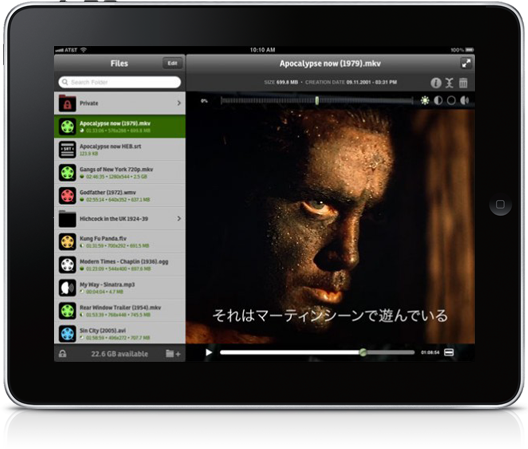
    A new app called “It’s Playing 2.0.” available for iPad can play FLV, AVI, MKV, OGG, WMV and it does AC3 sound and subtitles. A whole range of features including adjustments for colour, contracts, brightness and sound so you can adjust the playback to suite the video file.

    Play all video and audio formats commonly available on the web — including AVI, RMVB, MKV and FLV (Flash Video)

    — What’s so special about It’s playing —
    iPads, iPhones and iPods have great video capabilities. On latest models you can even shoot and encode high resolution video and stereo sound in real time.
    The problem with most videos available on the Internet – sent by email, or on web sites – is that they don’t use the formats handled natively by iOS (mpeg4 and h264).

    Decoding and playing videos are among the most resource-hungry tasks that computers perform today. When playing high-resolution, high-bit rate movies, devices often lack the necessary resources to decode and show one or more frames on time. These issues can result in noticeable pauses or in desynchronization between sound and image. It really depends on the player you are using.

    What differentiates It’s playing, apart from pricing and the quality of the user interface, is the engine that takes advantage of the outstanding hardware and operating system it runs on.
    AdditionFlow© is our optimized process for making sure that you get more video frames more synchronized with the audio, ensuring the best viewing experience.

    The app costs $1.99/ £1.49 from iTunes