• Siri Successfully Ported to Run on iPhone 4 and iPod Touch


    Siri has finally made its way to the iPhone 4

    Developer Steven Troughton-Smith had successfully ported the Siri onto the iPhone 4 and iPod Touch. The video provided below not only shows the Siri functionality on an iPhone 4, but is in depth and shows a side-to-side comparison against the iPhone 4S. In addition, the video shows the Siri Dictation in action.

    iPhone 4S jailbreak was the key to make the port working successfully on iPhone 4. 9to5mac’s Mark Gurman has brought this story and an got exclusive interview about the port with the developer:

    Mark: Where do you go from here with the port?

    Steven: At this point it’s all about confirming this works across devices, making it reproducible (we got it working on two devices today), and documenting everything. It does require files from an iPhone 4S which aren’t ours to distribute, and it also requires a validation token from the iPhone 4S that has to be pulled live from a jailbroken iPhone 4S, and it’s about a 20-step process right now.

    Mark: In its current state, is the port 100% functional, is there anything you would like to see work better?

    Steven: Yes, it seems to be 100% functional. I’m working on the rough edges, but everything that works on the iPhone 4S seems to work here.

    Mark: Do you ever see Siri showing up in Cydia (or another jailbreak store) for non natively supported devices?

    Steven: No, I could not be a part of that. I have no doubts that others will package this up and distribute it quasi-illegally, or try and sell it to people. I am only interested in the technology and making it work; proving that it works and works well on the iPhone 4 and other devices.

    Mark: So, you also got Siri working on the fourth-generation iPod touch, how is that working out?

    Steven: We got chpwn’s iPod touch up and running with Siri after proving it works on my iPhone 4. Unfortunately the microphone on the iPod is nowhere near as good as the iPhone – you will notice that the Siri level meter hardly moves when you talk to it. While it does work, you have to speak loudly and clearly to the iPod.

    Mark: How long did porting take you, what was the “I got it” moment?

    Steven: Basically, I already had everything I needed to make it work. I had spent a lot of time mapping out in my head exactly how Siri works on the iPhone. All I needed was access to a jailbroken iPhone 4S to put my hunch to the test. It literally took no longer than 10 minutes to put all the pieces in place and perform our first test on my iPhone 4, and it was an instant success.

  • List of iOS 5 Voice Commands for Siri


    Curious about the iPhone 4S‘s new voice assistant feature, Siri?

    Here is a set of example phrases tracked down by TUAW that Siri voice assistant is capable of understanding, ordered by interaction category, along with Apple-supplied examples of using each category.

    Address Book

    Querying Contacts

    • What’s Michael’s address?
    • What is Susan Park’s phone number?
    • When is my wife’s birthday?
    • Show Jennifer’s home email address

    Finding Contacts

    • Show Jason Russell
    • Find people named Park
    • Who is Michael Manning?

    Relationships

    • My mom is Susan Park
    • Michael Manning is my brother
    • Call my brother at work

    Calendars

    Adding Events

    • Set up a meeting at 9
    • Set up a meeting with Michael at 9
    • Meet with Lisa at noon
    • Set up a meeting about hiring tomorrow at 9am
    • New appointment with Susan Park Friday at 3
    • Schedule a planning meeting at 8:30 today in the boardroom

    Changing events

    • Move my 3pm meeting to 4:30
    • Reschedule my appointment with Dr. Manning to next Monday at 9am
    • Add Lisa to my meeting with Jason
    • Cancel the budget review meeting

    Asking about events

    • What does the rest of my day look like?
    • What’s on my calendar for Friday?
    • When is my next appointment?
    • When am I meeting with Michael?
    • Where is my next meeting?

    Alarms

    Setting Alarms

    • Wake me up tomorrow at 7am
    • Set an alarm for 6:30am
    • Wake me up in 8 hours
    • Change my 6:30 alarm to 6:45
    • Turn off my 6:30 alarm
    • Delete my 7:30 alarm

    Checking the Clock

    • What time is it?
    • What time is it in Berlin?
    • What is today’s date?
    • What’s the date this Saturday?

    Using a Timer

    • Set the timer for ten minutes
    • Show the timer
    • Pause the timer
    • Resume
    • Reset the timer
    • Stop it

    Email

    Sending Messages

    • Email Lisa about the trip
    • Email Jennifer about the change in plans
    • New email to Susan Park
    • Mail Dad about the rent check
    • Email Dr. Manning and say I got the forms, thanks
    • Mail Lisa and Jason about the party and say I had a great time

    Checking Messages

    • Check email
    • Any new email from Michael today?
    • Show new mail about the lease
    • Show the email from Lisa yesterday

    Responding to Messages

    • Reply Dear Susan sorry about the late payment
    • Call him at work

    Friends

    Checking Up on Friends

    • Where’s Jason?
    • Where is my sister?
    • Is my wife at home?
    • Where are all my friends?
    • Who is here?
    • Who is near me?

    Maps

    Directions

    • How do I get home?
    • Show 1 Infinite Loop Cupertino California
    • Directions to my dad’s work

    Local Businesses

    • Find coffee near me
    • Where is Starbucks?
    • Find some burger joints in Baltimore
    • Find a gas station within walking distance
    • Good Mexican restaurants around here

    Messages

    Sending Texts

    • Tell Susan I’ll be right there
    • Send a message to Jason Russell
    • Send a message to Lisa saying how about tomorrow
    • Tell Jennifer the show was great
    • Send a message to Susan on her mobile saying I’ll be late
    • Send a message to 408 555 1212
    • Text Jason and Lisa where are you?

    Reading Texts

    • Read my new messages
    • Read it again

    Replying to Texts

    • Reply that’s great news
    • Tell him I’ll be there in 10 minutes
    • Call her

    Music

    Playback

    • Play The Light of the Sun
    • Play Trouble
    • Play Taking Back Sunday shuffled
    • Play Alicia Keys
    • Play some blues
    • Play my party mix
    • Shuffle my roadtrip playlist
    • Play
    • Pause
    • Skip

    Notes

    Creating and finding notes

    • Note that I spent $12 on lunch
    • Note: check out that new Alicia Keys album
    • Find my restaurant note
    • Create a reading list note
    • Add Tom Sawyer to my reading list note

    Phone

    Phone calls

    • Call Jason
    • Call Jennifer Wright mobile
    • Call Susan on her work phone
    • Call 408 555 1212
    • Call home
    • FaceTime Lisa

    Reminders

    Requesting reminders

    • Remind me to call mom
    • Remind me to call my mom when I get home
    • Remember to take an umbrella
    • Remind me take my medicine at 6am tomorrow
    • Remind me to pick up flowers when I leave here
    • Remind me when I leave to call Jason
    • Remind me to finish the report by 6

    Stocks

    Checking Stocks

    • What’s Apple’s stock price?
    • What is Apple’s PE ratio?
    • What did Yahoo close at today?
    • How is the Nikkei doing?
    • How are the markets doing?
    • What is the Dow at?


    Weather

    Checking the Forecast

    • What’s the weather for today?
    • What’s the weather for tomorrow?
    • Will it rain in Cupertino this week?
    • Check next week’s forecast for Burlington
    • What’s the forecast for this evening?
    • How’s the weather in Tampa right now?
    • How hot will it be in Palm Springs this weekend?
    • What’s the high for Anchorage on Thursday?
    • What’s the temperature outside?
    • How windy is it out there?
    • When is sunrise in Paris?

    Websearch

    Looking up information

    • Search the web for Bora Bora
    • Search for vegetarian pasta recipes
    • Search the web for best cable plans
    • Google the war of 1812
    • Search Wikipedia for Abraham Lincoln
    • Search for news about the World Cup
    • Bing Alicia Keys


    Using Wolfram Alpha

    • How many calories in a bagel?
    • What is an 18% tip on $86.74 for four people?
    • Who’s buried in Grant’s tomb?
    • How long do dogs live?
    • What is the Gossamer Condor?
    • What’s the square root of 128?
    • How many dollars is €45?
    • What was the Best Picture of 1983?
    • How many days until Christmas?
    • How far away is the Sun?
    • When is the next solar eclipse?
    • Show me the Orion constellation
    • What’s the population of Jamaica?
    • How high is Mt. Everest?
    • How deep is the Atlantic ocean?
    • What’s the price of gasoline in Chicago?
  • Apple Confirms October 4 for iPhone 5 Unveiling Event


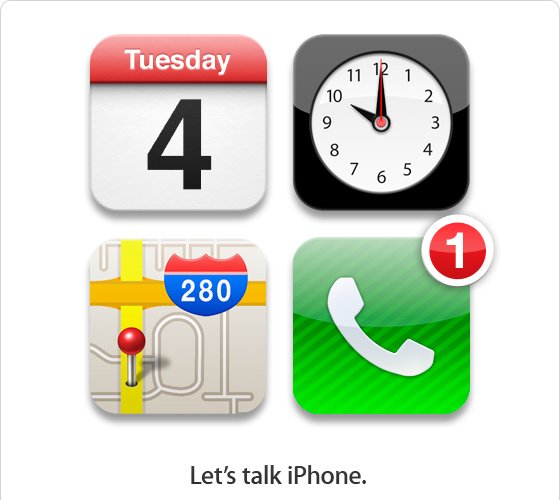
    The Loop reports that Apple has finally confirmed the long-awaited media event. Apple has scheduled a press conference next Tuesday, October 4. that new Apple CEO Tim Cook will deliver the presentation, a first for Cook in his new CEO role.

    According to the invitation received by The Loop, the event will be held on October 4 at Apple’s Cupertino, Calif. campus. The event will begin at 10:00 am PT.

    Apple’s next iPhone is expected to sport a dual-core A5 chip, 1GB of RAM, twice as much as the iPhone 4′s A4 chip. Camera will be upgraded to eight megapixels with a backlit sensor with ability to shoot Panorama photos. Other additions include a Qualcomm Gobi baseband chip that support dual network GSM and CDMA.

    One of the coolest addition that probably will be an iPhone 5 exclusive is the new voice activated feature called Assistant, after Apple’s acquisition of Siri, a search intelligence startup by Nuance technology. The “Let’s talk iPhone” tagline surely hints at this feature.

  • Apple’s New Data Center to Run iOS 5 Voice Recognition Powered by Nuance Technologies


    Another view of Apple’s relationship with Nuance Communications offered up tonight by TechCrunch and this time claiming that, having dug into the ties between both companies more deeply, Apple could already be using Nuance technology in its yet-to-officially-open North Carolina data center.

    In digging into the information about the relationship between the two companies, we had heard that Apple might actually already be using Nuance technology in their new (but yet to be officially opened) massive data center in North Carolina. Since then, we’ve gotten multiple independent confirmations that this is indeed the case. And yes, this is said to be the keystone of a partnership that Apple is likely to announce with Nuance at WWDC next month.

    More specifically, we’re hearing that Apple is running Nuance software – and possibly some of their hardware – in this new data center. Why? A few reasons. First, Apple will be able to process this voice information for iOS users faster. Second, it will prevent this data from going through third-party servers. And third, by running it on their own stack, Apple can build on top of the technology, and improve upon it as they see fit.

    Nuance technology, which already used to power personal assistant Siri, is expected to be “a big part” of iOS 5, reportedly set for introduction at Apple’s software-centric Worldwide Developers Conference, which kicks off June 6.