• Unlock iPhone 4 and iPhone 3GS on iOS 4.3.3 Using Ultrasn0w 1.2.3


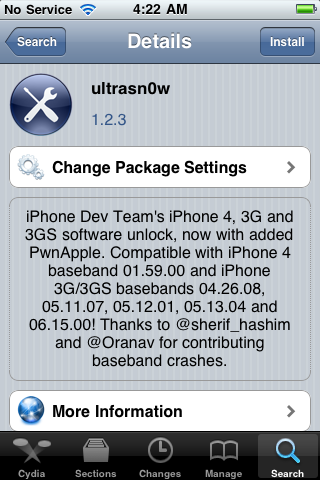
    Ultrasn0w 1.2.3 tool to unlock iPhone 4 and iPhone 3GS is now available. The unlock tool is fully compatible with iPhone 4 and 3GS devices running the latest iOS 4.3.3 firmware. It can NOT unlock higher basebands whose unlock is not possible right now. Its not a new unlock, it can only unlock lower basebands whose unlock was already possible but broken on iOS 4.3.3.

    Compatible basebands with Ultrasn0w 1.2.3

    iPhone 4: 01.59.00
    iPhone 3GS: 04.26.08 / 05.11.07 / 05.12.01 / 05.13.04 / 06.15.00

    DO NOT USE WITH the following basebands:

    iPhone 4: 02.10.04 / 03.10.01 / 04.10.01
    iPhone 3GS: 05.14.02 / 05.15.04 / 05.15.04 / 05.16.01 / 05.16.02

    Jailbreak your device on iOS 4.3.3 using:

    Unlock iOS 4.3.3 iPhone 4 and iPhone 3GS with Ultrasn0w 1.2.3 Guide:

    Step 1: Launch Cydia on your jailbroken iPhone.
    Step 2: Navigate to “Manage” and then “Sources”
    Step 3: Now “Edit” and then “Add”. Type the repo: “http://repo666.ultrasn0w.com”. Now “Add Source”
    Step 4: Once its done with installation, find “Ultrasn0w 1.2.3”. Select and to install the package. After that it will restart your device.

    Your device is now unlocked on iOS 4.3.3 on basebands 01.59.00 / 04.26.08 / 05.11.07 / 05.12.01 / 05.13.04 / 06.15.00.

  • iOS 4.3.3 Untethered Jailbreak Using Redsn0w 0.9.6rc16 Guide


    Redsnow brings untethered jailbreak for iOS 4.3.3 on iPhone 4, iPhone 3GS, iPod touch 4G, iPod touch 3G and iPad. iOS 4.3.3 untethered jailbreak is based on i0n1c’s untethered exploit. No Untethered Jailbreak for iPad 2 yet.

    A step by step guide on how to jailbreak iOS 4.3.3 untethered using Redsn0w 0.9.6rc16 (Win / Mac)

    Note: If you rely on ultrasn0w unlock don’t follow this guide, you have to follow This Guide (PwnageTool 4.3.3) to preserve your old baseband to unlock with ultrasn0w

    Step 1: Download iOS 4.3.3 for iPhone, iPad or iPod touch (download links at the end).

    Step 2: Restore to iOS 4.3.3 in case you haven’t yet using the IPSW file you just downloaded via iTunes 10.2.2.

    Step 3: Start Redsn0w and point it to the official iOS 4.3.3 firmware file.

    Step 4: Now select “Install Cydia” and click “Next”. Optionally (if available), you can also select any other option you like.

    Step 5: Now make sure your device is both OFF and PLUGGED IN to the computer before you click “Next”.

    Now you will be guided on how to enter DFU mode. Quickly hold “Power” button and then while holding the “Power” button, you will now have to hold “Home” button too. Now after few seconds release “Power” button but keep holding “Home” button until installation begins.

    Step 6: Wait until you get untethered iOS 4.3.3 jailbroken in few minutes.

    Update:

    New version RedsnOw 0.9.6rc16 to Fix Side Switch and Vibration Problems