Ultrasn0w fixer for iOS 4.3.1 unlock on iPhone 4 and iPhone 3GS on older basebands. The fix is developed by msft_guy and iH8sn0w.
Ultrasn0w was previously unable to unlock iPhone 4 and 3GS devices after untethered iOS 4.3.1 jailbreak. But now you can use Ultrasn0w 4.3.1 fixer to unlock your device. DO NOT take it as a new unlock tool, it can ONLY UNLOCK basebands 01.59.00 / 04.26.08 / 05.11.07 / 05.12.01 / 05.13.04 / 06.15.00.
How to Guide To Use Ultrasn0w fixer for iOS 4.3.1 to Unlock iPhone 4 and 3GS:
Step 0: You need to have a jailbroken iOS device in order for iOS 4.3.1 unlock to work. You can jailbreak your device using Redsn0w 0.9.6 RC9, PwnageTool 4.3 or Sn0wbreeze 2.5.
Step 1: Launch Cydia in your jailbroken iPhone 4 or iPhone 3GS
Step 2:  Navigate to “Manage†and then “Sourcesâ€
Step 3: “Add†the repo: “http://cydia.pushfix.infoâ€
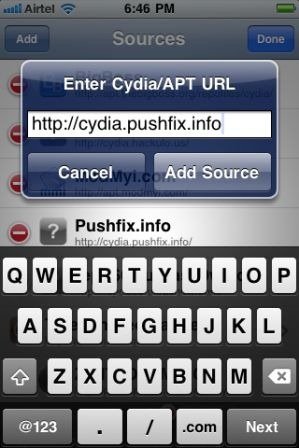
Step 4: Now press “Doneâ€.
Step 5: Now select  â€Pushfix.info†to Install it.
Step 6: Once its done with installation. Go to Pushfix.info. Scroll down to find “Ultrasn0w fixer for 4.3.1â€. Select and to install the package. After that it will restart your device.

Your device is now unlocked on iOS 4.3.1 on basebands 01.59.00 / 04.26.08 / 05.11.07 / 05.12.01 / 05.13.04 / 06.15.00. DO NOT use it other than the mentioned basebands.


