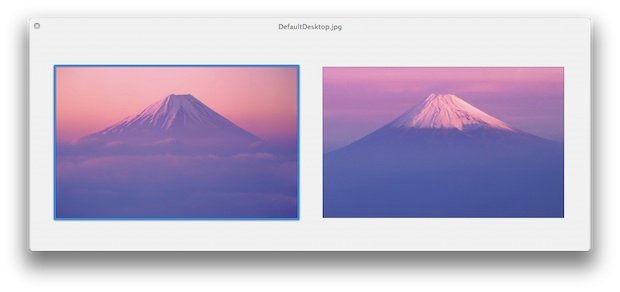
The new default wallpaper on OS X 10.7 Lion Developer Preview 2 featuring Fuji Mountain has a whopping size of 3200×2000 pixels as noted by the guys at osxdaily.com.
Click here to download the full version, [3200×2000 pixels.]
However, 3200×2000 pixels is significantly larger than any existing resolution offered by Apple displays, including the 27″ and 30″ Apple Cinema Displays. Furthermore, the default wallpaper size in Mac OS X 10.6 is 2560×1600, which is exactly the maximum resolution of Apple’s 30″ Cinema Display. Is it just coincidence that Apple is bundling an ultra high resolution image in Lion as the new default wallpaper, or does this suggest that higher resolution Macs, possibly with retina displays, are coming sometime in the future?
Here’s a nice chart that shows what screen size at what viewing distance with that resolution would be considered a retina display:
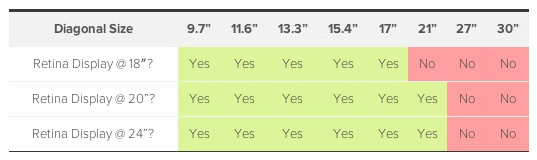
Notice that even for the closest viewing distance of 18 inches, a 3200 x 2000 resolution represents a Retina Display for display sizes up to and including 17 inches. And of course, that covers the entire range of Apple laptops on the market today.
And smaller displays wouldn’t need a resolution that high to be considered retina:
A 13.3†MacBook Air, for example, would need a screen providing approximately 2200 x 1375 pixels (191 dpi) to be considered a Retina Display at an 18-inch viewing distance.
To help understand what a “Retina Display†means. Steve Jobs, at the announcement of the iPhone 4, had this description:
It turns out there’s a magic number right around 300 pixels per inch, that when you hold something around to 10 to 12 inches away from your eyes, is the limit of the human retina to differentiate the pixels.
Other than providing dramatically improved display clarity on a Mac, the other reason a Mac with a 3200×2000 pixel resolution makes sense is for iOS developers. So what does this have to do with iPad 3?
… according to an analyst cited by AppleInsider, the high resolution retina display will come to iPad 3 in the form of a whopping 2048×1536 resolution display. If this happens, you’d expect similar displays to come to the Mac platform so that developers can accurately produce and test apps for the ultrahigh resolution.
Indeed, 3200×2000 would be such an ultrahigh resolution for a Mac, and it would be more than adequate to develop for a 2048×1536 pixel iPad 3 display.
Sure, this is speculation based on a new wallpaper in a developer preview OS, but who knows what Apple is prepping for us.