Gradly

  • About Me
  • Portfolio
  • My Blog
  • Contact Me


  • iOS 4.3.3 Untethered Jailbreak Using Redsn0w 0.9.6rc16 Guide

    May 6, 2011 // Gradly // Apple, blog, Download, Featured, How To, iPad, iPhone, Jailbreak Tags: Apple, blog, Download, Guide, How To, iOS 4.3.3, Jailbreak, Redsn0w 0.9.6rc15, Redsn0w 0.9.6rc16, Untethered 8 Responses


    Redsnow brings untethered jailbreak for iOS 4.3.3 on iPhone 4, iPhone 3GS, iPod touch 4G, iPod touch 3G and iPad. iOS 4.3.3 untethered jailbreak is based on i0n1c’s untethered exploit. No Untethered Jailbreak for iPad 2 yet.

    A step by step guide on how to jailbreak iOS 4.3.3 untethered using Redsn0w 0.9.6rc16 (Win / Mac)

    Note: If you rely on ultrasn0w unlock don’t follow this guide, you have to follow This Guide (PwnageTool 4.3.3) to preserve your old baseband to unlock with ultrasn0w

    Step 1: Download iOS 4.3.3 for iPhone, iPad or iPod touch (download links at the end).

    Step 2: Restore to iOS 4.3.3 in case you haven’t yet using the IPSW file you just downloaded via iTunes 10.2.2.

    Step 3: Start Redsn0w and point it to the official iOS 4.3.3 firmware file.

    Step 4: Now select “Install Cydia” and click “Next”. Optionally (if available), you can also select any other option you like.

    Step 5: Now make sure your device is both OFF and PLUGGED IN to the computer before you click “Next”.

    Now you will be guided on how to enter DFU mode. Quickly hold “Power” button and then while holding the “Power” button, you will now have to hold “Home” button too. Now after few seconds release “Power” button but keep holding “Home” button until installation begins.

    Step 6: Wait until you get untethered iOS 4.3.3 jailbroken in few minutes.

    • Download Redsn0w 0.9.6rc16 for Windows
    • Download Redsn0w 0.9.6rc16 for Mac
    • Download iOS 4.3.3 for iPhone,  iPod touch, iPad
    • Download iTunes 10.2.2

    Update:

    New version RedsnOw 0.9.6rc16 to Fix Side Switch and Vibration Problems

  • iPad 2 Jailbreak By GeoHot is Coming

    May 1, 2011 // Gradly // Apple, blog, iPad, Jailbreak, News, Rants & Raves, Twitter Tags: @p0sixninja, Apple, blog, Geohot, iPad 2, Jailbreak, Joshua Hill, Playstation 3 No Responses


    Geohot may be interested in coming back to Jailbreak world as hinted by Chronic Dev Team key member Joshua Hill, and this time to make iPad 2 jailbreak which is the only device left with no solution yet.

    @p0sixninja has tweeted:

    I challenged geohot to dump the iPad2 bootrom before me. Maybe having a worthy opponent will motivate me to work harder =P

    @p0sixninja confirmed that GeoHot has accepted his challenge:

    he accepted, he said he didn’t have an iPad yet but he’s getting one really soon

    This is a good news after Geohot busy days he spent fighting against the lawsuit by Sony for hacking into Playstation 3 firmware and both parties settled down finally, however. Hope we get a  bootrom level exploit instead of userland jailbreak this time.

    We are waiting impatiently as no ETA provided yet.


  • Untether a Tethered Verizon iPhone with iOS 4.2.7 Jailbreak Tool

    May 1, 2011 // Gradly // Apple, blog, Download, How To, iPhone, Jailbreak, News Tags: blog, iOS 4.2.7, Jailbreak, Tethered, Untethered, Verizon 1 Response


    You can now untether iOS 4.2.7 jailbreak on Verizon iPhone 4 by installing a simple package from Cydia on a previously tethered device and it will become untethered, it’s that easy:

    • Launch Cydia and add the following rep: http://cydia.pushfix.info
    • Search for “Verizon Untether 4.2.7″ and install the package
    • Reboot your iPhone

    Jailbreaking the Verizon iPhone on iOS 4.2.7 is the same as jailbreaking 4.3.1 using redsn0w, but remember to download the iOS 4.2.7 IPSW for the CDMA iPhone 4.

  • Jailbreak Utility blocks iOS From Tracking iPhone Location Data

    April 21, 2011 // Gradly // Apple, blog, Conspiracies, Download, iPhone, Jailbreak, News, Rants & Raves, Tech. Tags: blog, iOS, iPhone, Jailbreak, Location Data, Logs, Secret No Responses


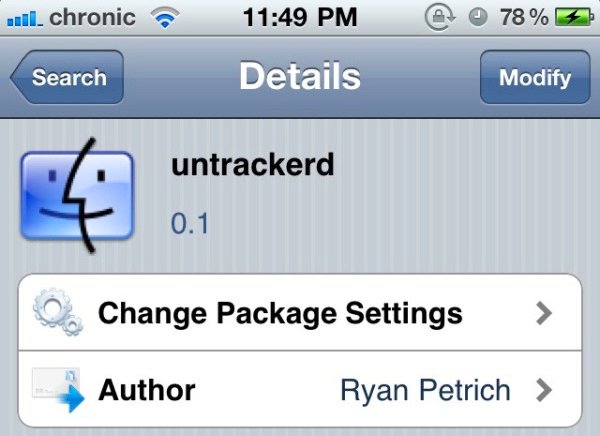
    Jailbreak developer Ryan Petrich has released a new jailbreak utility called untrackerd, which manages to block iOS and Apple’s ability to track your device’s location information. this application comes after the discovery that Apple’s iPhone keeps track of where you go – and saves every detail of it to a secret file on the device which is then copied to the owner’s computer when the two are synchronised.  which in turn let anybody with access to your phone or computer get detailed information about where you’ve been. Untrackerd is available for free on the Cydia

    Untrackerd’s description in Cydia:

    This package installs a daemon (process that can run in the background) to clean consolidated.db file) No new icons are added to your homescreen. There are no options to configure.

← Older posts
Newer posts →