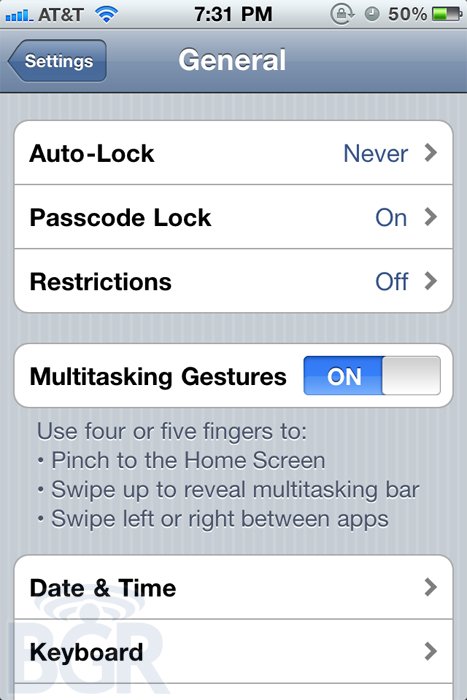
• iPhone 4 Leaked Screenshot showing Multitasking Gestures


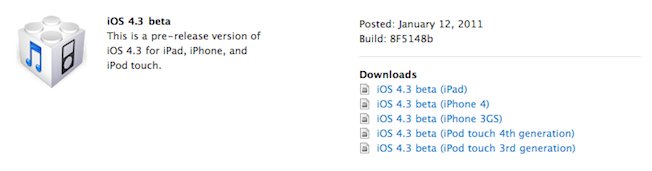
    Well after the 4.3 Beta that previewed multitasking gestures on the iPad, there is now some supposed evidence that suggests that the iPhone is also being considered by Apple to have gestures thanks to an internal build that BGR claims to have gotten some screenshots of. Here waht they had to say:

    One of our Apple sources has just sent us over a couple screen shots from what we’re told is an internal test model of the iPhone 4. The shots are interesting because it looks like Apple is testing multitouch gestures on the iPhone in addition to the iPad. While this isn’t shocking, what’s interesting is that internally, the same amount of fingers applies to gestures on both devices. What we mean by this, is that you have to use four finger gestures on the iPhone just like the iPad — kind of difficult such a comparatively tiny screen. It might be easier with say… a multitouch gesture area below the screen, sort of where the home button is? Oh, wait. We imagine things will be refined as testing progresses, but we have to ask in all seriousness — can you handle four fingers?

  • Apple to pack ultrafast, dual core SGX543 graphics into iPad 2, iPhone 5


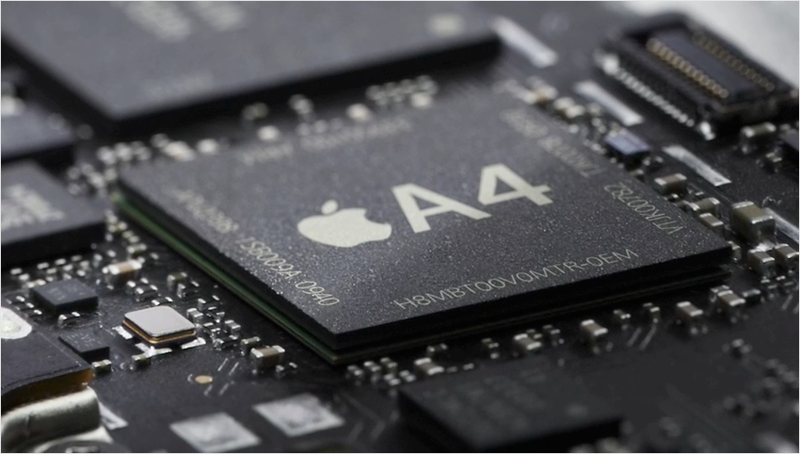
    Apple’s next generation iPad and iPhone, both due the first half of this year, will pack a new version of the company’s custom A4 chip, with dual, faster graphics cores capable of supporting a Retina Display iPad and potentially bringing 1080p HD support to iOS devices, including Apple TV.

    Later this year, Apple will introduce its second generation iPad, reportedly with double the resolution and four times the pixels to process. That type of display upgrade would necessitate a big boost in graphics and video processing power.

    The same source behind’s AppleInsider’s coverage of the secret licensing deal that occurred between Apple, Imagination Technologies and Samsung beginning back in 2008, and resulting in the new chips that powered the iPhone 3GS and iPhone 4, is now indicating what can be expected from Apple’s A4 replacement.

    Apple’s next custom System on a Chip is expected to jump from the SGX535 (which has been used since the iPhone 3GS) to the new SGX543 graphics and video core, which is said to offer around twice the processing power at the same clock speed. The new graphics core also supports OpenCL, used to offload general purpose computing tasks on the GPU for fast execution.

    Faster video, HDMI

    This speed boost applies not only to graphics, such as drawing polygons in a video game or rendering fonts in a productivity app, but video processing as well. The A4 includes hardware acceleration for video decoding and encoding, and both appear to be used to support high quality video conferencing in Apple’s FaceTime on iPhone 4. FaceTime and a front facing camera did not make the cut in the original iPad, but are expected on the new iPad 2.

    Faster video processing could also enable Apple to upgrade the iPad and iPhone 4 from VGA-style component video output to the more modern HDMI, which is already used by the new iOS-based Apple TV. Some high end smartphones and tablet devices already support HDMI output, although not flawlessly.

    Apple TV has its own share of HDMI problems being reported by users, including handshaking problems that appear to affect nearly every Philips HDTV model and many Sony sets.

    Multiple SGX graphics cores

    A source familiar with Apple’s graphics strategy says the company will not only be upgrading its video core, but also going to multiple cores, a feature that is designed into the SGX543 design. The most likely configuration of Apple’s next custom chip is reportedly the SGX543MP2, which pairs two SGX543 cores to work as one, offering around four times the capability of the previous A4 in graphics and video tasks.

    The SGX543 core is designed to parallel as many as 16 cores together, in a way that is transparent to higher level software, meaning that apps don’t have to be rewritten specifically to benefit from the new speed boost. Imagination supplies intelligent core management that automatically determines the number of cores available and accelerates the graphic tasks by distributing them across the available cores.

    Sony is rumored to be using the same multiple core SGX543 architecture in its forthcoming PlayStation Portable 2, potentially using four or eight cores, and likely driving the clock chip faster.

    Multiple ARM Cortex-A9 cores

    Outside of graphics, Apple will reportedly be using the multiple core ARM Cortex-A9 for general purpose processing.

    RIM has drawn a lot of attention to its multiple core future as essential to deploying its new QNX-based PlayBook OS, first on a tablet device and eventually across the company’s smartphones, although it couldn’t give a timeframe of when that might happen. RIM’s PlayBook is reported to use the TI OMAP 4 series SoC, which pairs a dual core Cortex-A9 with a PowerVR SGX540 series GPU.

    Nvidia’s Tegra 2 uses a similar dual core Cortex-A9 paired with the company’s own ultra low power GeForce CPU core; that chip will be used used in the LG Optimus 2X, Motorola Xoom tablet and Atrix smartphone, and Asus Slider and Transformer netbooks, all of which are due later this year.

    2010: Today’s A4

    Apple’s existing A4 chip, used across all of its iOS products introduced in 2010 (iPad, iPhone 4, iPod touch fourth generation and Apple TV), pairs an ARM Cortex-A8 general purpose CPU core with an Imagination Technologies PowerVR 535 graphics and video processing core.

    That chip appears to have been developed in cooperation with Samsung, using processor acceleration technology from Intrinsity, a company which Apple acquired last April.

    Samsung sells its own chip with an identical ARM core and a similar overall design, under the model number S5PC110A01, also known as “Hummingbird.” Samsung used this chip in the Samsung Wave smartphone, which uses the company’s own Bada OS, as well as the similar Galaxy S line of Android models, including a range of smartphones sold as Captivate by AT&T, Vibrant by T-Mobile, Epic 4G by Sprint, Fascinate and Continuum by Verizon and marketed as the Google-branded Nexus S. The chip is also used in Samsung’s Galaxy Tab and the forthcoming Galaxy Player.

    Qualcomm’ Snapdragon chips, used in HTC’s Droid Incredible, and Texas Instruments’ OMAP 3 series chips, used by Motorola’s Droid series, the Palm Pre and Nokia’s N95, both use nearly identical pairings of the Cortex-A8 and Power VR530 cores (Qualcomm uses it own Scorpion CPU core and its own GPU core named Adreno). Intel’s mobile Atom processor also uses Power VR530 graphics core, pairing it with an x86-compaitible CPU.

    Wild reports of the future of mobile silicon

    It’s important to note that the core specifications of a chip are not always directly proportional to its actual performance, and that what Apple does in software is often just as important than the hardware itself.

    Nvidia’s original Tegra chip was expected to blow the iPod touch out of the water when it appeared in Microsoft’s Zune HD and subsequently the KIN, but that didn’t happen.

    On the other hand, over-exuberant reports also accompanied the A4. Last year, a report made prior to the A4’s introduction, by the “Bright Side of News” blog, imagined that it might include a Cortex-A9 MPCore and an ARM-designed Mali 50-series GPU core. Jon Stokes of Ars Technica correctly described the A4 as being a single Cortex-A8 CPU and a PowerVR SGX GPU.

    However, Stokes also added that it “isn’t anything to write home about,” and predicted that the A4 would skip on power by omitting camera processing features, making it unsuitable for use in a smartphone.

    Another report, appearing in The New York Times last February, stated that Apple, Nvidia and Qualcomm were all working to develop their own ARM-based chips before noting that “it can cost these companies about $1 billion to create a smartphone chip from scratch.” Developing an SoC based on licensed ARM designs is not “creating a chip from scratch,” and does not cost $1 billion, but the article set off a flurry of reports that said Apple has spent $1 billion on the A4.

    [qrcodetag]https:/?p=1745[/qrcodetag]

    Gradly is a blogger and technology enthusiast, keeping you all posted about new & cool stuff. You can also remain in contact by Following Him on Twitter and or be friend on Facebook. , and if you are getting tired by ordinary bookmarking and URLs collecting, Scan this post QR code on the left and enjoy sharing the experience …

    [via: Appleinsider]

  • iPad 2 Likely to Have 2048×1536 Screen Resolution


    There’s been a lot of talk about a “Retina” display for the next generation iPad due from Apple in the coming months, but it hasn’t been completely clear what resolution the iPad’s “Retina” display would be. Based on Apple’s marketing efforts for the original “Retina” display, it would suggest a DPI (dots per inch) greater than 300 to exceed the abilities of the human eye.

    A more practical approach would simply be doubling the resolution of the current iPad (1024×768) to 2048×1536 at a 260 DPI. While not quite a “Retina” display, it would follow with Apple’s efforts to avoid fragmenting their product line. From a developer’s perspective, the doubling of an existing resolution is much easier to support. Apple similarly doubled the iPhone’s resolution from 480×320 to 960×640 when they introduced the iPhone 4. Like on the iPhone 4, older apps can will simply run pixel-doubled while native apps will take advantage of the full resolution of the new screens.

    Based on some findings by @StroughtonSmith by way of @Xuzz on Twitter, it seems Apple is going to take this pixel-doubled approach again for the iPad 2. These icons were also previously found in August.

    Version 1.1 of Apple’s iBooks application seems to have accidentally included some artwork for this hypothetical pixel-doubled iPad. As shown above, the App’s bookmark icon included versions for the iPad, the iPhone and the iPhone Retina Display (iPhonex2). It, however, also included one additional version labeled “iPadx2”. Sure enough, this is exactly double the resolution version of the iPad icon and is distinct from the other versions. The most likely explanation for this added graphic is plans for a double-resolution iPad. Apple has since removed this extra artwork in subsequent versions of iBooks.

    Based on this information, and persistent rumors of a higher resolution iPad 2, we believe the next iPad will have a 2048×1536 screen resolution. It would also explain why Apple would have to upgrade the GPU on the new devices to drive this higher resolution.

    Update 1: Rafeed.me points out another “x2” iPad graphic found in iBooks 1.2.

    See the Wood Tile@2x.png below. It’s current dimensions are 1536×800 pixels. For comparison, the previous Wood Tile.png in iBooks 1.1 was a mere 768×400 pixels.

    Update 2: Several commenters note that the “Retina” definition is based on a specific distance the device is being held from your eye. Since an iPad display would likely be held farther from your face, it would require a lower DPI to achieve the same effect.

    [via: macrumors]

  • Apple iOS 4.3 change log revealed


    UPDATE:

    iOS 4.3 is Available Now, iPhone, iPad, iPod Touch, Apple TV, Direct Download Repository Here

    Known issues:

    Telephony

    * MMS pictures are rotated 90 degrees
    * Delay in activating FaceTIme after SIM swap
    * Delay when zooming in and out in Safari
    * FTP tool sometimes errors out

    WiFi

    * If SIM card is removed with personal hotspot is enabled, iPhone panics

    Bluetooth

    * D2D apps are not opening

    Other

    * Sound remains on even though the device is muted

    Issues Fixed Since iOS 4.3 8F5132f

    Accessibility

    * Fixed issue that prevented controls from being dismissed in some cases
    * Addressed issue where the keyboard could not be brought back when highlighting and swiping through search results
    * Voice over now reads the entire chart in stocks app while in landscape mode

    AirPlay

    * Fixed slideshow stop after 15 image when using AirPlay

    Baseband& Telephony

    * iPhone -> 04.08.00
    * Enabled Traffic Volume Indicator IE in CELL UPDATE
    * Fixed issue with integrity protection failing after SRNS relocation
    * Fixed issue of iPhone units deactivating and not activating after baseband logging is enabled
    * iPad -> 07.11.00
    * Fixed issue of Physical channel reconfiguration failure during a reselection procedure
    * Fixed issue of the UE missing a page because it is decoding and responding to RRC Setup messages meant for other UEs

    Bluetooth

    * Fixed incorrect auto routing with LG HBM-210 on FaceTime calls

    CalDAV

    * Fixed canceled recurring calendar events still shows on the event list

    Calendar

    * Fixed deleting a recurring events make the alarm go away
    * Fixed all-day alarm fired an hour early

    Exchange

    * Fixed exchange calendar event duplicating when passing Israeli daylight savings time

    Fonts

    * Letter Å‚ is now visible in notes

    Keyboard

    * Fixed missing accented letters in European keyboard popups
    * Increase font size for China and Pinyin inputs
    * Fixed auto-correction issue when switch back from Emoji to English keyboard
    * Added inline space with Pingyin inputs
    * Corrected “Undo” translation in Simplified Chinese to “撤销”

    Localization

    * Updated inconsistent translation in Chinese, Finnish, Norwegian, Korean, Dutch, Polish, Portuguese,
    * Fixed missing Chinese characters in Pinyin
    * Improved common phrases used in Chinese
    * Improved common phrased used in Japanese
    * 劲歌金曲 is no longer missing
    * Fixed issue that produced unexpected output when trying to type 从前门进入果
    * 一点儿 now ranked higher than 一点二
    * Word completion candidates capability now available for Chinese language
    * Added additional common phrases for character 耍
    * Fixed issue that caused the wrong candidates to be displayed (J: “間スコット”) when “ますこっと” is input
    * “軽さ(かるさ)” now in the candidate

    Mail

    * Fixed orientation of mail application not following device orientation under specific conditions
    * Fixed popover when drilling into a thread while the empty search field is focused
    * Fixed mail message view and orientation when quickly selecting a message and hitting edit mode

    Messaging

    * Fixed MMS messages with vCards scrolling up

    Phone

    * Fixed screen not drawing properly when Nike+ is in the background

    Status bar

    * Added new icon for wifi tethering for personal hotspot on status bar

    Web

    * Fixed issue that caused Safari and other apps to crash after loading certain heavy Websites

    WiFi

    * Fixed Personal Hotspot password failure with 22+ characters

    VoiceOver

    * Added support to for “find” in Safari
    * Fixed wallpaper titles for VoiceOver

    [via: bgr]