• Apple to Introduce iPad 2 And iOS 4.3 To Public Within 10 Days?


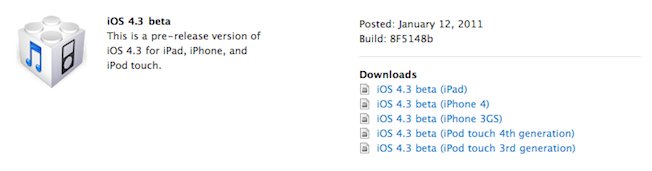
    We’re firmly in rumor territory now, and MacRumors has managed to piece a few tidbits together that certainly seem to point towards iOS 4.3 being released to the public on February 13th, along with a possible iPad 2 announcement.

    Two of the main additions to iOS in version 4.3 are the personal WiFi hotspot feature along with the ability to use in-app subscriptions.

    With that in mind, Daring Fireball’s John Gruber believes that a Feb 13th release must be on the cards, due to the recent release of News Corps’ The Daily app.

    The Daily requires a subscription – either $1 per week, or $40 per year. They’re using a new in-app subscription payment system from Apple for this – but these in-app subscription APIs aren’t in iOS 4.2. So The Daily launched today, free for a limited time. They announced at the event that this initial free two-week period was brought to us by: Verizon.

    This is certainly a logical conclusion. As things are, there is no way for a user to purchase a subscription to The Daily once the 2 week trial expires. An oversight on Apple’s part? I highly doubt it.

    If that doesn’t convince you, try this on for size. In David Pogue’s original Verizon iPhone review, the NY Times writer claimed that all iPhones will be receiving the new mobile hotspot on, you guessed it, February 13th.

    The single new feature in Verizon’s iPhone is Personal Hotspot, where the iPhone becomes a Wi-Fi base station. Up to five laptops, iPod Touches or other gadgets can get online, using the phone as a glorified Internet antenna.

    That’s incredibly convenient. Many other app phones have it – AT&T’s iPhone gets it on Feb. 13 – but Apple’s execution is especially nice

    Unsurprisingly that review has now been edited to remove all mention of the release date. Ooops!

    Next up we have German blog MacNotes claiming that Apple is planning an event for the coming week that will play host to the iPad 2 announcement along with the iOS 4.3 public release. The site also believes Apple is aiming to release the device in the US during the first half of April. Not long now folks!

    It’s only going to get more interesting from here on, with more pieces starting to slot together. All we need now is a couple of nice iPad 2 spy shots, and rest assured we’ll be bringing them to you as soon as we (hopefully!) have them!

  • GreenPois0n Untethered Jailbreak for iOS 4.2.1 Finally Released


    Members of Chronic Dev Team has finally announced the release of the long awaited GreenPois0n RC5. This tool brings untethered iOS 4.2.1 jailbreak for all iOS devices. Besides you do not need to have ‘4.2b3’ SHSH blobs saved in Cydia, unlike the Redsn0w 0.9.7. Keep in mind, the software is only available for Mac OS X. A Windows version will be coming very soon.

    Follow the below guide for step by step instructions to convert your tethered jailbreak to untethered jailbreak on iOS 4.2.1:

    STEP 1: Your device must be on iOS 4.2.1, then download GreenPois0n RC5 for Mac OS X from here.

    STEP 2: Launch GreenPois0n RC5 then connect your iPhone into your Mac via USB and click on Jailbreak as shown below:

    STEP 3: Follow the instructions shown on the screen to enter DFU mode:

    STEP 4: After the jailbreak is done, you will have a new application on your springboard called Loader. Use it to install Cydia, then it will ask you if you want to remove it. A quick re-spring, and you now have Cydia.

    This is it! You are done !

    Download GreenPois0n
    Download iOS 4.2.1 for iPhone 4, 3GS, iPod touch 4G / 3G / 2G and iPad

  • New Theme Brings Windows Phone 7 Live Tiles To iOS


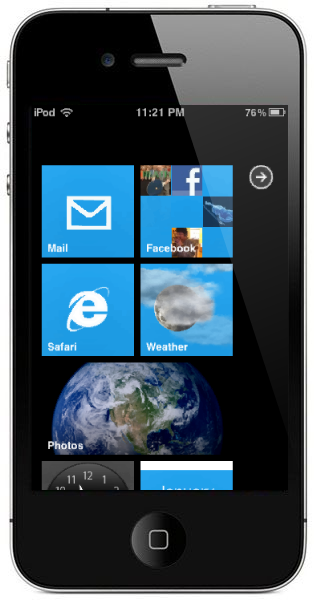
    If there is one thing that Windows Phone 7 has going for itself, it’s probably its Live Tiles home screen. Just like iOS updates the calendar’s icon once a day to show the right date, Microsoft made its entire homescreen display real-time information. It allows you for example to check when’s your next appointment, your Twitter feed or email without having to launch any app. It sounds great on paper, but they’re not quite there yet. Still, it’s a neat idea.

    Wyndwarrior, a jailbreak theme creator certainly thought so too and took up to recreate the interface for jailbroken iOS devices. From the live tiles, all the way to displaying applications, he managed to reproduce pretty much the entire experience. Of course, even jailbroken, iOS has certain limitations, so don’t expect too much from it. Still, the result is impressive. Check it out:

    [via: appadvice]

  • Apple iOS 4.3 change log revealed


    UPDATE:

    iOS 4.3 is Available Now, iPhone, iPad, iPod Touch, Apple TV, Direct Download Repository Here

    Known issues:

    Telephony

    * MMS pictures are rotated 90 degrees
    * Delay in activating FaceTIme after SIM swap
    * Delay when zooming in and out in Safari
    * FTP tool sometimes errors out

    WiFi

    * If SIM card is removed with personal hotspot is enabled, iPhone panics

    Bluetooth

    * D2D apps are not opening

    Other

    * Sound remains on even though the device is muted

    Issues Fixed Since iOS 4.3 8F5132f

    Accessibility

    * Fixed issue that prevented controls from being dismissed in some cases
    * Addressed issue where the keyboard could not be brought back when highlighting and swiping through search results
    * Voice over now reads the entire chart in stocks app while in landscape mode

    AirPlay

    * Fixed slideshow stop after 15 image when using AirPlay

    Baseband& Telephony

    * iPhone -> 04.08.00
    * Enabled Traffic Volume Indicator IE in CELL UPDATE
    * Fixed issue with integrity protection failing after SRNS relocation
    * Fixed issue of iPhone units deactivating and not activating after baseband logging is enabled
    * iPad -> 07.11.00
    * Fixed issue of Physical channel reconfiguration failure during a reselection procedure
    * Fixed issue of the UE missing a page because it is decoding and responding to RRC Setup messages meant for other UEs

    Bluetooth

    * Fixed incorrect auto routing with LG HBM-210 on FaceTime calls

    CalDAV

    * Fixed canceled recurring calendar events still shows on the event list

    Calendar

    * Fixed deleting a recurring events make the alarm go away
    * Fixed all-day alarm fired an hour early

    Exchange

    * Fixed exchange calendar event duplicating when passing Israeli daylight savings time

    Fonts

    * Letter Å‚ is now visible in notes

    Keyboard

    * Fixed missing accented letters in European keyboard popups
    * Increase font size for China and Pinyin inputs
    * Fixed auto-correction issue when switch back from Emoji to English keyboard
    * Added inline space with Pingyin inputs
    * Corrected “Undo” translation in Simplified Chinese to “撤销”

    Localization

    * Updated inconsistent translation in Chinese, Finnish, Norwegian, Korean, Dutch, Polish, Portuguese,
    * Fixed missing Chinese characters in Pinyin
    * Improved common phrases used in Chinese
    * Improved common phrased used in Japanese
    * 劲歌金曲 is no longer missing
    * Fixed issue that produced unexpected output when trying to type 从前门进入果
    * 一点儿 now ranked higher than 一点二
    * Word completion candidates capability now available for Chinese language
    * Added additional common phrases for character 耍
    * Fixed issue that caused the wrong candidates to be displayed (J: “間スコット”) when “ますこっと” is input
    * “軽さ(かるさ)” now in the candidate

    Mail

    * Fixed orientation of mail application not following device orientation under specific conditions
    * Fixed popover when drilling into a thread while the empty search field is focused
    * Fixed mail message view and orientation when quickly selecting a message and hitting edit mode

    Messaging

    * Fixed MMS messages with vCards scrolling up

    Phone

    * Fixed screen not drawing properly when Nike+ is in the background

    Status bar

    * Added new icon for wifi tethering for personal hotspot on status bar

    Web

    * Fixed issue that caused Safari and other apps to crash after loading certain heavy Websites

    WiFi

    * Fixed Personal Hotspot password failure with 22+ characters

    VoiceOver

    * Added support to for “find” in Safari
    * Fixed wallpaper titles for VoiceOver

    [via: bgr]