• Untethered iPad 2 Jailbreak On iOS 4.3.2 Is Imminent


    It seems like iPad 2 jailbreak is almost ready or at least in its final stages of development. iPad 2 is the only device that left not jailbroken yet. @Veeence is confirming that the iPad 2 jailbreak is almost ready. This is what he has tweeted:

    Apparently an A5 (iPad2) jailbreak is almost developed. There’s no release plan tho. What you get when security researchers investigate…


  • TinyUmbrella 4.3.2 Released with iOS 4.3.2 Support


    TinyUmbrella 4.3.2 has been released, it allows you to save your existing iOS 4.3.1 and iOS 4.3.2 SHSH blobs from iOS 4.3.2 or iOS 4.2.7 for CDMA devices.

    SHSH blobs are important to save for jailbreaking and iPhone unlocking because having them stored allows you to revert to previous firmware versions.

    Download TinyUmbrella for iOS 4.3.2

    Versions are available for both Mac OS X and Windows

  • Unlock iOS 4.3.2 On iPhone 4, 3GS With Ultrasn0w Fixer for 4.3.2


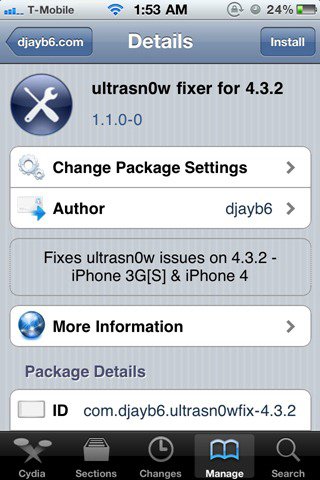
    DjayB6 has released a new version of his “Ultrasn0w Fixer For 4.3.2” to make Ultrasn0w 1.2.1 unlock for both iPhone 4 and 3GS (old basebands only) compatible with the latest iOS 4.3.2 firmware.

    Important Notes:

    • There is no unlock for the new baseband on iOS 4.3.2. If your iPhone relies on a carrier unlock, DO NOT update to stock iOS 4.3.2.
    • Ultrasn0w Fixer for 4.3.2 supports unlock for basebands (01.59.00 / 04.26.08 / 05.11.07 / 05.12.01 / 05.13.04 / 06.15.00)
    • Ultrasn0w Fixer for 4.3.2 is NOT compatible with the following basebands (02.10.04 / 03.10.01 / 04.10.01 / 05.14.02 / 05.15.04 / 05.16.02)
    • iPhone 3GS users can upgrade to iPad’s 06.15.00 baseband to unlock on 4.3.2.
    • Upgrading iPhone 3GS baseband to the 06.15.00 iPad baseband to unlock MAY cause you to lose your GPS.

    Ultrasn0w 1.2.x unlocking requires that your iPhone 3GS is jailbroken with 06.15.00 baseband.

    Step 1: First, you will have to jailbreak your iPhone 4 or 3GS on the latest iOS 4.3.2 firmware.

    Note: DO NOT use Redsn0w. Doing so will result in updating of your iPhone’s baseband, in the process losing unlock, probably forever.

    Step 2: Once done, you can now unlock your iPhone on the supported basebands using Ultrasn0w Fixer for 4.3.2 from Cydia. To do this:

    • Start “Cydia” on your iPhone.
    • Touch on “Manage” tab on the bottom.
    • Now touch on “Sources” as seen in the screenshot below
    • Touch on “Edit” and then on “Add”. You will be prompted to enter a url source as seen in the screenshot below. Type “http://djayb6.com” and touch on“Add Source” to add this repo if you haven’t already.
    • Cydia will now automatically update your sources by following a series of automated steps.
    • After installation is completed. Search for “ultrasn0w fixer for 4.3.2” in Cydia and install this application. This app will automatically unlock your iPhone so that you can use it with any carrier.

    Step 3: Now simply restart your iPhone and you should now have a fully unlocked iPhone 4 or 3GS, running iOS 4.3.2.


  • Redsn0w 0.9.6 RC 13 Released For Untethered iOS 4.3.2 Jailbreak


    Untethered iOS 4.3.2 jailbreak solution has been released using Redsn0w 0.9.6 RC13 on iPhone, iPad and iPod Touch.

    The 4.3.2 untether jailbreak works on all iOS devices which are compatible with 4.3.2 firmware except for the iPad2 device:

    • iPhone 4
    • iPhone 3GS
    • iPod Touch 3G
    • iPod Touch 4G
    • iPad1

    A must read information:

    “Only a few weeks after the 4.3.1 untether created by @i0n1c was released, Apple pushed out firmware 4.3.2. Thankfully, it appears Apple didn’t have a chance to fix the hole used by @i0n1c’s untether, so he ported his code over to 4.3.2’s kernel.

    As always, ultrasn0w unlockers should stay away from redsn0w and only update their firmware through a custom IPSW. We’ll release a new version of PwnageTool sometime this week.

    Note that many people are currently having problems updating to 4.3.2 through saurik’s server. You’ll need to remove the gs.apple.com entry in your hosts file in order to restore directly to Apple’s servers.”

    Apple has released iTunes 10.2.2 software. The update brings minor bug fixes. Most of the synchronization problems are fixed now.


    Here is an official changelog:

    • Addresses an issue where iTunes may become unresponsive when syncing an iPad.
    • Resolves an issue which may cause syncing photos with iPhone, iPad, or iPod touch to take longer than necessary.
    • Fixes a problem where video previews on the iTunes Store may skip while playing.
    • Addresses other issues that improve stability and performance.

    iTunes 10.2 came with several new features and improvements, including:

    • Sync with your iPhone, iPad, or iPod touch with iOS 4.3.
    • Improved Home Sharing. Browse and play from your iTunes libraries with Home Sharing on any iPhone, iPad, or iPod touch with iOS 4.3.

    Download Redsn0w 0.9.6 RC13 For Windows & Mac OS:

    Download iTunes 10.2.2 software: