• How To Transform Windows 7 Into Mac OS X 10.7 Lion


    A new transformation pack intended for Windows 7 users, this pack  transforms the look of your Windows 7 into a Mac OS X Lion desktop. This transformation pack by HamedDanger.

    Lion Skin Pack for Windows 7. It is an extremely easy to install Mac UI theme. It does not require any theme patching software and can be installed via a simple executable file. It can be quite handy for die hard Mac lovers who require using Windows for some reason (e.g. at office), or Windows users who wish to bring the Mac style to their desktop.

    Note: Please bear in mind that such transformation packs are difficult to uninstall and often a system restore point will not revert the changes. Before installing the Lion Skin Pack, make sure that you backup your computer to revert the changes (if required). Moreover, make sure that UAC (User Account Control) is disabled.

    When installing the transformation pack, you will be presented with the option to install the UXTheme Patch, files and extra items (e.g. wallpaper, visual styles, etc). You may select all or some of these options to continue. For example, you may not be interested in installing a screensaver, wallpaper, etc from the pack. To uncheck these items, expand the options to deselect items from the Files and Extras options.  Click on Install to begin the installation process. The rest of installing is fairly simple.

    Again, such transformation packs are difficult to uninstall and often a system restore point will not revert the changes. Before installing the Lion Skin Pack, make sure that you backup your computer to revert the changes.

    [via: addictivetips]
  • Unlock iOS 4.3.2 On iPhone 4, 3GS With Ultrasn0w Fixer for 4.3.2


    DjayB6 has released a new version of his “Ultrasn0w Fixer For 4.3.2” to make Ultrasn0w 1.2.1 unlock for both iPhone 4 and 3GS (old basebands only) compatible with the latest iOS 4.3.2 firmware.

    Important Notes:

    • There is no unlock for the new baseband on iOS 4.3.2. If your iPhone relies on a carrier unlock, DO NOT update to stock iOS 4.3.2.
    • Ultrasn0w Fixer for 4.3.2 supports unlock for basebands (01.59.00 / 04.26.08 / 05.11.07 / 05.12.01 / 05.13.04 / 06.15.00)
    • Ultrasn0w Fixer for 4.3.2 is NOT compatible with the following basebands (02.10.04 / 03.10.01 / 04.10.01 / 05.14.02 / 05.15.04 / 05.16.02)
    • iPhone 3GS users can upgrade to iPad’s 06.15.00 baseband to unlock on 4.3.2.
    • Upgrading iPhone 3GS baseband to the 06.15.00 iPad baseband to unlock MAY cause you to lose your GPS.

    Ultrasn0w 1.2.x unlocking requires that your iPhone 3GS is jailbroken with 06.15.00 baseband.

    Step 1: First, you will have to jailbreak your iPhone 4 or 3GS on the latest iOS 4.3.2 firmware.

    Note: DO NOT use Redsn0w. Doing so will result in updating of your iPhone’s baseband, in the process losing unlock, probably forever.

    Step 2: Once done, you can now unlock your iPhone on the supported basebands using Ultrasn0w Fixer for 4.3.2 from Cydia. To do this:

    • Start “Cydia” on your iPhone.
    • Touch on “Manage” tab on the bottom.
    • Now touch on “Sources” as seen in the screenshot below
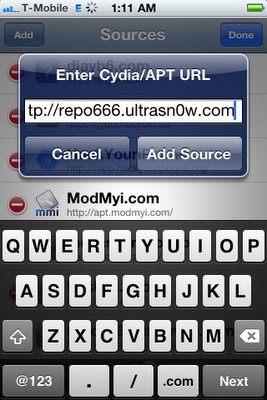
    • Touch on “Edit” and then on “Add”. You will be prompted to enter a url source as seen in the screenshot below. Type “http://djayb6.com” and touch on“Add Source” to add this repo if you haven’t already.
    • Cydia will now automatically update your sources by following a series of automated steps.
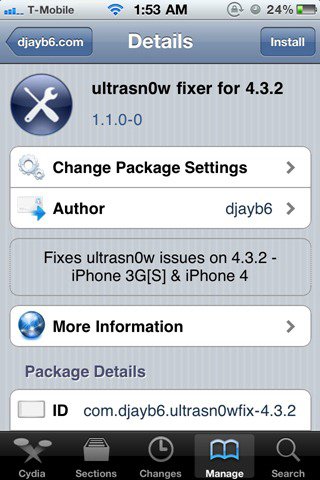
    • After installation is completed. Search for “ultrasn0w fixer for 4.3.2” in Cydia and install this application. This app will automatically unlock your iPhone so that you can use it with any carrier.

    Step 3: Now simply restart your iPhone and you should now have a fully unlocked iPhone 4 or 3GS, running iOS 4.3.2.

  • How To Unlock iPhone 4, 3GS on iOS 4.3.1 with Ultrasn0w 1.2.1


    iPhone Dev Team has released Ultrasn0w 1.2.1 unlock for iOS 4.3.1. The unlock tool can be used with iPhone 4 and iPhone 3GS. Its not a new unlock, it can only unlock lower basebands whose unlock was already possible but broken on iOS 4.3.1. Ultrsn0w 1.2.1 WILL NOT unlock higher basebands whose unlock is not possible right now.

    If you have upgraded to iOS 4.3.1 firmware and jailbroken you device with PwnageTool 4.3 or Sn0wbreeze 2.5 and requires an unlock then you can use Ultrasn0w 1.2.1.

    Compatible basebands with Ultrasn0w 1.2.1:

    iPhone 4: 01.59.00
    iPhone 3GS: 04.26.08 / 05.11.07 / 05.12.01 / 05.13.04 / 06.15.00

    DO NOT USE WITH the following basebands:

    iPhone 4: 02.10.04 / 03.10.01 / 04.10.01
    iPhone 3GS: 05.14.02 / 05.15.04 / 05.15.04 / 05.16.01 / 05.16.02

    Remember you need to have a jailbroken device with PwnageTool 4.3 and Sn0wbreeze 2.5.

    How To Guides for Untethered 4.3.1 Jailbreak on Windows & Mac
    How To Guides for Untethered 4.3.1 Jailbreak on Windows & Mac

    Step 1: You have to jailbreak your iPhone 4 / 3GS on iOS 4.3.1 with preserving your old baseband, follow this guide (PwnageTool 4.3 for Mac) or (Sn0wbreeze 2.5 Windows)

    Step 2: Once you jailbreak yoour device, you can now unlock your iPhone 4 / 3GS with Ultrasn0w 1.2.1 from Cydia. To do so, follow the steps below:

    • Press to launch Cydia Installer from your SpringBoard.
    • Press to select the Manage tab at the bottom of the screen.
    • Press to select the Sources button.
    • Now touch on Edit and then on Add. You will be prompted to enter the URL of the source. Type http://repo666.ultrasn0w.com and touch on Add Source to add this repository.

    Cydia will now automatically update your sources by following a series of automated steps.

    • After installation is completed. Search for “ultrasn0w 1.2.1” in Cydia and install this application. This app will automatically unlock your iPhone so that you can use it with any carrier.

    Step 3: Almost done, now simply reboot your iPhone and you should have a fully unlocked iPhone 3GS / 4 on iOS 4.3.1.

  • How to Enable Multi-Touch Gestures in iOS 4.3.1 for iPhone 4 Using Cydia Hack


    We have previously showed you a way to enable multitouch gestures in iOS 4.3.1 using a manual method to SSH through the device but thanks to Cydia Hacks that can fix the issue and do all the dirty work on behalves of you. All you need is a jailbroken iPhone and make sure, currently the tweak only works with iPhone 4 and iPod touch 4G.

    Step 1: Search for MT Gestures via ModMyi repo

    Step 2: Install / respring and its done

    You can now do the following three gestures using four or five fingers:

    • Pinch to home screen
    • Swipe up for Multitasking bar
    • Swipe left/right to switch apps.