• Install OS X Lion Final Release Over Lion GM Guide


    If you are running the Mac OS X Lion GM build and you want to buy and install the Final release of Lion through the Mac App Store, you’ve noticed that you’ll get that’s already “installed” App Store. To work around you just need to hold Option and click on the Install button to be able to install the final release over GM. You can also do this through the “Purchases” tab in the Mac App Store, just hold down Option to enable the “Install” button.

    Note: if you’re a developer who is running the Lion GM build 11A511 there is technically no need to install the Lion Final, both builds are 11A511 and identical.

    This is also a way for those who inappropriately downloaded Lion GM to pay Apple for the final release. It’s only $29.99. Developers needn’t do this however thanks to The Loop for getting this tip.
  • How to Edit your Facebook Comments


    Facebook recently rolled out an update to its commenting system. Now, instead of pressing Comment, you simply press the Enter key to save a comment. More excitingly, however, Facebook silently rolled out another new feature at the same time: you can now edit comments!

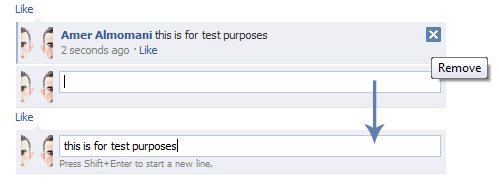
    When you comment on your friend’s status, photos or link, and want to edit your comment, simply press the ‘X’ in the top right corner to edit it. Your comment instantly turns into a text box where you can alter what you’ve written, then just press Enter again to save it.

    Note: If someone send a comment after you, your comment will be blocked, but you still able to delete your comment by the same ‘X’ button. Also you have to know that you also have only 60 seconds to edit your comment.

    It’s also worth noting that everyone still gets email (and SMS!) notifications when you comment, and when you edit comments.