• iOS 5 is Jailbroken Already


    Apple has released the next iteration of their Mobile software, iOS 5 for iPhone, iPad and iPod touch yesterday at the WWDC conference. The new version comes with more than 200 new features, including a new notification system, Newsstand, which is an iBook like but for magazines and Newspaper subscription, Twitter integration, Safari Reader and Reading List, Reminders, Camera and Image editing Capabilities, Mail updates, iOS-wide built-in dictionary, PC-free for syncing, updating wirelessly, Delta OTA software updates, and iMessage.

    MuscleNerd one of key members of the Dev Team has confirmed via his twitter the possibility of jailbreak future on iOS 5, and no matter the fact that it will be a tethered solution at least initially, but the Jailbreak community will love to have their hands on it.

    iOS 5 beta is available for developers, with public release planned for this fall.

  • iPad 2 Jailbreak Is Waiting For An Elevat0r


    iPad 2 is the only iDevice left with no jailbreak available yet and as the Jailbreak community seem rushed to figure out a rigid exploit, one of them, Stefan Esser a.k.a @i0n1c, a well known security guy among the jailbreak team, has recently thrown the word “Elevat0r” and began to tease a series of tweets since a month ago and apparently this is an iPad 2 jailbreak exploit. Stefan Esser has successfully found an exploit in iOS 4.3.1 which once again used in subsequent iOS 4.3.2 and iOS 4.3.3.

    To tie the loosing ends, a new website elevat0r.com has surfaced and, interestingly, it says:

    “Is an elevator arriving soon?

    This website is dedicated to all those iPad 2 that are waiting for an elevator…
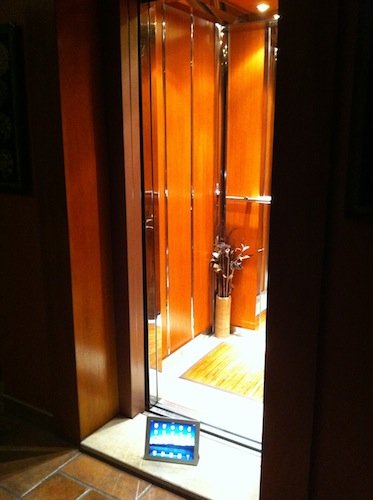
    If your iPad 2 is waiting for an elevator don’t hesitate to share a photo of it with the rest of the world.”

    And for more ambiguity they put another statement at the bottom which read:

    “This website is not about an iPad 2 jailbreak, it is about photos of waiting iPad 2 only.”

    The website is full of iPad 2 images showing a real elevator and it seems Stefan is waiting for 1000 images to be submitted before he reveals the expected jailbreak. He tweeted:

    Wonder how many days it will take to get 1000 submissions for http://elevat0r.com

    Do you think that Elevat0r is the upcoming iPad 2 jailbreak/exploit?

  • How To Unlock iPhone 4, 3GS on iOS 4.3.1 with Ultrasn0w 1.2.1


    iPhone Dev Team has released Ultrasn0w 1.2.1 unlock for iOS 4.3.1. The unlock tool can be used with iPhone 4 and iPhone 3GS. Its not a new unlock, it can only unlock lower basebands whose unlock was already possible but broken on iOS 4.3.1. Ultrsn0w 1.2.1 WILL NOT unlock higher basebands whose unlock is not possible right now.

    If you have upgraded to iOS 4.3.1 firmware and jailbroken you device with PwnageTool 4.3 or Sn0wbreeze 2.5 and requires an unlock then you can use Ultrasn0w 1.2.1.

    Compatible basebands with Ultrasn0w 1.2.1:

    iPhone 4: 01.59.00
    iPhone 3GS: 04.26.08 / 05.11.07 / 05.12.01 / 05.13.04 / 06.15.00

    DO NOT USE WITH the following basebands:

    iPhone 4: 02.10.04 / 03.10.01 / 04.10.01
    iPhone 3GS: 05.14.02 / 05.15.04 / 05.15.04 / 05.16.01 / 05.16.02

    Remember you need to have a jailbroken device with PwnageTool 4.3 and Sn0wbreeze 2.5.

    How To Guides for Untethered 4.3.1 Jailbreak on Windows & Mac
    How To Guides for Untethered 4.3.1 Jailbreak on Windows & Mac

    Step 1: You have to jailbreak your iPhone 4 / 3GS on iOS 4.3.1 with preserving your old baseband, follow this guide (PwnageTool 4.3 for Mac) or (Sn0wbreeze 2.5 Windows)

    Step 2: Once you jailbreak yoour device, you can now unlock your iPhone 4 / 3GS with Ultrasn0w 1.2.1 from Cydia. To do so, follow the steps below:

    • Press to launch Cydia Installer from your SpringBoard.
    • Press to select the Manage tab at the bottom of the screen.
    • Press to select the Sources button.
    • Now touch on Edit and then on Add. You will be prompted to enter the URL of the source. Type http://repo666.ultrasn0w.com and touch on Add Source to add this repository.
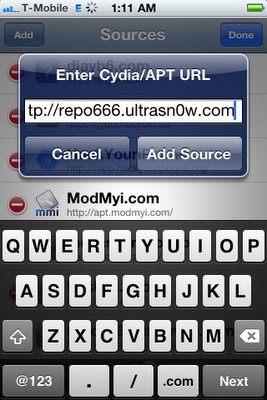
    Cydia will now automatically update your sources by following a series of automated steps.

    • After installation is completed. Search for “ultrasn0w 1.2.1” in Cydia and install this application. This app will automatically unlock your iPhone so that you can use it with any carrier.

    Step 3: Almost done, now simply reboot your iPhone and you should have a fully unlocked iPhone 3GS / 4 on iOS 4.3.1.

  • iOS 4.3.1 Untethered Jailbreak is Getting Closer


    There’s an eerie quiet among the folks taking the lead in the jailbreaking community, demos have been demonstrated, and tweets have been tweeted.

    To tide us over, previously Stefan Esser has delivered his untethered iOS 4.3.1 jailbreak solution to iPhone Dev Team. Now MuscleNerd dropped a few hints about the imminence of the Dev Team’s new version of RedSn0w and PwnageTool; each will support 4.3.1. The upcoming untethered 4.3.1 will work on all iOS devices except for iPad 2.

    MuscleNerd has announced this in a series of tweets. This is what he has said on his Twitter account:

    @kunalshaha his untether will be in both redsn0w and PwnageTool forms

    @branz1 remember, i0n1c’s untether doesn’t cover iPad2 yet…so must still wait for a legal method to distribute comex’s 4.3 JB for iPad 2

    As we already know iPhone Dev Team is beta testing on the exploit originally developed by Stefan Esser. Hopefully they will release Redsn0w 0.9.8 both for Mac and Windows users.