• The Avengers Official Character Descriptions Revealed


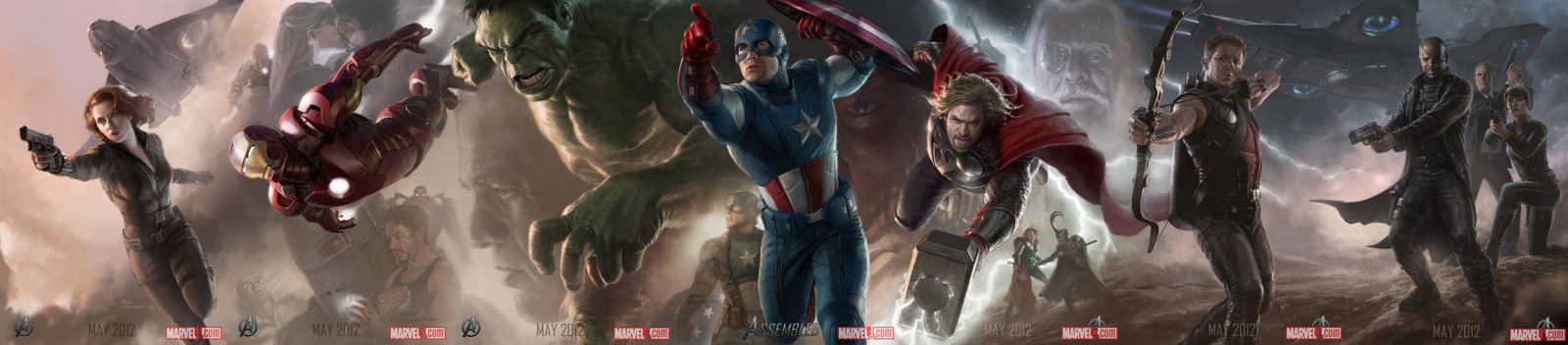
    The Avengers Assembled Poster

    Marvel and Disney have released the official character description for the highly anticipated movie The Avengers. The Joss Whedon directed movie is to be released in summer 2012.

    CAPTAIN AMERICA (Steve Rogers) 

    After a top secret Super-Soldier program transformed frail Steve Rogers (Chris Evans) into the powerful and heroic Captain America, his amazing WWII exploits made him a living legend. Steve saved New York City and turned the tide of the war, but crashed into the Arctic during his final mission. Awakening in the modern day, Steve learned that he had spent decades frozen in the icy tundra. Now, Steve Rogers finds himself alone in a modern world that he hardly recognizes. When Nick Fury, director of the international peacekeeping agency S.H.I.E.L.D.,

    IRON MAN (Tony Stark) 

    On top of being an eccentric genius, a billionaire, a playboy and a philanthropist, Tony Stark (Robert Downey Jr.) is also the armored super hero known as Iron Man. Fresh off of defeating enemies the world over, Stark reluctantly agreed to serve as a consultant to Nick Fury’s top-secret peacekeeping and intelligence agency known as S.H.I.E.L.D. Now, with a global crisis on the horizon and the fate of the world in the balance, Stark must again power up his Iron Man armor to save the world, and become a full-fledged member of The Avengers.

    THOR (The God of Thunder) 

    An arrogant prince from the distant land of Asgard, Thor (Chris Hemsworth) was banished to Earth after his irresponsible behavior threatened his homeland. While in exile on Earth, Thor learned humility and helped to save his new friends from a destructive threat sent by his brother Loki. In the process, Thor redeemed himself in the eyes of his father, Odin, the King of Asgard. After being welcomed back to Asgard as a hero, Thor must now return to Earth once again to prevent a cosmic-level catastrophe. With Mjolnir in his hand, a legendary hammer with immense power, the mighty warrior soon finds himself drawn into an unlikely alliance with Nick Fury’s secret initiative, The Avengers, lending his power to their cause against his wayward brother, Loki.

    THE HULK (Bruce Banner) 

    After a gamma radiation experiment went awry, mild-mannered scientist Dr. Bruce Banner (Mark Ruffalo) found himself with a peculiar condition. When angered or provoked, he would transform into the uncontrollable, green-skinned monster known as the Hulk. Now, fearful of the damage that the Hulk could inflict, Dr. Banner chooses to live a discreet life in remote parts of the world, working to cure the sick and help the poor while trying to elude those who would take advantage of his ability to change into the enormous, green menace. When a mounting threat calls for Banner’s specialized scientific expertise, S.H.I.E.L.D. Director Nick Fury recruits him, knowing full well that the incredible strength of Banner’s alter ego, the Hulk, would be an asset to The Avengers.

    HAWKEYE (Clint Barton) 

    One of S.H.I.E.L.D.’s most elite agents, Clint Barton (Jeremy Renner), code-named Hawkeye, is the greatest living marksman on Earth. Armed with his weapon of choice, the recurve bow, Hawkeye fires his arsenal of custom augmented arrows, specialized for any number of specific situations, with perfect precision. With the potential for global catastrophe on the horizon, he employs his amazing combat skills to fight along side The Avengers.

    BLACK WIDOW (Natasha Romanoff) 

    S.H.I.E.L.D. Agent Natasha Romanoff, aka Black Widow (Scarlett Johansson), is one of the world’s greatest spies and quite possibly the world’s most skilled assassin. Armed with an extensive arsenal of specialized weapons like widow stings and cluster bombs, as well as a vast repertoire of martial arts skills, Romanoff’s unique talents make her one of director Fury’s top agents and an integral part in assembling The Avengers.

    LOKI 

    After his bid to overthrow the throne of Asgard was thwarted by his brother Thor, the evil Loki (Tom Hiddleston) retreated to lands unknown to plot his revenge. Not just against his brother, but against Earth, whose inhabitants Thor now protects. Loki, now returns with a nefarious plot to conquer Earth and will stop at nothing to see his vision realized. When his misuse of power threatens the entire planet, it may take more than The Avengers to stop him.

    NICK FURY (Director of S.H.I.E.L.D.) 

    As the legendary Director of the international peacekeeping organization, S.H.I.E.L.D., Nick Fury (Samuel L. Jackson) is humanity’s first line of defense against the world’s biggest threats. When S.H.I.E.L.D. becomes aware of an evil that threatens global safety, Fury assembles the planet’s most powerful beings and forms The Avengers.

  • Xbox 360 Has Biggest Sales Week in History with Around 1 Million Units Sold


    Xbox 360 Has Biggest Sales Week in History

    Xbox 360 has sold 960,000 units in the U.S. during Black Friday week, Microsoft announced today. That makes it the biggest sales week in the history of Xbox.

    800,000 of those units were sold within a period of 24 hours. Besides, over 750,000 Kinect sensors were sold during the Black Friday week, combination of standalone and bundled.

    “We have seen tremendous excitement from customers for our hot holiday gaming offers,” commented Chris Homeister, senior vice president and general manager of Home Entertainment at Best Buy. “Xbox 360 was among the best-sellers at Best Buy this Black Friday, and is a testament to the continued popularity of the gaming category this holiday.”

    Microsoft added, “Xbox 360 should deliver its eleventh straight month as the number one console in the US.  With a robust holiday portfolio and the new Xbox LIVE dashboard going live on Dec. 6, we expect holiday momentum to continue, driving Xbox 360 to finish the year as the number one console in the U.S.”

    As for the competition, Sony noted strong demand but did not provide a sales figure for PS3, while Nintendo had its best Black Friday for the Wii yet by selling 500,000 units.

    [via industrygamers]

  • Try Out Windows Phone on Your iPhone or Android Right Now


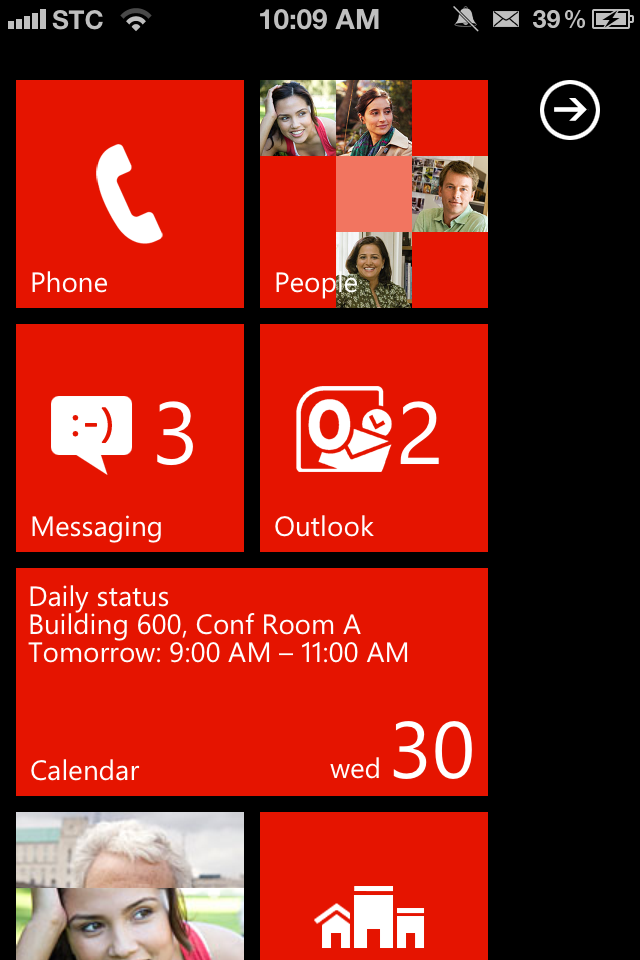
    Windows Phone on Your iPhone

    if you are eager to see how Windows Phone feels? Microsoft has just made it easy for you. They released a new HTML 5 website that allows iPhone and Android users to get a taste of the Windows Phone 7, Mango 7.5 operating system.

    Browse to the webpage http://aka.ms/wpdemo on your mobile device to try it out right away. To enjoy full screen experience, you can save the page to your home screen by clicking on the bookmark button.

    The demo gives a comprehensive look at some features you find in Windows Phone with a blue dot to guide you around the operating system.

    Ironically, the demo doesn’t work in Windows Phone’s own browser. I guess it doesn’t really have to, but funny none the less.

    [via Gizmodo]

  • iOS 5.1 Beta 1 for iPhone, iPad & iPod Touch Available for Download


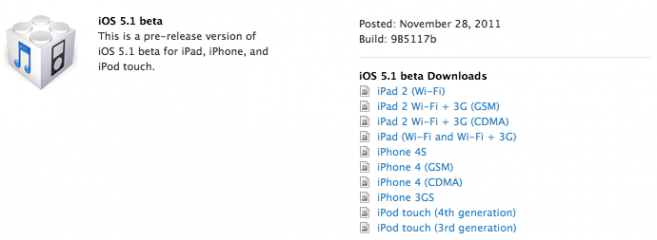
    Apple has released iOS 5.1 first beta for iPhone, iPad and iPod Touch. This is a beta version intended for for developers only. Apple has also released Xcode 4.3 which you can download from iOS Dev Center.

    iOS 5.1 Beta 1 for iPhone, iPad & iPod Touch Available for Download

    Introduction

    iOS SDK 5.1 provides support for developing iOS applications and includes the complete set of Xcode tools, compilers, and frameworks for creating applications for iOS and Mac OS X. These tools include the Xcode IDE and the Instruments analysis tool among many others.

    With this software you can develop applications that run on iPhone, iPad, or iPod touch running iOS 5.1. You can also test your applications using the included iOS Simulator, which supports iOS 5.1. There are two Xcode iOS SDK 5.1 images, one for installing on a Macintosh computer running Mac OS X 10.6.7 (Snow Leopard) or later, the other for installing on a Macintosh computer running Mac OS X 10.7 (Lion).

    This version of iOS is intended only for installation on devices registered with Apple’s developer program. Attempting to install this version of iOS in an unauthorized manner could put your device in an unusable state.

    For more information and additional support resources, visit:

    http://developer.apple.com/programs/ios/

    Bug Reporting

    Please report any bugs not mentioned in the “Introduction” section using the Apple Bug Reporter on the Apple Developer website (http://developer.apple.com/bugreporter/). Additionally, you may discuss these issues and iOS SDK 5 in the Apple Developer Forums: http://devforums.apple.com. You can also access more information about iCloud for Developers at: http://developer.apple.com/icloud

    Notes and Known Issues

    The following issues relate to using the 5.1 SDK to develop code.

    Accounts
    When creating an iCloud account, you can use any Apple ID as long as it is a full email address and not a MobileMe account. If you have a MobileMe account, you can move that account to iCloud. You can find more information at: http://me.com/move

    APIs
    The NSNetService class and CFNetService APIs do not include P2P interfaces by default. To browse, register, or resolve services over P2P interfaces, an application needs to use the Bonjour DNSService*() APIs noted below.
    Setting the interfaceIndex parameter to kDNSServiceInterfaceIndexAny in the following API’s will not include P2P interfaces by default. To include P2P interfaces, you must now set the kDNSServiceFlagsIncludeP2P flag when using kDNSServiceInterfaceIndexAny or set the interfaceIndex to kDNSServiceInterfaceIndexP2P. The affected APIs are:
    DNSServiceBrowse
    DNSServiceRegister
    DNSServiceResolve
    DNSServiceRegisterRecord
    DNSServiceQueryRecord
    GameKit
    App Icons and Profile Photos are not loading in apps using Game Center.

    iCloud Storage
    Provisioning profiles must be enabled for iCloud in the iOS Provisioning Portal. You can enable a provisioning profile for iCloud by navigating to the App ID section of the iOS Provisioning Portal and configuring your App ID for iCloud. After enabling the App ID for iCloud, regenerate your provisioning profiles to enable them for iCloud.
    The setSortDescriptors: method of NSMetadataQuery is not supported.
    In iOS 5, files that are protected via Data Protection cannot be used with iCloud Storage APIs.
    File names are case-insensitive in Mac OS X but case-sensitive in iOS. This can lead to problems when sharing files between the two using iCloud. You should take steps on iOS to avoid creating files whose names differ only by case.
    Movie Player
    Starting in iOS 5.0, in order to facilitate finer-grained playback control, a movie player is not automatically prepared to play upon creation. Call the prepareToPlay method to prepare the movie player. For more information, see MPMoviePlayerController Class Reference

    Music Player
    Using shake-to-shuffle causes Music app to freeze and playback to stop.

    Newsstand
    FIXED: Deleting an issue that was marked as the currently reading issue could cause a crash.

    Security
    In iOS 5, the signing of certificates with MD5 signatures is not supported. Please ensure that certificates use signature algorithms based on SHA1 or SHA2.

    Xcode/Developer Tools
    A bug in the documentation organizer causes an exception when you type in any field in the content area. To prevent the need to log in to the developer website from Xcode, download documentation sets locally using Xcode’s documentation preference pane and enable the ‘Check for and install updates automatically’ checkbox as a workaround.
    “uninstall-devtools” script mistakenly removes files and packages even if Xcode is still running. Be sure to quit any running copy of Xcode before starting the “uninstall-devtools” script.
    The Network Link Conditioner daemon cannot be launched after installing the Networking Link Conditioner without a reboot. You can manually workaround the issue with a restart or by the following command: sudo launchctl load /system/library/launchdaemons/com.apple.networklinkconditioner.plist.]
    In the iOS 5 development tools, it is possible to extract APIs used by an application and have them checked for use of private APIs. This option is offered when you validate your application for app submission.