• iPad 2 Jailbreak on iOS 4.3.3 Using JailbreakMe 3.0 Now Available [Updated]


    NOTE: Please, remember this is not recommended for anyone, take it at your own risk

    The news came in a video that recently hit the Web. The PDF file in question, which appears to have leaked from a JailbreakMe beta tester, is currently circulating online, and we’ve included a link to it below if you’re interested in taking the solution for a spin. Remember, first, that this is not the final release – so proceed with caution.

    In order to jailbreak your device, simply click this link in Safari for iOS. Safari should close, a pop-up box should appear and you should be able to jailbreak your iPad 2.

    Here’s the video, and remember: Be careful. And if you decide to take the jailbreak solution for a spin, let us know how it works for you in the comments.

    Update 1:

    @Comex, the hacker behind the JailbreakMe, has responded to the leaked iPad 2 jailbreak that was apparently stolen by a beta tester. He tweeted:

    Congratulations, some moron used a dictionary attack(?) to leak a buggy version and put me on a useless time limit.
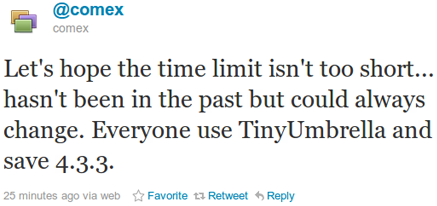
    Let’s hope the time limit isn’t too short… hasn’t been in the past but could always change. Everyone use TinyUmbrella and save 4.3.3.

    Hopefully, Apple isn’t able to close the exploit before comex finishes the jailbreak. To be safe please follow comex’s advice and save your SHSH Blobs.

    Save SHSH Blobs:

    You can get TinyUmbrella from here (for Windows) or here (for Mac OS X) and then click on “Save SHSH Blobs.”

    Update 2:

    Check out the real story behind iPad 2 Jailbreak here

  • Mac OS X 10.7 Lion Golden Master GM Download Now [Updated]


    Apple has seeded Mac OS X 10.7 Lion’s GM (Gold Master) build to developers. This is ahead of the promised July launch, probably this Wednesday, and it looks as if Apple may be targeting an early- to mid- July launch date.

    The GM build is generally the build that consumers will end up with and ready for mass production; however, if any major bugs are found, there could always be another seed. Apple has also released iCloud beta 3 for this build, along with a new preview for Xcode. You can download OS X Lion GM below:

    filesonic.com Links:

    • Mac OS X 10.7 Lion Golden Master GM Build 11A511 | 3.48 GB

    [hide 1]http://www.filesonic.com/folder/7518821[hide 1]

    • All below links are interchangeable:

    filesonic.com Links:

    • Mac OS X 10.7 Lion Golden Master GM Build 11A511 | 3.48 GB

    [hide 1]Part 1[hide 1]
    [hide 1]Part 2[hide 1]
    [hide 1]Part 3[hide 1]
    [hide 1]Part 4[hide 1]
    [hide 1]Part 5[hide 1]
    [hide 1]Part 6[hide 1]
    [hide 1]Part 7[hide 1]
    [hide 1]Part 8[hide 1]

    Uploadstation.com Links:

    • Mac OS X 10.7 Lion Golden Master GM Build 11A511 | 3.48 GB

    [hide 1]Part 1[hide 1]
    [hide 1]Part 2[hide 1]
    [hide 1]Part 3[hide 1]
    [hide 1]Part 4[hide 1]
    [hide 1]Part 5[hide 1]
    [hide 1]Part 6[hide 1]
    [hide 1]Part 7[hide 1]
    [hide 1]Part 8[hide 1]

    Wupload.com Links:

    • Mac OS X 10.7 Lion Golden Master GM Build 11A511 | 3.48 GB

    [hide 1]Part 1[hide 1]
    [hide 1]Part 2[hide 1]
    [hide 1]Part 3[hide 1]
    [hide 1]Part 4[hide 1]
    [hide 1]Part 5[hide 1]
    [hide 1]Part 6[hide 1]
    [hide 1]Part 7[hide 1]
    [hide 1]Part 8[hide 1]

    Fileserve.com Links:

    • Mac OS X 10.7 Lion Golden Master GM Build 11A511 | 3.48 GB

    [hide 1]Part 1[hide 1]
    [hide 1]Part 2[hide 1]
    [hide 1]Part 3[hide 1]
    [hide 1]Part 4[hide 1]
    [hide 1]Part 5[hide 1]
    [hide 1]Part 6[hide 1]
    [hide 1]Part 7[hide 1]
    [hide 1]Part 8[hide 1]

    Uploading.com Links:

    • Mac OS X 10.7 Lion Golden Master GM Build 11A511 | 3.48 GB

    [hide 1]Part 1[hide 1]
    [hide 1]Part 2[hide 1]
    [hide 1]Part 3[hide 1]
    [hide 1]Part 4[hide 1]
    [hide 1]Part 5[hide 1]
    [hide 1]Part 6[hide 1]
    [hide 1]Part 7[hide 1]
    [hide 1]Part 8[hide 1]

  • iPhone 5 and iPad 3 Parts Being Prepared For October Release?


    DigiTimes is reporting that the supply chain for not only the iPhone 5 but iPad 3 is beginning to prepare materials for production of the two devices. Both devices are likely to make their debuts in September and to hit the market in October, according to industry sources.

    iPhone 5’s supply volume is estimated to be around 6-7 million units in the third quarter and with the addition of iPhone 4 shipments, total iPhone shipments in the quarter will reach 24-25 million units with volumes to maintain at the same level in the fourth quarter. In 2011, Apple is forecasted to ship over 85 million iPhones.

    Upstream component makers including Foxconn Electronics (Hon Hai Precision Industry), which is in charge of assembling the devices; Simplo Technologies and Dynapack International Technology, in charge of manufacturing batteries; TPK Holding and Wintek, in charge of touch panel modules; Catcher, in charge of chassis; and Largan Precision, in charge of webcams, are all expected to benefit from the orders.

    DigiTimes has somewhat of a hit-and-miss record of Apple related rumors, while the iPhone 5 is expected, the iPad 3 release is somehow questionable. Previous rumors pointed out to two iPad will make their releases this year, so this might work this time.

  • Gmail Has Got a New UI Look and You Can Try it NOW


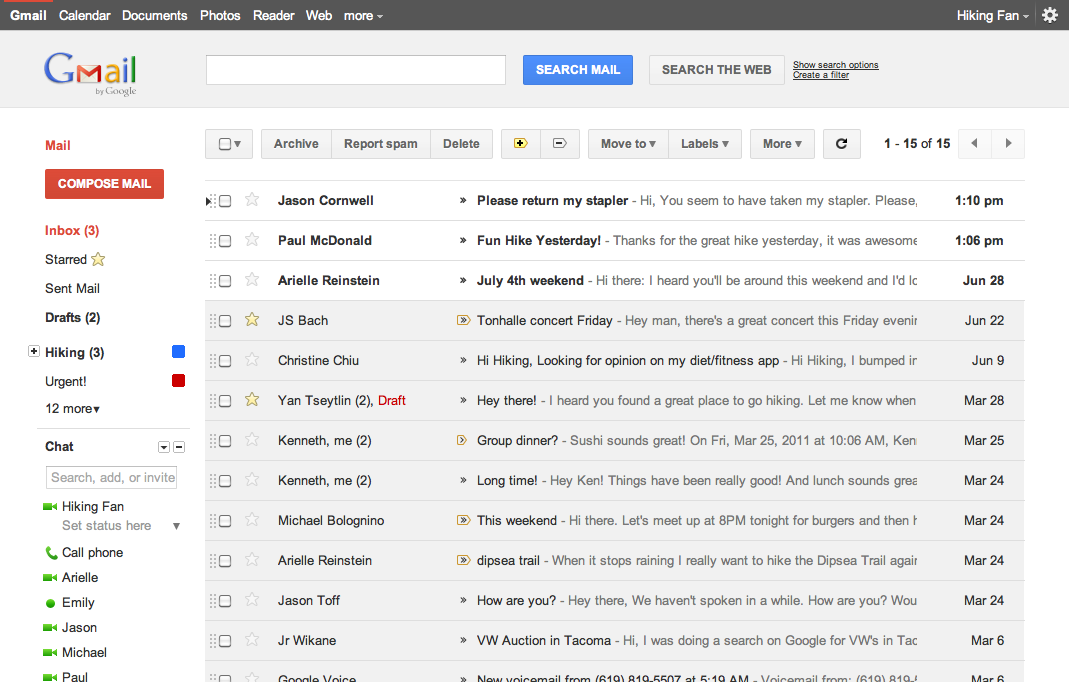
    Google has rolled out a lot of redesigning work this week starting from the new black bar and Google search page new UI, some Gmail tweaks and introducing Google+. The Gmail, in particular, is about to get a new theme and you can try it right now. Here is what Google says about the matter:

    … we’re embarking on a series of interface updates to help strip out unnecessary clutter and make Gmail as beautiful as it is powerful. This is part of a Google-wide effort to bring you an experience that’s more focused, elastic, and effortless across all of our products. The changes are not going to happen all at once. We know that you love and care about Gmail as much as we do, and we’ll be working on these upgrades gradually over the next few months to allow plenty of time to understand and incorporate your feedback into the evolving design.

    How to get the new Theme:

    Simply go to Gmail Settings, click over to the Themes tab and select “Preview” or “Preview (Dense)” as your theme to try this yourself. Google has provided two themes because the end result is an elastic responsive design that shifts its information density to accomodate your screen size, but for now, you need to pick based on the density you prefer

    We’re kicking things off with two new themes for you to try out as a sort of sneak peek at what we’re up to. Starting today, you’ll see the “Preview” and “Preview (Dense)” themes in the Themes tab in Gmail Settings. Why two themes? Our new interface will eventually expand dynamically to accommodate different screen sizes and user preferences, but until then you can pick the information density that you prefer.