• How To Transform Windows 7 Into Windows 8


    Following our story on How to transform Windows 7 into Mac OS X Lion, here comes a new skin pack been created which contains many of the expected Windows 8 features. It has visual styles liked the leaked screenshots and third party apps that have been developed to provide users with the expected Windows 8 features. So if you would like to get the Windows 8 skin and small number of features today, try out 8 Skin Pack for 7.

    Note: Please bear in mind that such transformation packs are difficult to uninstall and often a system restore point will not revert the changes. Before installing 8SkinPackFor7, make sure that you backup your computer to revert the changes (if required). Moreover, make sure that UAC (User Account Control) is disabled.

    When installing the transformation pack, you will be presented with the option to install the UXTheme Patch, files and extra items (e.g. wallpaper, visual styles, third party software, etc). You may select all or some of these options to continue. For example, you may not be interested in installing a screensaver, wallpaper, or some third-party software. To uncheck these items, you can expand the options but clicking on the + sign to unselect items from the Files and Extras options. Click on Install to begin the installation process.

    This will install the selected components on your Windows 7 operating system. After the installation is complete, reboot your system for the changes to take effect.

    [via: addictivetips]

  • How To Transform Windows 7 Into Mac OS X 10.7 Lion


    A new transformation pack intended for Windows 7 users, this pack  transforms the look of your Windows 7 into a Mac OS X Lion desktop. This transformation pack by HamedDanger.

    Lion Skin Pack for Windows 7. It is an extremely easy to install Mac UI theme. It does not require any theme patching software and can be installed via a simple executable file. It can be quite handy for die hard Mac lovers who require using Windows for some reason (e.g. at office), or Windows users who wish to bring the Mac style to their desktop.

    Note: Please bear in mind that such transformation packs are difficult to uninstall and often a system restore point will not revert the changes. Before installing the Lion Skin Pack, make sure that you backup your computer to revert the changes (if required). Moreover, make sure that UAC (User Account Control) is disabled.

    When installing the transformation pack, you will be presented with the option to install the UXTheme Patch, files and extra items (e.g. wallpaper, visual styles, etc). You may select all or some of these options to continue. For example, you may not be interested in installing a screensaver, wallpaper, etc from the pack. To uncheck these items, expand the options to deselect items from the Files and Extras options.  Click on Install to begin the installation process. The rest of installing is fairly simple.

    Again, such transformation packs are difficult to uninstall and often a system restore point will not revert the changes. Before installing the Lion Skin Pack, make sure that you backup your computer to revert the changes.

    [via: addictivetips]

  • Download Internet Explorer 10 Platform Preview 1


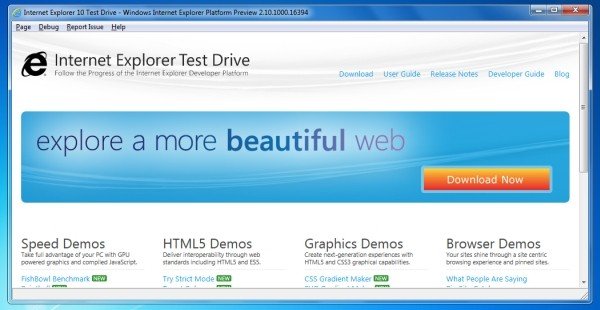
    Internet Explorer 9 hasn’t even been live for a month and already Microsoft is preparing the way for its successor: IE10. The company released a developer preview of the browser, which it showed off for the first time at its MIX 11 conference yesterday.

    Like its predecessor, IE10 is being designed for HTML5 and built with full hardware acceleration. In the words of Dean Hachamovitch, Microsoft’s corporate vice president for Internet Explorer, it’s intended to make sites feel and run more like native applications than Web pages. Little wonder industry observers expect IE10 to be the browser Microsoft includes in Windows 8 when it finally ships.

    Welcome to the Platform Preview

    The Platform Preview is an early look at the Internet Explorer platform so some features are incomplete, some may change, and some may be added. To learn more about this preview of the Web Platform, please see the Internet Explorer 10 Developer Guide. These release notes list new features available in the latest Platform Preview and known issues with those features. To report issues, and provide feedback please click on Report Issue and click Send Feedback.

    What’s New in Internet Explorer 10 Platform Preview 1

    Internet Explorer 10 Platform Preview 1 is the first public preview of the IE10 web platform. In this release, we are showcasing support for CSS3 Flexbox, CSS3 Grid Alignment, CSS3 Multi-column, CSS3 Gradients on background-images and ECMAScript5 Strict Mode.

  • Windows App Store Screenshots leaked: Looks Suspiciously Like Apple’s


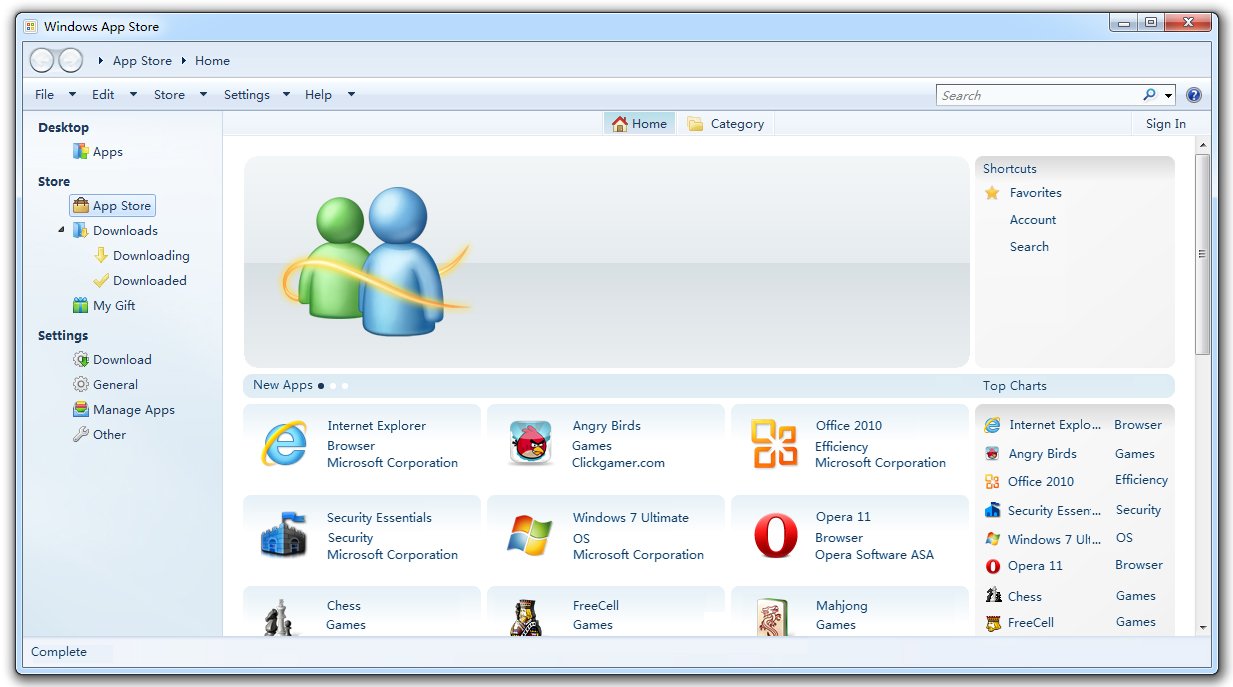
    Images of the new Windows App Store have emerged, showing similar functionality to not only Apple’s App Store, but also the Ubuntu Download Center. Regardless, it is bringing Windows 8, for which these screenshots are taken from, into the next-generation application game. From what we see here, it suggests one will be able to download a vast number of applications, ranging from games to office applications. With applications available like Opera and Angry Birds, it’s clear that Microsoft are following suit with other content providers by opening up to third-party applications.

    Since Apple released the Mac App Store, Microsoft has been fighting to get the application store ready for users in time. However, considering Apple’s move to sue Amazon for the use of the name “App Store”, Microsoft could also be in hot water if it continues to use the name. Apple maintains it should have control over the “App Store” name, though Microsoft is contending the challenge.

    Though it does look suspiciously similar to the Mac App Store and the Ubuntu Download Center, I don’t think much can be taken from it. Personally, I think it looks strangely similar to Windows Media Player.

    Regardless, these rumours we keep hearing about seem to be ringing true week by week as these leaks slip out. What else is Microsoft hiding up their increasingly long sleeves?

    [via: zdnet]