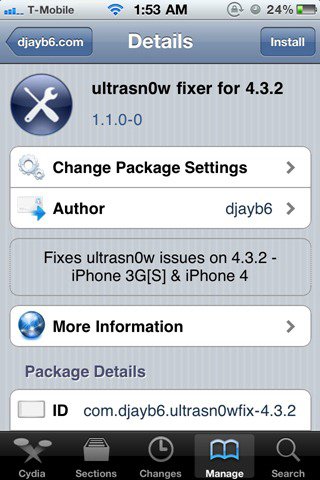
DjayB6 has released a new version of his “Ultrasn0w Fixer For 4.3.2†to make Ultrasn0w 1.2.1 unlock for both iPhone 4 and 3GS (old basebands only) compatible with the latest iOS 4.3.2 firmware.
Important Notes:
- There is no unlock for the new baseband on iOS 4.3.2. If your iPhone relies on a carrier unlock, DO NOT update to stock iOS 4.3.2.
- Ultrasn0w Fixer for 4.3.2 supports unlock for basebands (01.59.00 / 04.26.08 / 05.11.07 / 05.12.01 / 05.13.04 / 06.15.00)
- Ultrasn0w Fixer for 4.3.2 is NOT compatible with the following basebands (02.10.04 / 03.10.01 / 04.10.01 / 05.14.02 / 05.15.04 / 05.16.02)
- iPhone 3GS users can upgrade to iPad’s 06.15.00 baseband to unlock on 4.3.2.
- Upgrading iPhone 3GS baseband to the 06.15.00 iPad baseband to unlock MAY cause you to lose your GPS.
Ultrasn0w 1.2.x unlocking requires that your iPhone 3GS is jailbroken with 06.15.00 baseband.
Step 1: First, you will have to jailbreak your iPhone 4 or 3GS on the latest iOS 4.3.2 firmware.
Note: DO NOT use Redsn0w. Doing so will result in updating of your iPhone’s baseband, in the process losing unlock, probably forever.
Step 2: Once done, you can now unlock your iPhone on the supported basebands using Ultrasn0w Fixer for 4.3.2 from Cydia. To do this:
- Start “Cydia†on your iPhone.
- Touch on “Manage†tab on the bottom.
- Now touch on “Sources†as seen in the screenshot below
- Touch on “Edit†and then on “Addâ€. You will be prompted to enter a url source as seen in the screenshot below. Type “http://djayb6.com†and touch on“Add Source†to add this repo if you haven’t already.
- Cydia will now automatically update your sources by following a series of automated steps.
- After installation is completed. Search for “ultrasn0w fixer for 4.3.2†in Cydia and install this application. This app will automatically unlock your iPhone so that you can use it with any carrier.
Step 3: Now simply restart your iPhone and you should now have a fully unlocked iPhone 4 or 3GS, running iOS 4.3.2.