• Glasses Free 3D App For iPhone 4 & iPad 2 Free Download


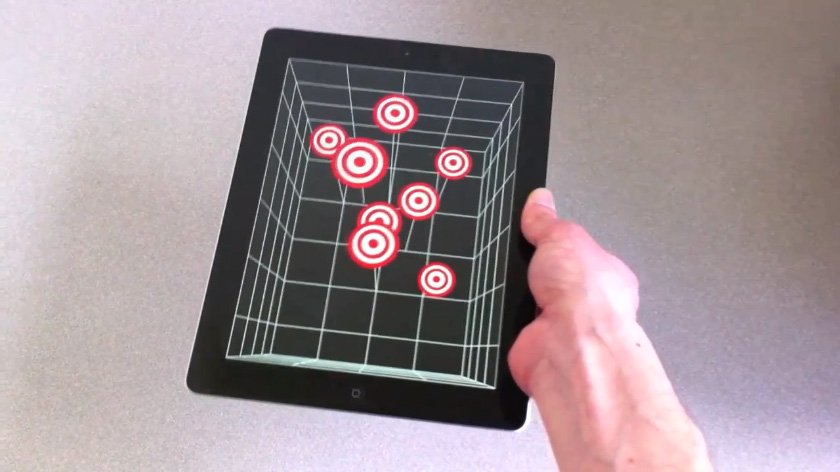
    Do you remember the Glasses Free 3D on iPad 2 and iPhone 4 via Head Tracking Demo? If you don’t, no worries the video is embedded below, but in short, a research team came up an amazing tech demoes by combining head-tracking technology that uses the iPad’s front facing camera to deliver glasses-free 3D experience that doesn’t require the accelerometer, but it’s entirely based on the camera and the movements of a user’s head in front of the screen. The position of the user will give the illusion of tridimensional objects moving on the display. Now that team has released the free i3D app, so you can see the 3D illusion effect yourself.

    Apps official description:

    i3D is an overview of Head-Coupled Perspective (HCP) on iOS devices. HCP uses the front camera of the device to track the face of the user in real time. This information tells the app how the user is looking at the display. The app updates the perspective of the 3D scene accordingly, giving the user the illusion that he looks at a small window.

    i3D contains several 3D scenes that you can observe with HCP. It only relies on face tracking. It does not use the accelerometers or the gyroscopes.

    The face tracking system does not detect and track the face in every lighting condition. Read the instructions in the app to get a good tracking.

    Head-Coupled Perspective does not create a stereoscopic display! It provides a kind of monocular 3D display: the same picture is seen by both eyes. In the future, it might be combined with a stereoscopic display for a better 3D effect.

    i3D has been developed by Jeremie Francone and Laurence Nigay at the Engineering Human-Computer Interaction (EHCI) Research Group of the Grenoble Informatics Laboratory (LIG), University Joseph Fourier (UJF).

    Here is the original video to watch it again:

  • Stream YouTube Videos Faster on iPhone, iPod Touch, iPad with TCP Optimizer Cydia Hack


    TCP Optimizer is a new and free Cydia tweak that modifies your iDevice’s settings to increase streaming speeds and improve its overall internet connection, including Wi-Fi.

    How To install TCP Optimizer:

    • You must have a jailbroken iDevice
    • Add http://cydia.pushfix.info/ repository to Cydia.
    • Search for and install ‘TCP Optimizer‘. No Restart needed.

    This actually will:

    • Increase theTCP Receive Buffer from 131072 to 292000,
    • Disable TCP delayed ACK’s
    • Double the number of possible un-ACK packets from 8 to 16 packages
    • Increase the size of un-ACK packets

    TCP Optimizer is compatible with iPhone, iPod touch and iPad, running iOS 3.1.2 or above; however, Its not recommended to be used on second generation Apple TVs.

  • iPhone 5 to Adopt Curved Glass?


    iPhone 5 may employ a curved cover glass, according to a Digitimes report.

    The latest buzz being circulated around the supply chain in Taiwan is that Apple is going to adopt a curved cover glass for its next generation model, according to industry sources.

    Apparently, iPhone 5 or iPhone 4S would not be similar to the iPhone 4, If we are to believe what Digitimes says:

    However, in order to push forward the production of curved glass, Apple reportedly has purchased 200-300 glass cutting machines to be used by glass makers, said the sources.

    The glass slicing machines are currently being stored at associated assembly plants and will be brought online once yield rates for the production of curved glass reaches a satisfactory level, the sources revealed.

    Samsung Nexus S was the first smartphone with curved glass and Apple’s iPhone 5 might be the next.

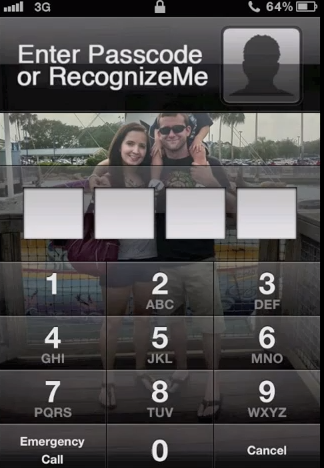
  • RecognizeMe Brings Facial Recognition Unlock to iPhone, Now Available in Cydia


    A new Cydia tweak RecognizeMe, allows you to use facial recognition to unlock your iPhone. The tweak is now available in Cydia Store for download for $6.99 via the BigBoss repository.

    RecognizeMe does a pretty good job at facial recognition, it sits on the iPhone passcode screen, so it serves as an alternate to, rather than a replacement for the passcode. Check this video out: