• Nuance Might Have Exposed The iPhone 5 Beans


    Interesting screenshots from Nuance’s new SpeechTrans Ultimate App. Nuance is widely believed to be working deeply with Apple on their speech recognition technology so maybe they know something.  Or maybe they just pasted screenshots that were too big on their App?!

  • Apple Starts Selling Unlocked iPhone 4, Works With Any GSM Network Worldwide


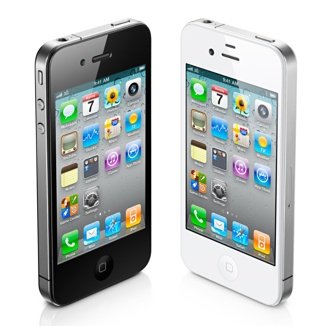
    Apple has begun selling unlocked GSM iPhone 4 in the US. The 16GB black model starts at $649 and the 32GB $749. The unlocked device has all the features and can be used worldwide on supported GSM:

    If you don’t want a multiyear service contract or if you prefer to use a local carrier when traveling abroad, the unlocked iPhone 4 is the best choice. It arrives without a micro-SIM card, so you’ll need an active micro-SIM card from any supported GSM carrier worldwide.

    The unlocked iPhone 4 requires an active micro-SIM card that you obtain from a supported GSM wireless carrier. Simply insert the micro-SIM card into the slot on your iPhone, connect to your Mac or PC using the USB cable, and launch iTunes on your computer to complete the setup.

  • iOS 5 Tethered Jailbreak Using Sn0wbreeze 2.8 Guide


    Sn0wbreeze 2.8 beta 2 (a.k.a PwnageTool for Windows) brings tethered jailbreak for iOS 5 on iPhone 4, iPhone 3GS (New Bootrom), iPod Touch 4G, iPod touch 3G, & iPad 1. It brings Untethered jailbreak for iPhone 3GS (Old Bootrom).

    A step by step guide on how to jailbreak iOS 5 Beta tethered using Sn0wbreeze 2.8 (Windows)

    Notes:

    • For Redsn0w you can follow our guide posted here (Redsn0w 0.9.8) to get tethered jailbreak iOS 5.
    • For iPhone 3GS (Old Bootrom) its Untethered.

    Step 1: Start Sn0wbreeze, click the next “blue” arrow to proceed.

    Step 2: Select the required firmware .ipsw file for your iOS device by clicking on the “Browse” button.

    Step 3: Sn0wbreeze will now identify the selected IPSW file. Once done, click the next “blue” colored arrow to proceed.

    Step 4: Now select the “Expert Mode”, followed by “Build IPSW” option to start creating your custom firmware.

    Step 5: Sn0wbreeze will greet you with the following “Done!” message when the custom firmware has been successfully created.

    Step 6: Now follow the onscreen steps to enter DFU mode using Sn0wbreeze:

    • Hold Power and Home buttons for 10 seconds
    • Now release the Power button but continue holding the Home button for 10 more seconds
    • You device should now be in DFU mode

    Step 7: Start iTunes, click on your iOS device icon from the sidebar in iTunes. Now press and hold Left “Shift” button on the keyboard and then click on “Restore” (Not “Update” or “Check for Update”) button in iTunes and then release this button. This will make iTunes prompt you to select the location for your custom firmware 5 file. Select the required custom .ipsw file that you created above, and click on “Open”.

    Step 8: Now sit back and let iTunes do the rest for you. This will involve a series of automated steps. Just wait while iTunes installs the new firmware 5 on your iOS device. Your iOS device screen at this point will be showing a progress bar indicating installation progress. After the installation is done, your iOS device will be jailbroken on iOS 5.

    Required Downloads:

  • JailbreakMe 3.0 For iPad 2 Jailbreak is Imminent?


    iPad 2 is the only device left without jailbreak or accurately Apple’s A5 processor-based architecture in iPad 2 and later iPhone 4S/5 seems a hard puzzle to solve. The Limera1n exploit, which worked on A4-based iOS devices like iPod touch 4G and iPhone 4, is hardware-based and, since iPad 2 is A5-based, the exploit doesn’t work on it. And so the community has to find an all-new exploit this time around.

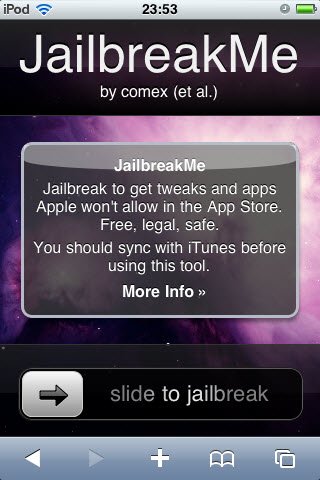
    iPhone hacker Comex and his JailbreakMe tool, which worked on a userland exploit, used to jailbreak iOS 4.0/4.0.1 with a very simple method of “slide to jailbreak” bar and Comex’s tool did the rest. However the exploit was later patched in iOS 4.0.2.

    Today, Comex has updated his website for the tool JailbreakMe. The updated page teases an image:

    The image shows a signboard with the word “PDF” written on top of it. this is might be pointing towards a potential PDF-based exploit. however its highly likely the new tool would work on iPad 2. Comex teased a lot of tweets:

    We just pin our hopes for an untethered jailbreak for iPad 2 as well as other iOS devices on iOS 5 which is set to release this fall.