• It’s Just Getting Ridiculous, Samsung?!


    Samsung caught again copying Apple

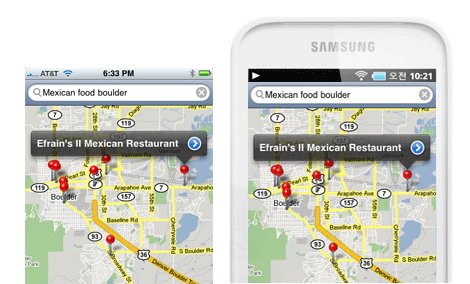
    Official Samsung website for Galaxy Player 50 has a slightly modified version of the Apple iOS Maps app, directly taken from a 2008 screenshot of iPhone Maps app. Apparently, Samsung doesn’t know (or care) that although the Apple’s Maps app uses Google maps data, the user interface is designed and copyrighted by Apple since 2007.

    No wonder Apple wins injunction in Australia and Germany. Fandroid drones, what excuses do you have now? Still think Samsung using Apple’s App Store and Safari icons is an “accident”?

    Samsung using Apple’s App Store and Safari icons in their stores

    This isn’t the first time a rival to Apple has used their artwork. Recently we’ve had Samsung using icons from Apple’s App Store in the backdrop of their in-store displays, a move which once again led to much embarrassment for the firm fighting a legal battle claiming they’re copying Apple’s iPhone and iPad.

    Note: Samsung took the page down.

    [Discovered by @raruler]

  • iPhone 4S and Samsung Galaxy Tab: Which smartphone is the best listener?


    Siri

    The BBC’s technology correspondent Rory Cellan-Jones wanted to find out which smartphone was the best listener, so he conducted a quick test of his own.

    He spoke the same text into a Siri-equipped iPhone 4S and a Samsung Galaxy Tab, and compared the transcribed results.

    The original text:

    It’s a challenge that has occupied scientists for decades and promised huge fortunes to anyone who could solve it. I’m talking about speech recognition, back in the news because it is one of the most significant features of Apple’s latest phone. Will it remain an amusing party-trick – or become the key way in which we communicate with computers?

    Siri transcribed it as:

    It’s a challenge that has occupied scientists the decade and promised huge fortunes to anyone who could solve it stop I’m talking about speech recognition back in the news because it is one of the most significant features of Apples latest phone STOCK will it remain unamusing party trick or become McKee way in which we communicate with COMPUTERS?

    And the Galaxy Tab came back with:

    If I started the decade and poets 14th avenue and hope It stops on Interstate recognItIon back In the news because It’s 1 of the most signIant pIctures of apples latest phone got the wIll remaIn In the musIc of the trIck or become a keyway computers.

    Have your own verdict?
    [via cultofmac]

  • How To Jailbreak iOS 5 On Your iPhone 4, 3GS, iPad or iPod Touch Using Redsn0w


    iOS 5 gets tethered jailbroken using Redsn0w

    iPhone Dev Team has released an updated version of Redsn0w jailbreak tool. The new Redsn0w 0.9.9b5 that can jailbreak iOS 5

    Important Notes:

    • Its a tethered jailbreak
    • Supported devices: iPhone4, iPhone 3GS, iPad 1 and iPod Touch 3G and iPod Touch 4G.
    • iPhone 4S and iPad 2 are NOT supported yet.
    • iBooks will crash and not be working after the jailbreak.

    NOTE: Before you follow the below guide to jailbreak your device, you need to know that the following process is NOT for those who want to preserve their baseband for the Unlock. I’ll be putting another guide for that and the ability to preserve the baseband using custom ipsw.

    How To Jailbreak iOS 5 on iPhone, iPad & iPod Touch

    Please backup all your information using iTunes before following this tutorial.

    1. Double-click to open redsn0w application. for Windows users right-click and choose open as administrator.


    2. Click the ‘Jaibreak’ button below the text. Now it will ask you to connect the device to your Mac/PC and then turn it off, do so and click ‘Next’. Now follow the on-screen instructions to proceed.


    3. The device will reboot while redns0w prepares the jailbreak data.


    4. Then choose Cydia and click the ‘Next’ button.

    6. The device will reboot showing ‘Downloading Jailbreak Data’ logo and then some code on the device’s screen, while redsn0w sends modified files to the device. You will be notified once redsn0w is done. Let the rest of process continue on the device, please be patient.


    7. After it reboots, your device should now be jailbroken with Cydia on the homescreen. If Cydia appears like a white icon reboot the device as below

    8. For booting up tethered, open redsn0w and click the “Extras” button below the jailbreak button.

    9. Select “Just Boot” from the “Extras” menu.

    10. You have to again enter the DFU mode then it automatically it will boot your device.

    That’s it!

  • Box.net Offers iOS Users 50GB Of Free Cloud Storage


    Box.net offers 50GB of free storage to iOS users

    Box.net has announced they are offering a promotional free 50GB of storage to iOS users, beginning at 12:01 PM PST Friday, October 14th. up to the next 50 days. Cool ha?!

    Follow these steps:

    1. Use your iPhone, iPad or iPod touch to visit the App Store and download the App.
    2. Log in to your account or register for a new one directly from the app.
    3. That’s it

    On top of 50GB of free storage, accounts will receive an increased file size limit of 100MB instead of 25MB. Box.net has over 7 million users, and the app was recently updated to support iOS 5. That means the app supports AirPlay.

    The 50GB of storage is ten times what Apple’s iCloud service offers users for free, and is being offered free with no strings attached. A comparable amount of storage on DropBox would cost $9.99 per month, and a comparable amount of storage through Apple’s iCloud service would cost $100 per year.

    Box.net can be used to store photos, documents, videos, music, or other digital files safely on Box.net’s servers.