• New Samsung Ad Bashes iPhone Fans


    New Samsung Ad Bashes iPhone Fans

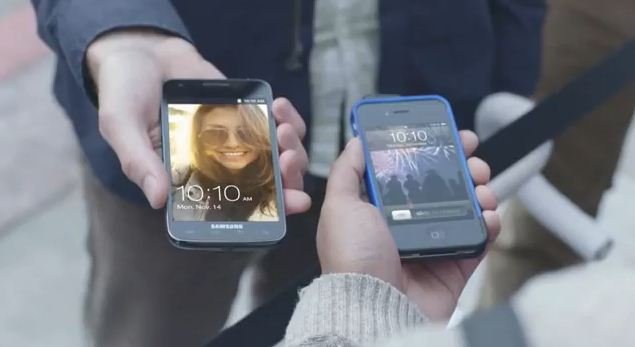
    Samsung has dropped a new ad for their Galaxy SII touting the device larger screen and 4G speeds and bashing Apple fans who stand in line for the latest iPhone for days without knowing there is something better. So this is Samsung’s way to counter the incredible popularity of the iPhone. Watch the ad below:

  • Siri Protocol Cracked


    Siri

    It seems the guys over at Applidium have managed to get Siri’s protocol cracked, this actually opens the door to all sorts of possibilities letting Siri to, potentially, be ported to various apps and devices including iPad, Android devices or other third-party apps.

    Apple has already gone into some detail of how Siri works. Basically it works by communicating with Apple’s remote servers, the speech you feed you iPhone 4S is sent, deciphered by the servers and then bounces it back to your handset.

    Today, we managed to crack open Siri’s protocol. As a result, we are able to use Siri’s recognition engine from any device. Yes, that means anyone could now write an Android app that uses the real Siri! Or use Siri on an iPad! And we’re going to share this know-how with you.

    But there is one little snag to this in that the Apple servers need an identifier key called a UDID associated to an iPhone 4S model only to get Siri work.

  • iOS 5.0.1 iPhone, iPad, iPod Touch, Apple TV Direct Download Links Repository


    Apple has just released iOS 5.0.1. The update brings battery life fixes for all devices running iOS 5, as well as security improvements and multitasking gestures on the original iPad. Battery life issues are said to be fixed as well.

    iOS 5.0.1 update

    This update contains improvements and other bug fixes including:

    – Fixes bugs affecting battery life
    – Adds Multitasking Gestures for original iPad
    – Resolves bugs with Documents in the Cloud
    – Improves voice recognition for Australian users using dictation

    device current version date found
    AppleTV(2G) (AppleTV2,1)
    4.4.2 (9A336a)
    10/24/2011 17:51:03
    iPad (iPad1,1)
    5.0.1 (9A405)
    11/10/2011 13:06:01
    iPad2(wifi) (iPad2,1)
    5.0.1 (9A405)
    11/10/2011 13:06:01
    iPad2(at&t) (iPad2,2)
    5.0.1 (9A405)
    11/10/2011 13:06:01
    iPad2(vz) (iPad2,3)
    5.0.1 (9A405)
    11/10/2011 13:06:01
    iPhone (iPhone1,1)
    3.1.3 (7E18)
    04/08/2010 21:05:48
    iPhone3G (iPhone1,2)
    4.2 (8C148)
    11/22/2010 13:08:57
    iPhone3GS (iPhone2,1)
    5.0.1 (9A405)
    11/10/2011 13:06:01
    iPhone4 (iPhone3,1)
    5.0.1 (9A405)
    11/10/2011 13:06:01
    iPhone4(vz) (iPhone3,3)
    5.0.1 (9A405)
    11/10/2011 13:06:01
    iPhone4S (iPhone4,1)
    5.0.1 (9A405)
    11/10/2011 13:06:01
    iPodTouch(2G) (iPod2,1)
    4.2 (8C148)
    11/22/2010 13:08:57
    iPodTouch(3G) (iPod3,1)
    5.0.1 (9A405)
    11/10/2011 13:06:01
    iPodTouch(4G) (iPod4,1)
    5.0.1 (9A405)
    11/10/2011 13:06:01
    last updated: 11/10/2011 15:55:02 EDT
  • How to Enable the Hidden Panorama Camera Mode in iOS 5


    Panorama functionality in iOS 5

    After the first beta of iOS 5 was seeded to developers in June, a series of code strings suggested the company could implement a panoramic photo-taking feature in the OS, allowing users to shoot wider photos with a Panorama functionality allegedly similar to what third-party apps like 360 Panorama and Pano are already offering. As Apple kept seeding more betas and eventually released iOS 5 to the public, Panorama was nowhere to be found in iOS, suggesting Apple wasn’t ready to debut the feature yet.

    One Developer did a little digging around inside the camera app and discovered that editing a particular .plist file made the missing panorama mode to appear, however, a new Cydia tweak made available now, called Firebreak. to simply enable camera’s panorama mode:

    Firebreak via Cydia

    Requires iOS 5 or higher

    Requires Gyroscope capable device, iPhone 4, or newer, or iPad 2.

    Enable built-in panoramas on iOS 5 Camera app.

    No icons added to the homescreen. The panorama button is added to the Options menu in the Camera app.

    Once downloaded and installed you will have the panorama mode enabled.