• Call Of Duty Elite Is Now Available On Your iPhone


    Call Of Duty Elite App

    Call Of Duty Elite App

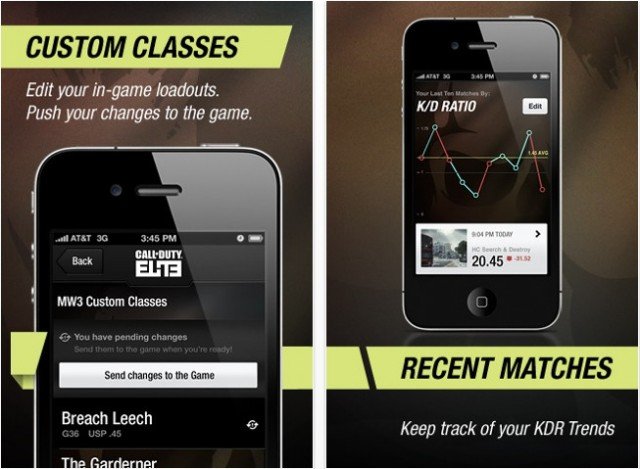
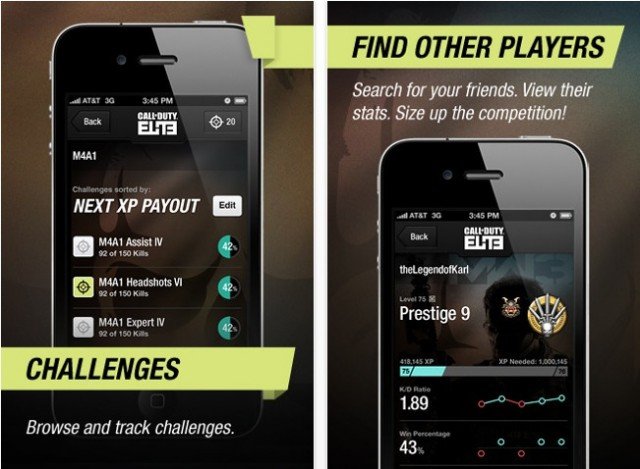
    The new service and progress tracking accompanying the launch of the hit Call of Duty: Modern Warfare 3, has now mad its way into the App Store. Dubbed, Call of Duty Elite, the app allows gamers to monitor their stats, view reports, get social and much more.

    Call Of Duty Elite App

    Call Of Duty Elite App

    As promised by Activision, the official Call of Duty Elite app is now available on the App Store.

    Download Call of Duty Elite app from the App Store

  • iPhone iOS 5 Outperforms Nokia Lumia 800 Windows Phone in Browser Benchmark Tests


    iPhone iOS 5 Outperforms Nokia Lumia 800 Windows Phone in Browser Benchmark Tests

    Here is a cool comparison test which shows the power of iPhone 4S along with iOS 5. The guys at 359gsm recently ran a test including iPhone 4 running iOS 4.3, iPhone 4S running iOS 5 against Nokia Lumia 800 smartphone running Windows Phone 7.5 Mango. iPhone 4S significantly outperform Nokia in all benchmark tests.

    The results are shown below courtesy of 359gsm, you can watch the test video above as well:

    Browsermark Test: Higher is better

    • iPhone 4 (iOS 4.3) – 37 503
    • Nokia Lumia 800 (WP7.5 aka Mango) – 30 452
    • iPhone 4S (iOS 5) – 86 702

    Speed Reading Test:

    • iPhone 4 (iOS 4.3) – 2 fps (iPhone 4 with iOS 5.0 – around 37 fps)
    • Nokia Lumia 800 (WP7.5 aka Mango) – 40 fps
    • iPhone 4S (iOS 5) – 60 fps

    Sunspider Test: Lower is better

    • iPhone 4 (iOS 4.3) – 4018.2 ms
    • Nokia Lumia 800 (WP7.5 aka Mango) – 7188.7 ms
    • iPhone 4S (iOS 5) – 2266 ms

    Acid3 Test:

    • iPhone 4 (iOS 4.3) – 100/100
    • Nokia Lumia 800 (WP7.5 aka Mango) – 100/100
    • iPhone 4S (iOS 5) – 100/100

    HTML5 Test:

    • iPhone 4 (iOS 4.3) – 210
    • Nokia Lumia 800 (WP7.5 aka Mango) – 141
    • iPhone 4S (iOS 5) – 296
  • iOS 5.0.1 Untethered Jailbreak Using Corona Guide


    sdfdsf

    If you are currently operating an A4 device which has a tethered jailbreak you can use this menthod to update to full untethered jailbreak for iOS version 5.0.1 and for all supported A4 (& lower) devices!

    You can quickly access, download & install Corona 5.0.1 Untether via Cydia store for your iPhone 4, iPhone 4 (CDMA), iPhone 3GS, iPad 1, iPod Touch 4G & iPod Touch 3G provided that iOS 5.0.1 being installed already by following the steps below:

    • Open the Cydia app on your tethered jailbroken device
    • Search for “Corona”
    • Hit the “Install” button.

    This package will allow your 5.0.1 device to install the untethered exploits and reboot without requiring an external tool like redsn0w, and without having to restore your device, so you get to keep all your apps, contacts, etc.

    if you do not currently have access to the Cydia store on your 5.0.1 device, you can use the redsn0w 0.9.10 tool developed by the iPhone Dev team. It is exactly the same set of files as our Cydia package, but bundled with redsn0w for new jailbreak users and/or those who are not already running a tethered jailbreak.

    If you have one of the A4 devices listed above and are not using iOS 5.0.1 yet, you can update your iOS version now (though you should not update to 5.0.2 when it is released, or you will lose your jailbreak) or you can wait a few days max for our Corona 5.0 Untether package, which will be available in the Cydia store upon release.
  • iOS 5.0.1 Untethered Jailbreak Using Redsn0w Guide


    Redsn0w

    This is a tutorial on how to perform an untethered jailbreak of your iPhone 4 on 5.0.1 using RedSn0w for Windows. The same steps for Mac version.

    This procedure will cause you to upgrade your baseband. For those how rely on an Unlock must stay away from this and update using a custom ipsw.

    Update #2: Redsn0w 0.9.10b4 released to address the iBooks issue for jailbroken devices.

    Update #1: The b3 version of redsn0w fixes a problem where re-running redsn0w over an existing jailbreak would cause MobileSubstrate-based apps to stop running until MS was installed again. Now you can re-run the redsn0w jailbreak step without worrying about that (but still remember to de-select the “Install Cydia” option if it’s already installed).

    iOS 5.0.1 Untethered Jailbreak Using Redsn0w Step-by-step Guide:

    Step 1: Download the latest version of RedSn0w and 5.0.1 firmware from links below. No need to download the 5.0.1 firmware if you are already on iOS 5.0.1

    Extract the Redsn0w zip file by double clicking it.

    Step 2: Connect your iPhone to the computer and launch iTunes.

    • Select your iPhone from the list of devices on the left.
    • Hold down Shift and click the Restore button. Navigate to the 5.0.1 firmware ipsw.
    • Click the Choose button to continue.
    • iTunes will now update your iPhone to the new firmware.

    Step 3: Launch the redsn0w application (As administrator)

    Step 4: Once RedSn0w opens click the Jailbreak button

    Step 5: Plug your iPhone into the computer and make sure its OFF then click the Next button.

    Step 6: RedSn0w will now guide you through the steps to get into DFU mode.

    Step 7: Your iPhone will now reboot

    Step 8: RedSn0w will now prepare the jailbreak data.

    Step 9: Select Cydia from the list of options and click Next.

    Step 10: Your iPhone will now be rebooted again and RedSn0w will begin uploading the new RAM Disk and Kernel.

    Step 11: Your mobile is now jailbroken with Cydia on the SpringBoard.

    Download Links:

    • Download Redsn0w 0.9.10b4 for Mac OS X
    • Download iOS 5.0.1 for iPhone, iPod touch, iPad