• iOS 4.3.3 Untethered Jailbreak Using Redsn0w 0.9.6rc16 Guide


    Redsnow brings untethered jailbreak for iOS 4.3.3 on iPhone 4, iPhone 3GS, iPod touch 4G, iPod touch 3G and iPad. iOS 4.3.3 untethered jailbreak is based on i0n1c’s untethered exploit. No Untethered Jailbreak for iPad 2 yet.

    A step by step guide on how to jailbreak iOS 4.3.3 untethered using Redsn0w 0.9.6rc16 (Win / Mac)

    Note: If you rely on ultrasn0w unlock don’t follow this guide, you have to follow This Guide (PwnageTool 4.3.3) to preserve your old baseband to unlock with ultrasn0w

    Step 1: Download iOS 4.3.3 for iPhone, iPad or iPod touch (download links at the end).

    Step 2: Restore to iOS 4.3.3 in case you haven’t yet using the IPSW file you just downloaded via iTunes 10.2.2.

    Step 3: Start Redsn0w and point it to the official iOS 4.3.3 firmware file.

    Step 4: Now select “Install Cydia” and click “Next”. Optionally (if available), you can also select any other option you like.

    Step 5: Now make sure your device is both OFF and PLUGGED IN to the computer before you click “Next”.

    Now you will be guided on how to enter DFU mode. Quickly hold “Power” button and then while holding the “Power” button, you will now have to hold “Home” button too. Now after few seconds release “Power” button but keep holding “Home” button until installation begins.

    Step 6: Wait until you get untethered iOS 4.3.3 jailbroken in few minutes.

    Update:

    New version RedsnOw 0.9.6rc16 to Fix Side Switch and Vibration Problems
  • Apple iOS 4.3.3 iPhone, iPad, iPod Touch, Direct Download Repository


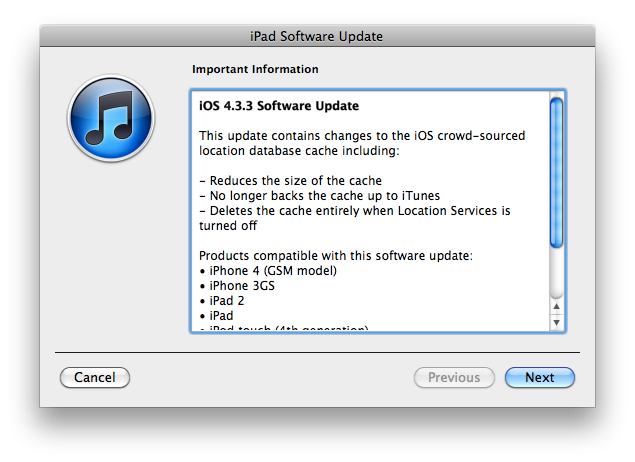
    Apple just released iOS 4.3.3. It’s available now in iTunes if you check for updates.

    As mentioned iOS 4.3.3 improves the way iPhones and iPads handle the location tracking database stored on-device by making is smaller and encrypted. The location database will be no longer backed up to iTunes and it will be deleted entirely when Location Services are turned off.

    Here are the direct links for iOS 4.3.3:

    Or this more handy table for the complete set:

    device current version date found
    AppleTV(2G) (AppleTV2,1) 4.2.1 (8F202) 03/22/2011 16:12:01
    iPad (iPad1,1) 4.3.3 (8J3) 05/04/2011 13:19:01
    iPad2,1 (iPad2,1) 4.3.3 (8J2) 05/04/2011 13:19:01
    iPad2,2 (iPad2,2) 4.3.3 (8J2) 05/04/2011 13:19:01
    iPad2,3 (iPad2,3) 4.3.3 (8J2) 05/04/2011 13:19:01
    iPhone (iPhone1,1) 3.1.3 (7E18) 04/08/2010 21:05:48
    iPhone3G (iPhone1,2) 4.2 (8C148) 11/22/2010 13:08:57
    iPhone3GS (iPhone2,1) 4.3.3 (8J2) 05/04/2011 13:19:01
    iPhone4 (iPhone3,1) 4.3.3 (8J2) 05/04/2011 13:19:01
    iPhone4(vz) (iPhone3,3) 4.2.8 (8E401) 05/04/2011 13:19:01
    iPodTouch(2G) (iPod2,1) 4.2 (8C148) 11/22/2010 13:08:57
    iPodTouch(3G) (iPod3,1) 4.3.3 (8J2) 05/04/2011 13:19:01
    iPodTouch(4G) (iPod4,1) 4.3.3 (8J2) 05/04/2011 13:19:01
    last updated: 05/04/2011 13:20:01 EDT
  • EA Acquires Firemint


    Indie Studio Firemint, the Australian company that has produced iPhone and iPad gaming hits like “Flight Control” and “Real Racing,” which have 4.5 million and about 2 million downloads in the App Store, is about to be acquired by the game giant within the next four weeks. EA announced that they’ll likely close the deal soon, giving no financial details regarding the acquisition.

    “The Firemint team is remarkable for its critical and commercial success,” said Barry Cottle, Executive Vice President and General Manger of EA Interactive. “Having them as part of EAi will accelerate our position as worldwide leader in game development for mobile devices and online gaming platforms.”

    The agreement follows EA’s recent acquisition of Mobile Post Production Inc. (MPP), the worldwide leader in high quality cross-platform development and porting of games for smartphones.

    Late last month, Firemint released an HD version of “Real Racing 2,” which allows users with the iPad 2 to hook up the device to a 1080p HDTV. Users can disconnect without interuppting the game, Firemint said.

  • Can iPad Recreate The Magic of Microsoft Courier Using Taposé?


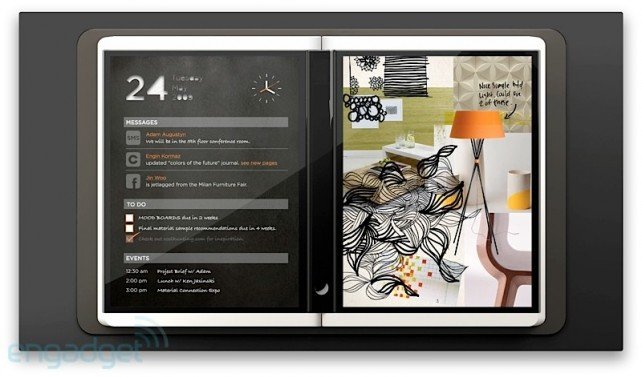
    We all remember Microsoft Courier, the highly anticipated but ultimately cancelled dual-screen tablet. Here is what GIZMODO had to say about the device:

    Courier is a real device, and we’ve heard that it’s in the “late prototype” stage of development. It’s not a tablet, it’s a booklet. The dual 7-inch (or so) screens are multitouch, and designed for writing, flicking and drawing with a stylus, in addition to fingers. They’re connected by a hinge that holds a single iPhone-esque home button. Statuses, like wireless signal and battery life, are displayed along the rim of one of the screens. On the back cover is a camera, and it might charge through an inductive pad, like the Palm Touchstone charging dock for Pre.

    Despite the fact that the Courier video about was little more than a tech demo, it turned heads like few other announcements in tech history. Part journal, part “digital scrapbook”, the Courier concept was everything Microsoft is least known for: enigmatic, magical, startlingly intuitive, strikingly beautiful.

    Part of what made Courier so exciting was how open-ended and freeform it was: it envisioned a future in which information is gathered, scattered, circled, captioned and written by hand, then tossed between the margins with (I imagine) a sort of da-Vinci-meets-Evernote bliss. It’s no surprise that, to many of us, Courier’s “death”—its entire existence a vaporware dream—was one of the sadder days in this industry.

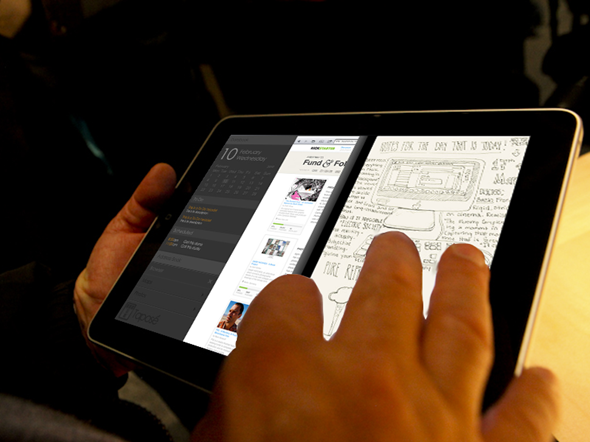
    But now, some measure of the “little notebook that could” is coming back. A Kickstarter project called Taposé aims to bring Courier-like functionality (including split views, drag-and-drop mapping and organizing, and the infamous “Middle Bar”) to the iPad. It’s too soon to tell exactly what features will be included, and of course, the Courier was designed for use with a pen, but the Taposé project has already received nearly $15,000 in funding, with another 19 days to go. That means the project is legitimate, it’s got capital, and it’s really happening!

    Head on over to Taposé to see more about what went into the elaborate re-imagining of what’s considered by many to be Microsoft’s best idea to date. Could our iPads recreate some of that magic?

    [via appadvice]