Gradly

  • About Me
  • Portfolio
  • My Blog
  • Contact Me


  • MobileMe to iCloud Transition Is Now Available for Developers

    August 7, 2011 // Gradly // Apple, blog, Cloud, How To, News, Tutorials Tags: Apple, blog, Guide, How To, iCloud, MobileMe, Tutorial 1 Response


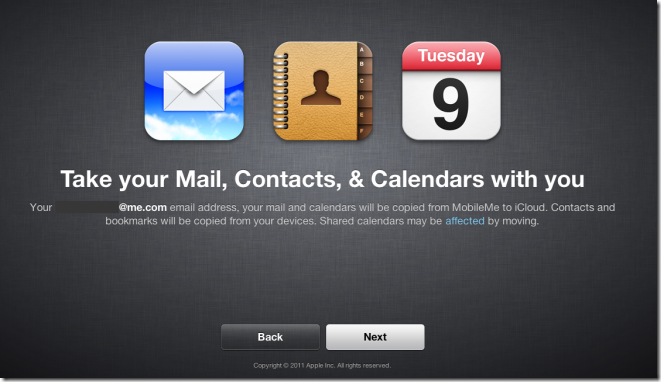
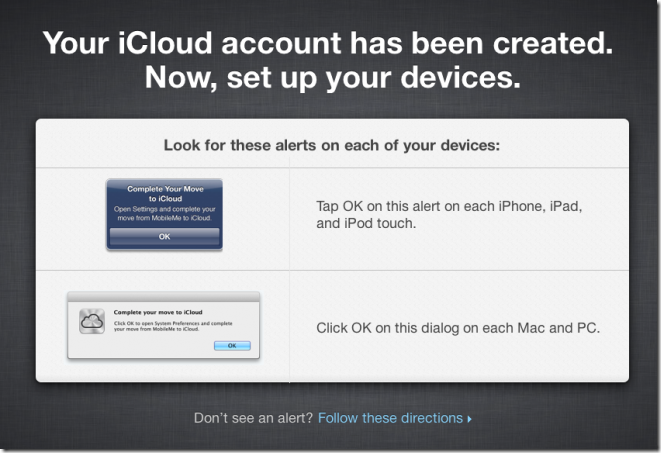
    Apple has just allowed MobileMe to iCloud Transition for developers through a new portal me.com/move. Now you can move your mail, Contacts and calendar to iCloud, And you can use iWeb, iDisk, and Photo Gallery up until June 30, 2012.

    Synchronization of the following will no longer be available :

    • Mac Dashboard Widgets
    • Dock Items
    • Keychains
    • Mail Accounts
    • Rules
    • Signatures
    • Smart Mailboxes
    • Preferences


    iOS devices must be running iOS 5 beta 5, Macs must be running Mac OS X Lion 10.7.2 Seed and iCloud for OS X Lion beta 6. PCs must be running Windows Vista or later, Outlook 2007​ or later and iCloud Control Panel for Windows beta 4.

    [Via iClarified]

  • Search Public Content On Google+ Using Google Plus Search Engine

    August 4, 2011 // Gradly // blog, google, How To, Social Networks Tags: blog, Chrome, Extension, Google, Google Plus, Google+, search, Search Engine, Social Networks, Tool 1 Response


    With more than active 20 Million Users, Google Plus is a great place where people are actively connecting and sharing fresh news and content. Google Plus Search Engine is just for you, It lets you search public content directly. If you are on Chrome you can get the extension so you can search in your tab without having to visit the site. The extension shows you results from Google+ profiles, posts, Buzz and blogs.

    • Visit the website from here directly
    • Install Google Plus Search Engine Extension For Chrome
  • Facebook For iPad Has Arrived [Updated]

    July 25, 2011 // Gradly // Apple, blog, Gadgets, How To, iPad, Jailbreak, News, Rants & Raves, Social Networks, Tutorials Tags: App, Apple, blog, Facebook, Guide, How To, iPad, iPhone, Jailbreak, Social Networks, Tutorial No Responses


    The entire world has been patiently awaiting the arrival of a Facebook iPad app. This however is just about to change. As discovered by some folks on Twitter and confirmed by TechCrunch, the new Facebook iPad app is ready and actually already out there. Indeed, Facebook did develop the app and placed it inside its code already, but hasn’t simply activated it. Just a few lines of code to change can however make it happen.

    Hidden in the code of Facebook’s iPhone app is the code for something else. Something everyone has been waiting over a year for. The iPad app.

    The gist of the trick is a modification to make inside the Facebook app discovered by AeroEchelon on Twitter:

    If you change the UIDeviceFamily to 2 for iPhone on the Facebook app you get an iPad version!

    You can make apps iPad compatible without pixelation and 2x button and also you can make the app support all 4 orientations. Here is how:

    1.  Navigate to the app you want to make compatible in /var/mobile/Applications
    2.  Open the info.plist in the applications main folder
    3.  Add the follow:

    <key>UIDeviceFamily</key>
    <array>
    <integer>1</integer>
    <integer>2</integer>
    </array>

    4. Respring and then you should have a nice iPad size app

    iClarified has a full step by step guide on how to achieve just that. It’s actually the same technique that has been long used to force iPhone-only apps to run in full screen on the iPad.

    Update #1:

    Facebook has blocked access to iPad version

    Update #2:

    You can re-enable Facebook’s iPad app by doing this:

    • Download Facebook app
    • Open Cydia and install FaceForward [a free tweak available under BigBoss repo]


    [via appadvice]

  • Jailbreak iOS 5 Beta 4 On iPhone 4, 3GS, iPad, iPod touch Using Redsn0w 0.9.8

    July 23, 2011 // Gradly // Apple, blog, Download, Featured, How To, iPad, iPhone, Jailbreak Tags: 3GS, blog, iPad, iPod touch Using Redsn0w 0.9.8, Jailbreak iOS 5 Beta 4 On iPhone 4 No Responses


    The just-released iOS 5 beta 4 can be Jailbroken using the redsn0w tools which were updated for the new release. The guide and download links are below. iOS 5 is in beta and should only be used by developers to test apps in the new iOS.

    It should also be noted that if you jailbreak your device on iOS 5, you wont get OTA updates from Apple, as explained by MuscleNerd of iPhone Dev-Team:

    The 5.0b4 OTA update won’t work on JB devices due to an explicit check of /Applications..almost like a present from Apple

    NOTE: It appears that by design, the OTA update that became available starting with iOS 5 beta4 will *not* be automatically applied to jailbroken devices.  That’s a relief to those who don’t want to lose their jailbreak via OTA pushes.  If you’re jailbroken, you’ll need to use the standard iTunes method to get to iOS 5 beta4.

    • A step by step guide on how to jailbreak iOS 5 beta tethered using Redsn0w 0.9.8 (Mac & Win)
    • Download iOS 5 Beta 4 for iPhone, iPod touch, iPad
    • Download | [Mirror]iTunes 10.5 Beta 4 for Windows 32bit
    • Download | [Mirror]iTunes 10.5 Beta 4 for Windows 64bit
    • Download iTunes 10.5 Beta 4 for Mac
    • Download Redsn0w 0.9.8b4 for Windows
    • Download Redsn0w 0.9.8b4 for Mac
← Older posts
Newer posts →