Gradly

  • About Me
  • Portfolio
  • My Blog
  • Contact Me


  • How to Enable Google New Bar Right Now

    December 4, 2011 // Gradly // blog, Design, google, How To, Tutorials Tags: blog, Design, Gmail, Google, How To, Tutorial, Youtube No Responses


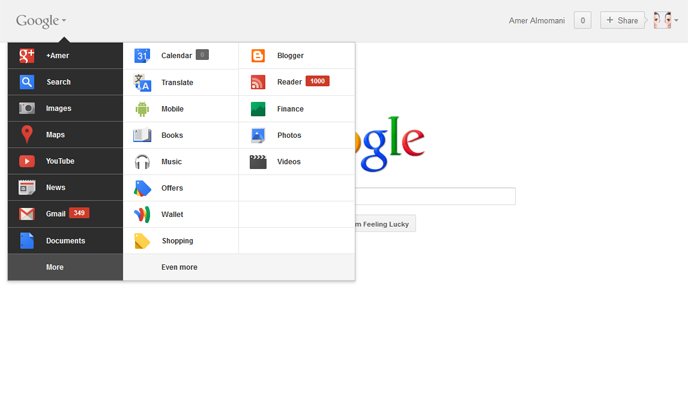
    Google new bar

    Google has rolled out a lot of redesigning work recently starting from the new black bar and Google search page new UI, YouTube, Gmail and many other products. The last addition comes as a new unified bar, as seen above, on which you have access to all Google products and services by rolling over the Logo itself.

    As always, these changes haven’t been rolled out to everyone yet. Google is doing a staggered rollout over the next couple weeks.

    How to enable the new bar instantly:

    1. Go to Google
    2. Open Developer Tools [Press Ctrl+Shift then J in Google Chrome] [Ctrl+Shift then K in Mozilla Firefox]
    3. Go to “Console” tab and enter: document.cookie=”PREF=ID=03fd476a699d6487:U=88e8716486ff1e5d:FF=0:LD=en:CR=2:TM=1322688084:LM=1322688085:S=McEsyvcXKMiVfGds; path=/; domain=.google.com”;window.location.reload();
  • Try Out Windows Phone on Your iPhone or Android Right Now

    November 30, 2011 // Gradly // Android, blog, How To, iPhone, Microsoft, Mobile, Tutorials Tags: Android, blog, iPhone, Mango 7.5, Microsoft, Windows Phone, WP7 1 Response


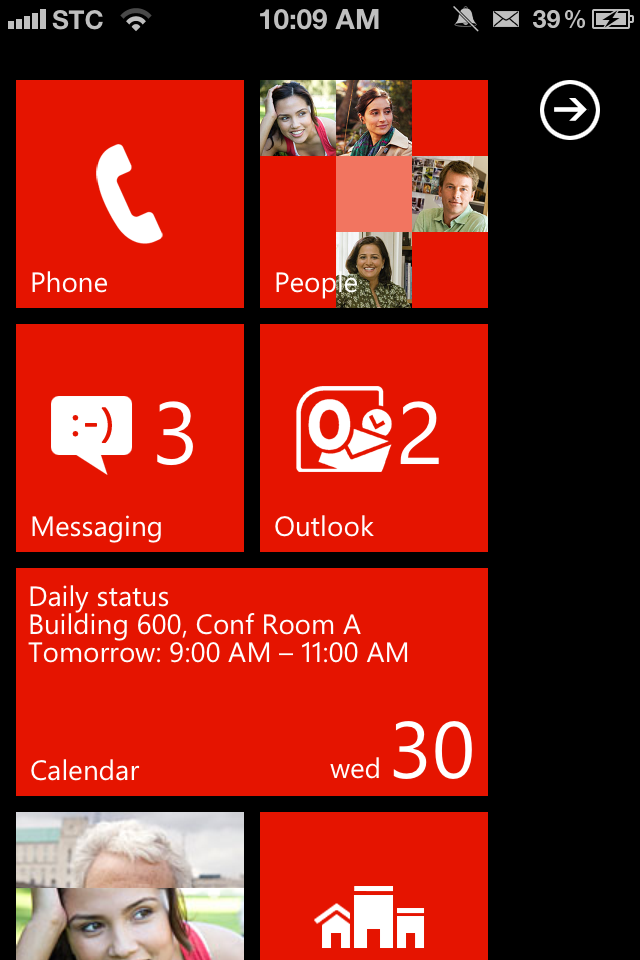
    Windows Phone on Your iPhone

    if you are eager to see how Windows Phone feels? Microsoft has just made it easy for you. They released a new HTML 5 website that allows iPhone and Android users to get a taste of the Windows Phone 7, Mango 7.5 operating system.

    Browse to the webpage http://aka.ms/wpdemo on your mobile device to try it out right away. To enjoy full screen experience, you can save the page to your home screen by clicking on the bookmark button.

    The demo gives a comprehensive look at some features you find in Windows Phone with a blue dot to guide you around the operating system.

    Ironically, the demo doesn’t work in Windows Phone’s own browser. I guess it doesn’t really have to, but funny none the less.

    [via Gizmodo]

  • Install Siri Dictation on iPhone 4, iPhone 3GS and iPod Touch 4G

    November 28, 2011 // Gradly // Apple, blog, Cydia, Download, Hack, How To, iPhone, Jailbreak Tags: Apple, blog, Cydia, Dictation, Hack, iPhone, iPhone 3GS, iPhone 4, iPod Touch 4G, Siri, Tweak No Responses


    Siri Dictation

    Since the debut of Siri virtual assistance alongside the iPhone 4S, hackers have been trying hardly to port the feature to older iDevices. There are no hardware limitations but the only concern still that the service needs to connect to Apple servers to get it working.

    Siri’s dictation feature has now been made publicly available in Cydia for the iPhone 4, 3GS, Touch 4G and it actually works. Developer Eric Day has released a jailbreak tweak called Siri0us.

    “Siri dictation for your iOS 5 devices. No iPhone 4S keys/files required.”

    The tweak actually works but sadly with some Ads around.

    Add the source http://apt.if0rce.com on Cydia to get the tweak

  • iOS 5.0.1 iPhone, iPad, iPod Touch, Apple TV Direct Download Links Repository

    November 11, 2011 // Gradly // Apple, blog, Download, Featured, How To, iPad, iPhone, News, Software Tags: Apple, Apple TV, blog, Download, iOS 5.0.1, iPad, iPhone, iPod Touch, Software 4 Responses


    Apple has just released iOS 5.0.1. The update brings battery life fixes for all devices running iOS 5, as well as security improvements and multitasking gestures on the original iPad. Battery life issues are said to be fixed as well.

    iOS 5.0.1 update

    This update contains improvements and other bug fixes including:

    – Fixes bugs affecting battery life
    – Adds Multitasking Gestures for original iPad
    – Resolves bugs with Documents in the Cloud
    – Improves voice recognition for Australian users using dictation

    device current version date found
    AppleTV(2G) (AppleTV2,1)
    4.4.2 (9A336a)
    10/24/2011 17:51:03
    iPad (iPad1,1)
    5.0.1 (9A405)
    11/10/2011 13:06:01
    iPad2(wifi) (iPad2,1)
    5.0.1 (9A405)
    11/10/2011 13:06:01
    iPad2(at&t) (iPad2,2)
    5.0.1 (9A405)
    11/10/2011 13:06:01
    iPad2(vz) (iPad2,3)
    5.0.1 (9A405)
    11/10/2011 13:06:01
    iPhone (iPhone1,1)
    3.1.3 (7E18)
    04/08/2010 21:05:48
    iPhone3G (iPhone1,2)
    4.2 (8C148)
    11/22/2010 13:08:57
    iPhone3GS (iPhone2,1)
    5.0.1 (9A405)
    11/10/2011 13:06:01
    iPhone4 (iPhone3,1)
    5.0.1 (9A405)
    11/10/2011 13:06:01
    iPhone4(vz) (iPhone3,3)
    5.0.1 (9A405)
    11/10/2011 13:06:01
    iPhone4S (iPhone4,1)
    5.0.1 (9A405)
    11/10/2011 13:06:01
    iPodTouch(2G) (iPod2,1)
    4.2 (8C148)
    11/22/2010 13:08:57
    iPodTouch(3G) (iPod3,1)
    5.0.1 (9A405)
    11/10/2011 13:06:01
    iPodTouch(4G) (iPod4,1)
    5.0.1 (9A405)
    11/10/2011 13:06:01
    last updated: 11/10/2011 15:55:02 EDT
← Older posts
Newer posts →