• Mac OS X Lion Dev Preview 2 Update Released Direct Downloads


    An update to Mac OS X Lion Developer Preview 2 has been pushed out via Software Update. The download comes in at around 1GB and changes aren’t specific other than being “recommended for all users running Mac OS X Lion Developer Preview 2.”

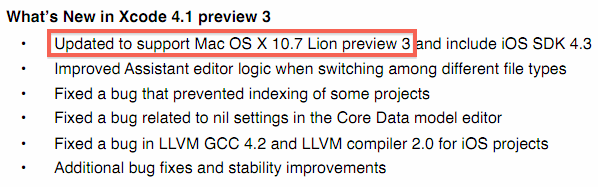
    Also, XCode 4.1 update includes a reference to “support Mac OS X Lion preview 3,” suggesting that Lion Developer Preview 3 may be released in the near future. XCode 4.1 preview 3 is a required update if you use Lion DP2.

    Mac OS X Lion Developer Preview 2 was released to developers on March 30. As always, backup your Mac before installing system updates. and use dual boot method if you plan on trying out the Lion preview releases.

    Lion Developer Preview 2 Update 1 Package – Direct Downloads

    Here are direct download links from Apple for Dev Preview 2 Update 1 Package installers. These do NOT contain the full installation of Lion, only the update package released today.

    Mac OS X Lion is due for release this summer, possibly on June 6 at WWDC 2011.

  • Apple Releases iOS 4.3.2 For iPhone, iPad, iPod Touch Direct Download Links


    Apple has released iOS 4.3.2 update for iPhone 3GS, iPhone 4 GSM, iPad, iPad 2, and iPod touch 3rd gen and 4th gen models. The 4.3.2 update includes several security updates and bug fixes, noticeably to resolve freezing FaceTime calls, and the update also resolves a 3G connectivity issue that some iPad users discovered in prior versions of iOS. iPhone 4 CDMA owners will also find an update to iOS 4.2.7 that includes the same fixes.

    iOS 4.3.2 Direct Download Links:

    These are direct download links of iOS 4.3.2 IPSW files from Apple. Right-click and “Save As” the file:

  • Download Internet Explorer 10 Platform Preview 1


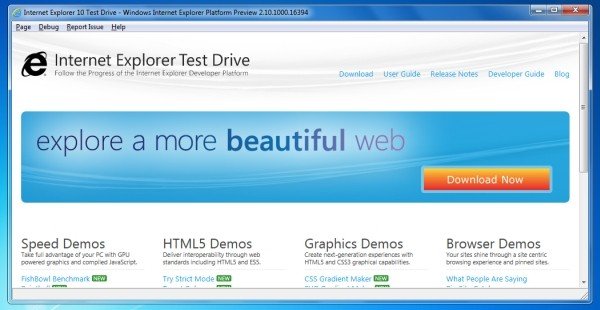
    Internet Explorer 9 hasn’t even been live for a month and already Microsoft is preparing the way for its successor: IE10. The company released a developer preview of the browser, which it showed off for the first time at its MIX 11 conference yesterday.

    Like its predecessor, IE10 is being designed for HTML5 and built with full hardware acceleration. In the words of Dean Hachamovitch, Microsoft’s corporate vice president for Internet Explorer, it’s intended to make sites feel and run more like native applications than Web pages. Little wonder industry observers expect IE10 to be the browser Microsoft includes in Windows 8 when it finally ships.

    Welcome to the Platform Preview

    The Platform Preview is an early look at the Internet Explorer platform so some features are incomplete, some may change, and some may be added. To learn more about this preview of the Web Platform, please see the Internet Explorer 10 Developer Guide. These release notes list new features available in the latest Platform Preview and known issues with those features. To report issues, and provide feedback please click on Report Issue and click Send Feedback.

    What’s New in Internet Explorer 10 Platform Preview 1

    Internet Explorer 10 Platform Preview 1 is the first public preview of the IE10 web platform. In this release, we are showcasing support for CSS3 Flexbox, CSS3 Grid Alignment, CSS3 Multi-column, CSS3 Gradients on background-images and ECMAScript5 Strict Mode.

  • How To Unlock iPhone 4, 3GS on iOS 4.3.1 with Ultrasn0w 1.2.1


    iPhone Dev Team has released Ultrasn0w 1.2.1 unlock for iOS 4.3.1. The unlock tool can be used with iPhone 4 and iPhone 3GS. Its not a new unlock, it can only unlock lower basebands whose unlock was already possible but broken on iOS 4.3.1. Ultrsn0w 1.2.1 WILL NOT unlock higher basebands whose unlock is not possible right now.

    If you have upgraded to iOS 4.3.1 firmware and jailbroken you device with PwnageTool 4.3 or Sn0wbreeze 2.5 and requires an unlock then you can use Ultrasn0w 1.2.1.

    Compatible basebands with Ultrasn0w 1.2.1:

    iPhone 4: 01.59.00
    iPhone 3GS: 04.26.08 / 05.11.07 / 05.12.01 / 05.13.04 / 06.15.00

    DO NOT USE WITH the following basebands:

    iPhone 4: 02.10.04 / 03.10.01 / 04.10.01
    iPhone 3GS: 05.14.02 / 05.15.04 / 05.15.04 / 05.16.01 / 05.16.02

    Remember you need to have a jailbroken device with PwnageTool 4.3 and Sn0wbreeze 2.5.

    How To Guides for Untethered 4.3.1 Jailbreak on Windows & Mac
    How To Guides for Untethered 4.3.1 Jailbreak on Windows & Mac

    Step 1: You have to jailbreak your iPhone 4 / 3GS on iOS 4.3.1 with preserving your old baseband, follow this guide (PwnageTool 4.3 for Mac) or (Sn0wbreeze 2.5 Windows)

    Step 2: Once you jailbreak yoour device, you can now unlock your iPhone 4 / 3GS with Ultrasn0w 1.2.1 from Cydia. To do so, follow the steps below:

    • Press to launch Cydia Installer from your SpringBoard.
    • Press to select the Manage tab at the bottom of the screen.
    • Press to select the Sources button.
    • Now touch on Edit and then on Add. You will be prompted to enter the URL of the source. Type http://repo666.ultrasn0w.com and touch on Add Source to add this repository.
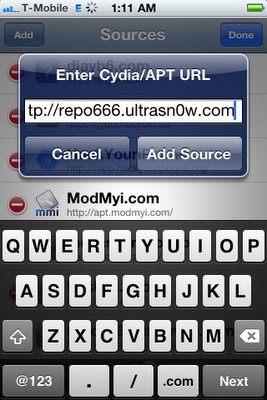
    Cydia will now automatically update your sources by following a series of automated steps.

    • After installation is completed. Search for “ultrasn0w 1.2.1” in Cydia and install this application. This app will automatically unlock your iPhone so that you can use it with any carrier.

    Step 3: Almost done, now simply reboot your iPhone and you should have a fully unlocked iPhone 3GS / 4 on iOS 4.3.1.