• Xcode 4.1 Developer Preview 5 & OSX Lion Preview 3 Direct Download


    Apple has released a third update for OSX Lion Preview 2. Its a 1.07 GB update & available through the software update application or can be downloaded (links below) for anyone with preview 2 update 2 installed. OSX Lion Developer Preview 2 update 2 links below in case you missed it.

    Apple has also released Xcode 4.1 Developer Preview 5 which is available for iOS program enrolled developers. Links to download will be available tonight.

    Direct Links:

    • Mac OS X 10.7 Lion Update 3 | OSX Lion Developer Preview 2 update 2 must be installed before | 1 GB | [Direct]:

    [hide 1] http://swcdn.apple.com/content/downloads/07/51/041-1135/Nwd4jg7rHrWP6qTprYns7RYjVRGn4CCQ8r/LionSWUpdate.pkg [hide 1]

    Thanks Sbooob for the link

    Torrents Links:

    • Mac OS X 10.7 Lion Developer Preview 2 | Mac OS X 10.7 Lion DP 2.dmg | 3.53 GB | [Torrent]:

    [hide 1] http://imzdl.com/download/198/torrent/Mac%20OS%20X%2010.7%20Lion%20Developer%20Preview%202.torrent [hide 1]

    • Xcode 4.1 Developer Preview 5 | xcode_4.1_developer_preview_5.dmg | ~ 4.35 GB | [Torrent]:

    [hide 1] http://imzdl.com/download/207/torrent/xcode4.1dp5.torrent [hide 1]

    • Xcode 4.1 Developer Preview 4 | xcode_4.1_developer_preview_4.dmg | 4.34 GB | [Torrent]:

    [hide 1] http://imzdl.com/download/203/torrent/xcode4.1developerpreview4.torrent [hide 1]

    Ge.tt Links:

    • Xcode 4.1 Developer Preview 5 | xcode_4.1_developer_preview_5.dmg | ~ 4.35 GB | [ge.tt]:

    [hide 1] http://ge.tt/#2rkRmOH/v [hide 1]

    Filesonic Links:

    • Xcode 4.1 Developer Preview 5 | xcode_4.1_developer_preview_5.dmg | ~ 4.35 GB | [filesonic]:

    [hide 1] http://www.filesonic.com/folder/5343711 [hide 1]

    Uploading Links:

    • Xcode 4.1 Developer Preview 5 | xcode_4.1_developer_preview_5.dmg | ~ 4.35 GB | [uploading]:

    [hide 1] http://uploading.com/linklists/7ed6a9dc/Xcode%204.1%20Developer%20Preview%205/ [hide 1]

    Uploadstation Links:

    • Xcode 4.1 Developer Preview 5 | xcode_4.1_developer_preview_5.dmg | ~ 4.35 GB | [uploadstation]:

    [hide 1] http://www.uploadstation.com/list/7UPdQcA [hide 1]

    Fileserve Links:

    • Xcode 4.1 Developer Preview 5 | xcode_4.1_developer_preview_4.dmg | 4.34 GB | [Fileserve]:

    [hide 1] http://fileserve.com/list/2Uu8MBp [hide 1]

    • Xcode 4.1 Developer Preview 4 | xcode_4.1_developer_preview_4.dmg | 4.34 GB | [Fileserve]:

    [hide 1]http://www.fileserve.com/file/DbRhvAg/Xcode.4.1.Developer.Preview.4.part01.rar[hide 1]
    [hide 1] http://www.fileserve.com/file/8DG4Jgq/Xcode.4.1.Developer.Preview.4.part02.rar[hide 1]
    [hide 1] http://www.fileserve.com/file/TNdbaMU/Xcode.4.1.Developer.Preview.4.part03.rar[hide 1]
    [hide 1] http://www.fileserve.com/file/GjUbUDG/Xcode.4.1.Developer.Preview.4.part04.rar[hide 1]
    [hide 1] http://www.fileserve.com/file/tJDxb5J/Xcode.4.1.Developer.Preview.4.part05.rar[hide 1]
    [hide 1] http://www.fileserve.com/file/85nxjsf/Xcode.4.1.Developer.Preview.4.part06.rar[hide 1]
    [hide 1] http://www.fileserve.com/file/A3FHbnv/Xcode.4.1.Developer.Preview.4.part07.rar[hide 1]
    [hide 1] http://www.fileserve.com/file/2ntyuUh/Xcode.4.1.Developer.Preview.4.part08.rar[hide 1]
    [hide 1]http://www.fileserve.com/file/CT2JAnN/Xcode.4.1.Developer.Preview.4.part09.rar[hide 1]
    [hide 1]http://www.fileserve.com/file/VhJZnTU/Xcode.4.1.Developer.Preview.4.part10.rar[hide 1]

    High Speed Direct link:

    • Mac OS X 10.7 Lion DP 2 | Mac OS X 10.7 Lion DP 2.dmg | 3.53 GB

    [wp_cart:Mac OS X 10.7 Lion DP 2 Direct Download:price:5:end] [consider a donation of $5 to get it]

    • Xcode 4.1 Developer Preview 4 | xcode_4.1_developer_preview_4.dmg | 4.34 GB

    [wp_cart:Xcode 4.1 DP 4 Direct Download:price:5:end] [consider a donation of $5 to get it]

    [show_wp_shopping_cart]

  • TRANSFORMERS: DARK OF THE MOON New Banner Featuring Optimus Prime


    Paramount Pictures has yet released another banner for Michael Bay‘s Transformers: Dark of the Moon which features the character Optimus Prime in action. Optimus Prime is the leader of the Autobots, a faction of heroic Transformers from the fictional planet Cybertron who wage their battles to destroy the evil forces of the Decepticons. He is depicted as a brave, powerful, wise and compassionate character who puts all his talent to use to improve the universe around him

    Checkout the first Bumblebee featured banner here, second Soundwave banner here.

    Synopsis:

    The Autobots, led by Optimus Prime, are back in action, taking on the evil Decepticons, who are determined to avenge their defeat in 2009’s Transformers Revenge of the Fallen. In this new movie, the Autobots and Decepticons become involved in a perilous space race between the U.S. and Russia, and once again human Sam Witwicky has to come to the aid of his robot friends. There’s new characters too, including a new villain in the form of Shockwave, a longtime “Transformers” character who rules Cybertron while the Autobots and Decepticons battle it out on Earth.

    Transformers: Dark of the Moon opens in 3D, 2D and IMAX theaters on July 1

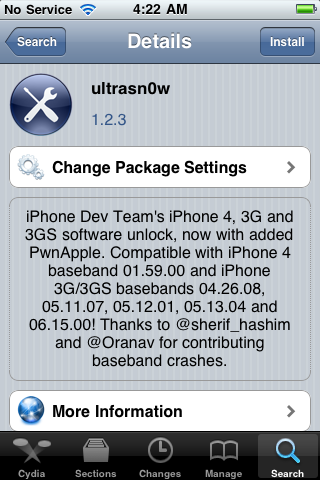
  • Unlock iPhone 4 and iPhone 3GS on iOS 4.3.3 Using Ultrasn0w 1.2.3


    Ultrasn0w 1.2.3 tool to unlock iPhone 4 and iPhone 3GS is now available. The unlock tool is fully compatible with iPhone 4 and 3GS devices running the latest iOS 4.3.3 firmware. It can NOT unlock higher basebands whose unlock is not possible right now. Its not a new unlock, it can only unlock lower basebands whose unlock was already possible but broken on iOS 4.3.3.

    Compatible basebands with Ultrasn0w 1.2.3

    iPhone 4: 01.59.00
    iPhone 3GS: 04.26.08 / 05.11.07 / 05.12.01 / 05.13.04 / 06.15.00

    DO NOT USE WITH the following basebands:

    iPhone 4: 02.10.04 / 03.10.01 / 04.10.01
    iPhone 3GS: 05.14.02 / 05.15.04 / 05.15.04 / 05.16.01 / 05.16.02

    Jailbreak your device on iOS 4.3.3 using:

    Unlock iOS 4.3.3 iPhone 4 and iPhone 3GS with Ultrasn0w 1.2.3 Guide:

    Step 1: Launch Cydia on your jailbroken iPhone.
    Step 2: Navigate to “Manage” and then “Sources”
    Step 3: Now “Edit” and then “Add”. Type the repo: “http://repo666.ultrasn0w.com”. Now “Add Source”
    Step 4: Once its done with installation, find “Ultrasn0w 1.2.3”. Select and to install the package. After that it will restart your device.

    Your device is now unlocked on iOS 4.3.3 on basebands 01.59.00 / 04.26.08 / 05.11.07 / 05.12.01 / 05.13.04 / 06.15.00.

  • iOS 4.3.3 Untethered Jailbreak Using Sn0wbreeze 2.7.1 Guide


    Sn0wbreeze 2.7.1 (a.k.a PwnageTool for Windows) brings untethered jailbreak for iOS 4.3.3 on iPhone 4, iPhone 3GS, iPod Touch 4G, iPod touch 3G, & iPad 1. It allows who rely on unlock to keep their old baseband on iOS 4.3.3 so that they can use ultrasn0w to unlock their devices later.

    A step by step guide on how to jailbreak iOS 4.3.3 untethered using Sn0wbreeze 2.7.1 (Windows)

    Note: For Redsn0w you can follow our guide posted here (Redsn0w 0.9.6rc16) to get untethered jailbreak iOS 4.3.3. For PwnageTool you can check the post here (PwnageTool 4.3.3.1).

    Step 1: Start Sn0wbreeze, click the next “blue” arrow to proceed.

    Step 2: Select the required firmware .ipsw file for your iOS device by clicking on the “Browse” button.

    Step 3: Sn0wbreeze will now identify the selected IPSW file. Once done, click the next “blue” colored arrow to proceed.

    Step 4: Now select the “Expert Mode”, followed by “Build IPSW” option to start creating your custom firmware.

    Step 5: Sn0wbreeze will greet you with the following “Done!” message when the custom firmware has been successfully created.

    Step 6: Now follow the onscreen steps to enter DFU mode using Sn0wbreeze:

    • Hold Power and Home buttons for 10 seconds
    • Now release the Power button but continue holding the Home button for 10 more seconds
    • You device should now be in DFU mode

    Step 7: Start iTunes, click on your iOS device icon from the sidebar in iTunes. Now press and hold Left “Shift” button on the keyboard and then click on “Restore” (Not “Update” or “Check for Update”) button in iTunes and then release this button. This will make iTunes prompt you to select the location for your custom firmware 4.3.3 file. Select the required custom .ipsw file that you created above, and click on “Open”.

    Step 8: Now sit back and let iTunes do the rest for you. This will involve a series of automated steps. Just wait while iTunes installs the new firmware 4.3.3 on your iOS device. Your iOS device screen at this point will be showing a progress bar indicating installation progress. After the installation is done, your iOS device will be jailbroken on iOS 4.3.3.

    Required Downloads:

    Update:

    Sn0wbreeze 2.7.1 updated to fix Silent and Mute Button issues