• New Trojan Targets the Mac


    Some security researchers have long complained that Apple won’t take security seriously because doing so conflict with the company’s marketing message that Mac buyers need not worry about being attacked. The discovery of a beta of a Mac-attacking Trojan once again shows Mac invulnerability to be a myth. And in an unrelated move, Apple has reached out to security researchers, showing that it may finally take security seriously.

    The security company Sophos says that it’s found the beta of a backdoor Trojan targeting the Mac that’s “a variant of “a well-known Remote Access Trojan (RAT) for Windows known as darkComet.”

    The author calls it the ‘BlackHole RAT,’ strongly implying that plans are to have it masquerade as the legitimate Black Hole security application designed to keep a Mac safe by purging private information such as clipboard data and recent file lists.

    Sophos is quick to point out that the Trojan is not yet finished. But the company clearly believes that attacks on the Mac are in the offing. It notes on its blog:

    It appears there is a new backdoor Trojan in town and it targets users of Mac OS X. As even the malware itself admits, it is not yet finished, but it could be indicative of more underground programmers taking note of Apple’s increasing market share.

    That Sophos researcher Chet Wisniewski has seen another Trojan called HellRTS already in circulation on file-sharing sites used to pirate Mac software.

    Apple hasn’t responded specifically to these new threats, but there’s a major, encouraging sign that it is taking Mac security very seriously, possibly because it now has a big enough market share that malware writers see it as a financially viable target.

    The Edible Apple blog reports that Apple is offering security experts free preview versions of OS X 10.7, called Lion, “so that they can take a look at Apple’s new security measures and presumably reach back to Apple with any thoughts, observations, and concerns they might have.”

    The site reports that Apple sent out the following note to security experts:

    “I wanted to let you know that I’ve requested that you be invited to the prerelease seed of Mac OS X Lion, and you should receive an invitation soon. As you have reported Mac OS X security issues in the past, I thought that you might be interested in taking a look at this. It contains several improvements in the area of security countermeasures.”

    Security researchers so far are pleased that Apple seems to be taking security more seriously than they have in the past. Edible Apple reports that MacBook hacker and security consultant Dino Dai Zov tweeted “This looks to be a step in the direction of opening up a bit and inviting more dialogue with external researchers.”

    And CNet quotes OS X hacker Charlie Miller saying in an email:

    “As far as I know they have never reached out to security researchers in this way. Also, we won’t have to pay for it like everybody else. It’s not hiring us to do pen-tests of it, but at least it’s not total isolation anymore, and at least security crosses their mind now.”

    That’s more than just faint praise, it appears that Apple may finally accept that security needs to trump marketing.

    [via: computerworld]
  • Mac OS X Lion to aid Windows PC switchers with new Migration Assistant


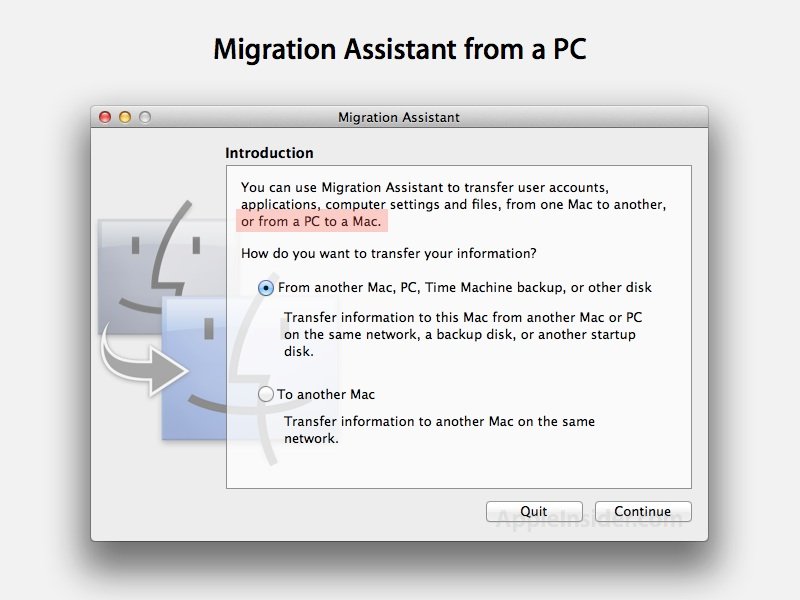
    Apple has added a new option in Mac OS X 10.7 Lion to simplify the process of switching from a Windows PC to a Mac via network import of old files.

    Apple has historically helped Mac users to upgrade to a new machine via FireWire Target Disk Mode, which converts their old Mac into a hard drive that their new machine can import data, files and settings from via Migration Assistant.

    However, as some new Mac models have dropped FireWire, Apple added a network copy feature to Migration Assistant that enabled a new machine to connect to a previous Mac via a network connection to perform the same task.

    In Lion, Migration Assistant offers to connect to a PC over the network as well, enabling new Mac users to pull their data from an existing Windows-based computer.

    It’s not clear if the Assistant requires client software running on the Windows PC to work; performing a Mac to Mac network migration simply uses the same app on both ends, one sharing to, the other copying from. The developer reporting the new feature did not note if anything was required on the PC side.

    Update: A developer has noted that Apple supplies a MigrationAssistantSetup.exe program for PC users on its developer site, which acts as a client for the Mac Migration Assistant to pull data from as it performs a migration.

    [via: appleinsider]

  • Apple to Have an Immediate Availability of iPad 2 Next Week


    According to sources close to AppleInsider, Apple is going to surprise everyone next week with “near immediate” availability of the next-generation iPad to public.

    According to people familiar with the matter, Apple is preparing several of its operating segments to perform functions during the second half of next week that are representative of nothing short of a large scale, consumer-oriented product roll out (not just an announcement). And with official invitations to next Wednesday’s press briefing clearly indicating a focus on iPad, these people believe at least one version of the refreshed device will be in transit to retail outlets during that briefing.

    Apple is going to announce iPad 2 in a media event, which is going to be held on Wednesday, March 2nd, at the famous Yerba Buena Center for the Arts in San Francisco.

    iPad 2 is expected to feature at least one camera for FaceTime video calls, Dual Core CPU and GPU, and will be thinner in size than its predecessor.

  • What Is Thunderbolt?


    Thunderbolt technology is what was Intel’s Light Peak. It’s not an Apple technology, but rather the culmination of Intel’s handiwork in combination with Apple’s mini DisplayPort. While Light Peak was developed to work over fiber (literally for light speeds), Thunderbolt is implemented over copper. Despite this, you’re still getting bi-directional (in and out as they say), 10 Gbps connection over a cable, plus a 10 Watt feed so you can power heavy equipment on the go (you don’t get that with USB). For comparison, your current USB 2.0 devices only get 480 Mbps through the cable! With this technology, you can drive multiple inputs including monitors, workstations, and audio equipment without a bird’s nest under your desk.

    What it does:

    Thunderbolt allows users to connect to monitors sport mini DisplayPort, or DisplayPort connections. Adapters can allow for HDMI, DVI, and VGA connections as well, but it doesn’t stop with these less ambitious technologies. Thunderbolt provides support for optical connections (you heard me: FIBER), to connect to high speed networks. It’s kind of insane to think about: USB 3.0 provides plug & play connections at up to 5 Gbps, yet Thunderbolt can accommodate almost any technology and possibly power a business out of a laptop. Apple and Intel are very much pushing the envelope here.

    Don’t worry about those silly terms above. Just think of it this way – data can go in & out of the cable at the same time with no waiting. Otherwise, Thunderbolt separates your display and data connections by passing your monitor input through DisplayPort, while your data is passed through the PCI Express bus. Thunderbolt is the combination of monitor and data technologies.

    How does it help me?

    For the consumer, the best part is simply this: you’ll no longer have multiple Cinema Display cables hooking to your laptop. You can still latch on your hard drives, USB sticks, and iPhone docks to your display, but because there’s such a huge amount of bandwidth with Thunderbolt, it can effortlessly slurp down one cable. Keep in mind that Thunderbolt is both giving the user display feedback, as well as shuffling bits of data around for files and music all in one tube. The idea itself isn’t new, but customer accessibility (especially in the Apple ecosystem) will simplify installation. You may not necessarily see a hard drive instantly fill up if there’s a USB connection in the middle somewhere (there would be a bottleneck at the Cinema Display for example), but the current generation of SATA III HDDs can gobble down data at 6 Gbps. Imagine if that was directly paired with Thunderbolt with or without an adapter, then plugged into your machine? It wouldn’t take long at all to clone your HDD or transfer a media center’s worth of files somewhere else.

    What if I have more than one Thunderbolt device?

    The cool part about Thunderbolt is that you can “daisy-chain” devices. So say you connect your MacBook to a Thunderbolt enabled external hard drive, but want to plug in another external hard drive via the same port. Well, instead of connecting to the MacBook, you’ll just connection to a second Thunderbolt port on your first external hard drive. Make sense? The connection will pass through subsequent devices until it reaches your Mac, but it will be instant.