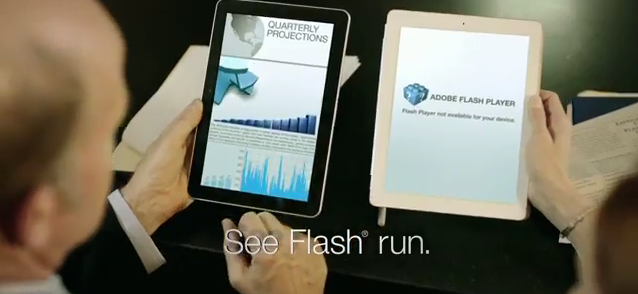
Samsung has released an Ad for its new Samsung Galaxy Tab 10.1 and again, like all rivals nothing but mocking the iPad for its lack of Flash support. Watch it below:
Samsung has released an Ad for its new Samsung Galaxy Tab 10.1 and again, like all rivals nothing but mocking the iPad for its lack of Flash support. Watch it below:

Apple has released a fourth preview for OS X Lion. Its a 3.47 GB and you can get it right now. check out the links below:
Wupload.com Links:
- Mac OS X 10.7 Lion Developer Preview 4 | 3.47 GB
[hide 1]http://www.wupload.com/file/11648843/OLDP4.part1.rar[hide 1]
[hide 1]http://www.wupload.com/file/11648941/OLDP4.part2.rar[hide 1]
[hide 1]http://www.wupload.com/file/11648683/OLDP4.part3.rar[hide 1]
[hide 1]http://www.wupload.com/file/11648862/OLDP4.part4.rar[hide 1]
[hide 1]http://www.wupload.com/file/11648955/OLDP4.part5.rar[hide 1]
[hide 1]http://www.wupload.com/file/11649076/OLDP4.part6.rar[hide 1]
[hide 1]http://www.wupload.com/file/11649221/OLDP4.part7.rar[hide 1]
[hide 1]http://www.wupload.com/file/11649232/OLDP4.part8.rar[hide 1]
Fileserve.com Links:
- Mac OS X 10.7 Lion Developer Preview 4 | 3.47 GB
[hide 1]http://www.fileserve.com/file/pDrVdZ6/OLDP4.part1.rar[hide 1]
[hide 1]http://www.fileserve.com/file/HR474YD/OLDP4.part2.rar[hide 1]
[hide 1]http://www.fileserve.com/file/HVUuAK9/OLDP4.part3.rar[hide 1]
[hide 1]http://www.fileserve.com/file/d8mSFRp/OLDP4.part4.rar[hide 1]
[hide 1]http://www.fileserve.com/file/WVh2Vau/OLDP4.part5.rar[hide 1]
[hide 1]http://www.fileserve.com/file/fydq8u3/OLDP4.part6.rar[hide 1]
[hide 1]http://www.fileserve.com/file/nd8CTTr/OLDP4.part7.rar[hide 1]
[hide 1]http://www.fileserve.com/file/bBzDwsd/OLDP4.part8.rar[hide 1]
Filesonic.com Links:
- Mac OS X 10.7 Lion Developer Preview 4 | 3.47 GB
[hide 1]http://www.filesonic.com/file/1153846031/OLDP4.part1.rar[hide 1]
[hide 1]http://www.filesonic.com/file/1153859744/OLDP4.part2.rar[hide 1]
[hide 1]http://www.filesonic.com/file/1153832601/OLDP4.part3.rar[hide 1]
[hide 1]http://www.filesonic.com/file/1153846801/OLDP4.part4.rar[hide 1]
[hide 1]http://www.filesonic.com/file/1153846951/OLDP4.part5.rar[hide 1]
[hide 1]http://www.filesonic.com/file/1153851341/OLDP4.part6.rar[hide 1]
[hide 1]http://www.filesonic.com/file/1153885454/OLDP4.part7.rar[hide 1]
[hide 1]http://www.filesonic.com/file/1153885474/OLDP4.part8.rar[hide 1]
Uploadstation.com Links:
- Mac OS X 10.7 Lion Developer Preview 4 | 3.47 GB
[hide 1]http://www.uploadstation.com/file/69qRGFh/OLDP4.part1.rar[hide 1]
[hide 1]http://www.uploadstation.com/file/tZMa3x9/OLDP4.part2.rar[hide 1]
[hide 1]http://www.uploadstation.com/file/gpKBkk7/OLDP4.part3.rar[hide 1]
[hide 1]http://www.uploadstation.com/file/ynEqS6s/OLDP4.part4.rar[hide 1]
[hide 1]http://www.uploadstation.com/file/4YVVPN9/OLDP4.part5.rar[hide 1]
[hide 1]http://www.uploadstation.com/file/q8ASqFx/OLDP4.part6.rar[hide 1]
[hide 1]http://www.uploadstation.com/file/96ysqMw/OLDP4.part7.rar[hide 1]
[hide 1]http://www.uploadstation.com/file/nf9xvt8/OLDP4.part8.rar[hide 1]

TUAW reports, while digging into iOS 5 beta seeded to developers yesterday, references to two new, unreleased iPad models “iPad3,1″ and “iPad3,2″ discovered. Current iPad 2 models indicated in iOS as iPad2,1 (WiFi), iPad2,2 (GSM) and iPad2,3 (CDMA), the discovery leaves us with a speculation that next iPad iteration getting two models, iPad3,1 for WiFi model, and iPad3,2 being the one with dual GSM/CDMA chip.
A discovery of iPhone4,1 and iPhone4,2 models were also noted in the beta. However, there’s no mention of iPod touch 5th generation in the current iOS 5 beta, leading to speculation that a new iPhone could be announced this Fall along with iOS 5 and iCloud launch, but not a new iPod touch.
Interestingly, there are no mentions of a new iPod touch. If there really is no iPod touch 5 ready to launch in September (the typical iPod refresh time), sources believe it could be because Apple is reserving the spotlight for another member of its iOS family, namely the iPhone 5.
Model identifiers are usually a good indication of new products to come in the next months, the following beta releases could bring more model identifiers in the future.

If you are not a developer or your device is not registered with any developer account and you aggressively want to test the new iOS 5 beta here is the solution to bypass the activation process. Everyone can do it following these extremely simple instructions:
The method exploits a security flaw in the activation screen, apparently related to the Voice Over system. Here’s how to do it.
Warning: While this operation should be simple, we are not responsible for what you do to your iPhone. Proceed at your own risk.
Notes:
- Download the iOS 5 IPSW file from here.
- Update your iPhone using iTunes. To do this, connect your iPhone to your computer, click on the Check for Update button with the Option (Mac) or Shift (PC) key pressed. Select the iOS 5 IPSW file from the place you downloaded it to.
- Wait until it upgrades. A new activation screen will appear.
- Triple click the home button. This will activate the Voice Over.
- Triple click the home button and Emergency Call will appear.
- Click on Emergency Call and, while it’s switching, swipe with your three fingers down.
- The Notification Center will appear!
- Click on the Weather widget. The Weather app will load.
- Click on the home button to exit to the iPhone’s springboard.
That’s it. Your iPhone is activated and fully operative.
[via Gizmodo]