iPad 2 is the only device left without jailbreak or accurately Apple’s A5 processor-based architecture in iPad 2 and later iPhone 4S/5 seems a hard puzzle to solve. The Limera1n exploit, which worked on A4-based iOS devices like iPod touch 4G and iPhone 4, is hardware-based and, since iPad 2 is A5-based, the exploit doesn’t work on it. And so the community has to find an all-new exploit this time around.
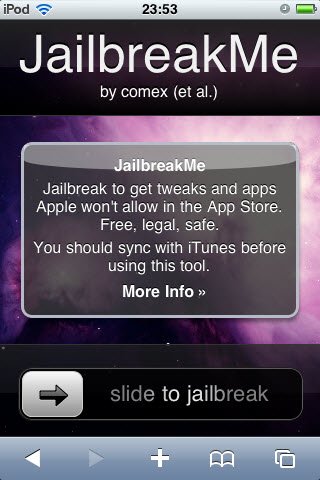
iPhone hacker Comex and his JailbreakMe tool, which worked on a userland exploit, used to jailbreak iOS 4.0/4.0.1 with a very simple method of “slide to jailbreak†bar and Comex’s tool did the rest. However the exploit was later patched in iOS 4.0.2.
Today, Comex has updated his website for the tool JailbreakMe. The updated page teases an image:
The image shows a signboard with the word “PDF†written on top of it. this is might be pointing towards a potential PDF-based exploit. however its highly likely the new tool would work on iPad 2. Comex teased a lot of tweets:
We just pin our hopes for an untethered jailbreak for iPad 2 as well as other iOS devices on iOS 5 which is set to release this fall.
In the days leading up to WWDC 2011, Nuance integration got enough speculations for a possible presence in Apples iOS 5. Now Developer and Hacker Chronicseems to have got his hands on iOS 5 build with internal settings — hidden from public, as he tweeted a series of screenshots for what might be settings for testing and troubleshooting. Some of these screenshots show what looks like Nuance voice recognition baked into the iOS.
The screenshots show some options like “mic on space keyâ€, “auto-record input†and “Nuance dictationâ€, which seem to suggest Apple has been testing ways to integrate additional buttons in the default iPhone keyboard to let users speak and have text transcribed on screen.
Although these settings look interesting, no Nuance announcement in WWDC and everything may be unveiled in fall with iPhone 5 keynote, though.
Step 1:Download iOS 5 for iPhone, iPad or iPod touch (download links at the end).
Step 2: Restore to iOS 5 in case you haven’t yet using the IPSW file you just downloaded via iTunes 10.5 Beta.
Step 3: Start Redsn0w and point it to the official iOS 5 firmware file.
Step 4: Now select “Install Cydia†and click “Nextâ€. Optionally (if available), you can also select any other option you like.
Step 5: Now make sure your device is both OFF and PLUGGED IN to the computer before you click “Nextâ€.
Now you will be guided on how to enter DFU mode. Quickly hold “Power†button and then while holding the “Power†button, you will now have to hold “Home†button too. Now after few seconds release “Power†button but keep holding “Home†button until installation begins.
Step 6: Wait until you get tethered iOS 5 jailbroken in few minutes.
Furthermore, iSpazio reports a first list of compatible and not working tweaks on iOS 5 beta 1:
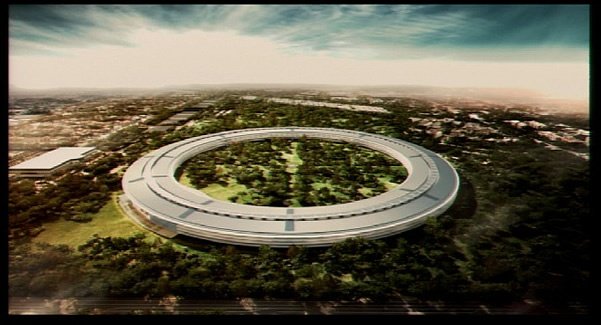
The 98-acre campus bought last year from Hewlett Packard, in Cupertino revealed to be a future campus for Apple as CEO Steve Jobs explained Apple’s plans for the space to the Cupertino City Council. Here’s what the new 4-story building holding 12,000 employees will look like when it’s completed in 2015 as described by Steve:
It’s a pretty amazing building. It’s a little like a spaceship landed. It’s got this gorgeous courtyard in the middle… It’s a circle. It’s curved all the way around. If you build things, this is not the cheapest way to build something. There is not a straight piece of glass in this building. It’s all curved. We’ve used our experience making retail buildings all over the world now, and we know how to make the biggest pieces of glass in the world for architectural use. And, we want to make the glass specifically for this building here. We can make it curve all the way around the building… It’s pretty cool.
The facility will be 80% landscaping, with most of the parking underground, compared to 20% landscaping with all above ground parking currently. The current campus has 3,700 trees and Apple plans to increase that to more than 6,000 trees, including “some apricot orchards.”
Apple also plans to build its own energy generation facility using natural gas, with the electricity grid as a backup.
One of the city councilors asked what the citizens of Cupertino would get from the new campus, and in particular brought up a free Wi-Fi network, like Google offers in Mountain View. Steve responded that Apple was the largest taxpayer in Cupertino and he felt that the tax benefits to having a company like Apple in Cupertino was benefit enough and the city should be providing a service like that.
“If we can get out of paying taxes, we would be glad to provide free Wi-Fi.”
Cupertino’s Mayor has responded to Steve’s proposal:
The City of Cupertino has responded to Apple’s stunning new campus proposal. In the statement, Cupertino Mayor Gilbert Wong states “there is no chance we are saying no” to the new Apple campus. Apple proposal will still have to go through an environmental and a public hearing, but Wong says they are willing to bring on more staff to accommodate the process.
Progress of the project can be followed at Cupertino.org/apple where they’ve also posted a PDF of Jobs’ presentation slides.