• How to Enable the Hidden Panorama Camera Mode in iOS 5


    Panorama functionality in iOS 5

    After the first beta of iOS 5 was seeded to developers in June, a series of code strings suggested the company could implement a panoramic photo-taking feature in the OS, allowing users to shoot wider photos with a Panorama functionality allegedly similar to what third-party apps like 360 Panorama and Pano are already offering. As Apple kept seeding more betas and eventually released iOS 5 to the public, Panorama was nowhere to be found in iOS, suggesting Apple wasn’t ready to debut the feature yet.

    One Developer did a little digging around inside the camera app and discovered that editing a particular .plist file made the missing panorama mode to appear, however, a new Cydia tweak made available now, called Firebreak. to simply enable camera’s panorama mode:

    Firebreak via Cydia

    Requires iOS 5 or higher

    Requires Gyroscope capable device, iPhone 4, or newer, or iPad 2.

    Enable built-in panoramas on iOS 5 Camera app.

    No icons added to the homescreen. The panorama button is added to the Options menu in the Camera app.

    Once downloaded and installed you will have the panorama mode enabled.

  • Siri Successfully Ported to Run on iPhone 4 and iPod Touch


    Siri has finally made its way to the iPhone 4

    Developer Steven Troughton-Smith had successfully ported the Siri onto the iPhone 4 and iPod Touch. The video provided below not only shows the Siri functionality on an iPhone 4, but is in depth and shows a side-to-side comparison against the iPhone 4S. In addition, the video shows the Siri Dictation in action.

    iPhone 4S jailbreak was the key to make the port working successfully on iPhone 4. 9to5mac’s Mark Gurman has brought this story and an got exclusive interview about the port with the developer:

    Mark: Where do you go from here with the port?

    Steven: At this point it’s all about confirming this works across devices, making it reproducible (we got it working on two devices today), and documenting everything. It does require files from an iPhone 4S which aren’t ours to distribute, and it also requires a validation token from the iPhone 4S that has to be pulled live from a jailbroken iPhone 4S, and it’s about a 20-step process right now.

    Mark: In its current state, is the port 100% functional, is there anything you would like to see work better?

    Steven: Yes, it seems to be 100% functional. I’m working on the rough edges, but everything that works on the iPhone 4S seems to work here.

    Mark: Do you ever see Siri showing up in Cydia (or another jailbreak store) for non natively supported devices?

    Steven: No, I could not be a part of that. I have no doubts that others will package this up and distribute it quasi-illegally, or try and sell it to people. I am only interested in the technology and making it work; proving that it works and works well on the iPhone 4 and other devices.

    Mark: So, you also got Siri working on the fourth-generation iPod touch, how is that working out?

    Steven: We got chpwn’s iPod touch up and running with Siri after proving it works on my iPhone 4. Unfortunately the microphone on the iPod is nowhere near as good as the iPhone – you will notice that the Siri level meter hardly moves when you talk to it. While it does work, you have to speak loudly and clearly to the iPod.

    Mark: How long did porting take you, what was the “I got it” moment?

    Steven: Basically, I already had everything I needed to make it work. I had spent a lot of time mapping out in my head exactly how Siri works on the iPhone. All I needed was access to a jailbroken iPhone 4S to put my hunch to the test. It literally took no longer than 10 minutes to put all the pieces in place and perform our first test on my iPhone 4, and it was an instant success.

  • How To Jailbreak iOS 5 Semi-Tethered On iPhone, iPad, iPod touch


    While waiting for full untethered jailbreak for iOS 5, here is a very good deal for a half solution to that.

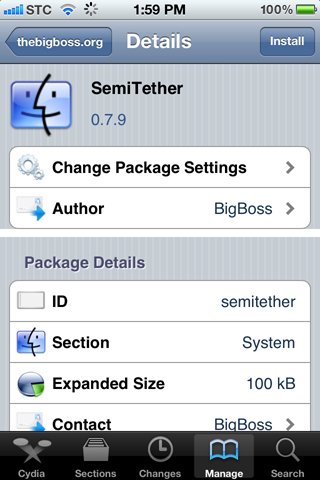
    BigBoss has released Semitethered Jailbreak, a new Cydia package that lets you reboot your iOS 5 jailbroken iPhone at will while away from your computer!

    semitether

    It’s not without it’s cons, but it’s a whole lot better than a normal tethered jailbreak.

    How to get use Semitethered Jailbreak

    Step 1: Tether Jailbreak your iOS 5 device with RedSn0w

    Step 2: Add http://thebigboss.org/semitether to your Cydia sources.

    Step 3: Install SemiTether and reboot!

    That’s it. Now you can reboot your iPhone, even away from your computer!

    As mentioned, there are a few cons though.

    • Phone will reboot to Home screen
    • Can use every stock app on iPhone except Mail and Safari until boot tether
    • Can’t use Cydia, or any jailbreak apps and tweaks until boot tether
    • Phone can take longer to boot

    That’s a pretty good compromise, whenever you want to reboot while away from the computer.

    Remember to get the full functionality back you have to boot the device back into a tethered jailbroken state using Redsn0w. To do this, start Redsn0w, go into “Extras”, select “Just Boot” option and enter DFU mode. Redsn0w should now boot your device as tethered

  • Samsung Galaxy Nexus Screen Held Back by Cheaper PenTile OLED


    Samsung Galaxy Nexus

    The new Samsung Galaxy Nexus sports a 720p HD display, its 4.65-inch screen is said to be held back by cheaper technology that gives it a lower pixel density and poorer color accuracy than Apple’s Retina Display found on the iPhone 4S and iPhone 4.

    According to FlatPanelsHD, the Galaxy Nexus features a display branded “Super AMOLED” by Samsung, which is less than the “Super AMOLED Plus” screen featured on the already-available Galaxy S II smartphone. The removal of “Plus” from the name references that the screen uses a cheaper PenTile OLED, despite the fact that it has more pixels per inch, .

    The less expensive panel on the Galaxy Nexus means that individual pixels must share subpixels on the screen, which undercuts the 315 pixel-per-inch density of the Galaxy Nexus display.

    “A PenTile OLED panel was recently introduced with the Samsung Galaxy Note, and we were not impressed. In real world PenTile means loss of details and sharpness, as well as a bluish/greenish tint around letters (depending on the background color)”

    By calculating the “real” pixel density of the display with the PenTile subpixel sharing, the Galaxy Nexus is said to have a pixel-per-inch number of about 200, which is just slightly higher than the Super AMOLED Plus screen on the Galaxy S II.

    “So, the HD Super AMOLED display in the new Galaxy Nexus is not as awesome as it sounds — unfortunately,” author Rasmus Larsen wrote. “And the reason that people do not call it a Retina display should seem much more obvious to you now that you know the underlying technical architecture.”

    The pixel density numbers of the Galaxy Nexus are also affected by the fact that the new flagship Android device has a large 4.65-inch screen to fill. For comparison, the iPhone 4S and iPhone 4 feature a display more than an inch smaller diagonally, at 3.5 inches.

    Samsung/Google states that Galaxy Nexus has a slightly curved screen but the same was said for the Nexus S where it was later revealed that only the front glass was curved

    Apple made the term “Retina Display” part of its marketing with the launch of the iPhone 4 in 2010. The name was chosen because Apple says the individual pixels are so small and densely packed that they cannot be seen by the human eye. The iPhone 4 and its follow-up, the newly released iPhone 4S, feature a pixel-per-inch density of 326.