• Apple’s iOS 6 New 3D Maps Screenshots Leaked


    Apple’s iOS 6 New 3D Maps Screenshots Leaked

    Apple’s iOS 6 New 3D Maps Screenshots Leaked

    A new purported image of Apple’s upcoming Maps service has surfaced and this time by the guys at BGR who just posted a few images of Apple’s iOS 6 Maps app with 3D option which was heavily rumored this month.

    These shots looked very likely and they add up to the claims that Apple has worked on an in-house mapping solution for years now. Apple is reportedly testing its 3D technology in build 10A314 of iOS 6.

    Apple has been working on an in-house mapping solution for a few years, and it appears as if the company is finally ready to release a new Maps app for iOS, sidestepping Google’s mapping data for its own. BGR has obtained exclusive information and photos of parts of Apple’s new Maps app from a trusted source, and the app features a refreshed user interface including a brand new navigation bar. This bar, we’re told, is silver instead of blue. Since the current Maps app follows the standard blue iOS color scheme, we think it’s possible Apple might shift toward a silver color theme in iOS 6 like on the iPad.

    The iPhone version of Maps has a floating locate me button (it sounds very similar to Android’s Google Maps app) in the bottom left corner. To access 3D mode, which will make use of Apple’s C3 Technologies acquisition, you have to peel back the lower right corner of Maps just like the current version and enable 3D mode. Once enabled, you can switch in and out of 3D mode by tapping a 3D icon in the lower left corner. A photo of this feature can be seen in our gallery.

  • Convert iOS 5.1.1 Thethered Jailbreak to Untethered Using Rocky Racoon 5.1.1


    Convert iOS 5.1.1 Thethered Jailbreak to Untethered Using Rocky Racoon 5.1.1

    Convert iOS 5.1.1 Thethered Jailbreak to Untethered Using Rocky Racoon 5.1.1

    All jailbreakers in the world breathed a sigh of relief as Absinthe 2.0 update brought untethered jailbreak for almost all iOS 5.1.1 devices, including the A5 iPhone 4S and iPad 2, and A5X new iPad 3. However some devices including A4 devices already had a tethered jailbreak for iOS 5.1.1. Chronic Dev Team has released the Rocky Racoon 5.1.1 Untether package in Cydia to convert a tethered into untethered jailbreak right away. You can check our tutorial on how to use Absinthe 2.0 here

    Similar to Corona package that followed Absinthe back for iOS 5.0.1, Rocky Racoon will convert your existing tethered jailbreak to an untethered one without requiring any obstacles or even wiping your content.

    To install the package, launch Cydia on your tethered jailbroken iPhone 4, iPad or iPod touch, search for Rocky Racoon 5.1.1 Untether. Install the package.

  • iOS 5.1.1 Untethered Jailbreak Using Absinthe 2.0 Just Released


    iOS 5.1.1 Untethered Jailbreak Using Absinthe 2.0 Just Released

    iOS 5.1.1 Untethered Jailbreak Using Absinthe 2.0 Just Released

    The Chronic Dev Team in collaboration with iPhone Dev Team have today released Absinthe 2.0, the tool to untethered jailbreak iOS 5.1.1. They have just announced the tool at Hack in the Box 2012 in Amsterdam as a “one more thing”.

    Absinthe 2.0 supports the following devices:

    • iPad1,1 – 2,1 – 2,2 – 2,3 – 3,1 – 3,2 – 3,3
    • iPhone2,1 – 3,1 – 3,3 – 4,1
    • iPod3,1 – 4,1
    • iPad2,4 support will be added at a later date
    iOS 5.1.1 untethered Absinthe 2.0 jailbreak just announced

    iOS 5.1.1 untethered Absinthe 2.0 jailbreak just announced

    How To Use Absinthe 2.0:

    1. Make a backup of your device in iTunes by right clicking on your device name under the ‘Devices’ menu and click ‘Back Up’.
    2. Once your backup is complete return to your device and go to Settings – General – Reset – Erase all Content and Settings. This will make the jailbreak process much faster.
    3. Open Absinthe and be sure you are still connected via USB cable to your computer.
    4. Click ‘Jailbreak’ and wait…. just be patient and do not disconnect your device.
    5. Once jailbroken return to iTunes and restore your backup from earlier. Right click on your device name under the ‘Devices’ menu in the left panel of iTunes and click ‘Restore from Back Up…’ then select the latest backup you created before. (restoring this backup will return all the content previously on your device ie, apps, photos, etc.)
    6. Enjoy your jailbroken iDevice!

    Download Links:

    iOS 5.1.1 iPhone, iPad, iPod Touch, Apple TV Direct Download Links:

  • iPhone 5 to Sport 1132 X 640 Pixels, 4-inch, 16:9 Display


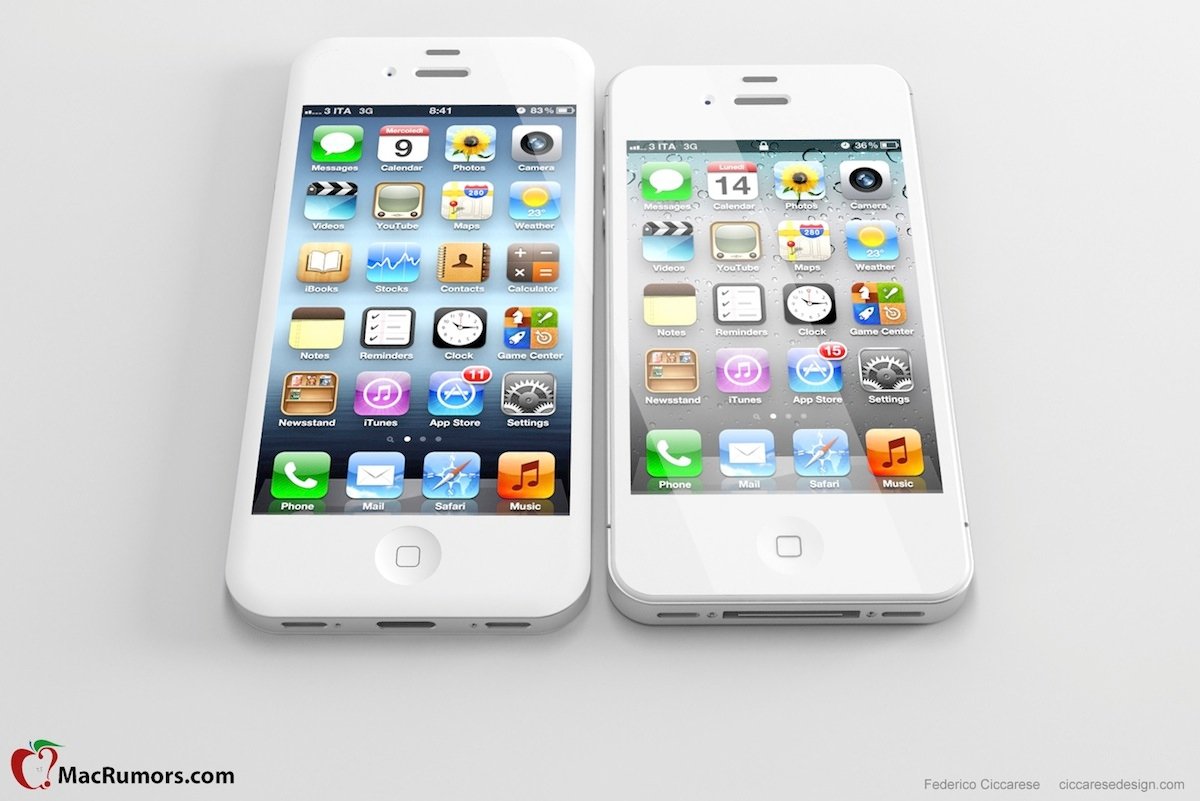
    iPhone 5 Mockup

    iPhone 5 Mockup

    The next-generation iPhone, iPhone 5, rumor mill is hot on tracks as we are approaching the announcement time. Previous rumors suggested a bigger screen and today we have more tidbits that worth noticing.

    The next iPhone, iPhone 5, no doubt will sport a slimmer shell and feature a taller screen display, probably to keep the overall device measurements. The new display will sport around 1132 x 640 pixles at 326 ppi measuring a 4″ display with 16:9 ratio (current iPhone 4 and iPhone 4S have 960 X 640 pixels, 3.5″ with 3:2 ratio).

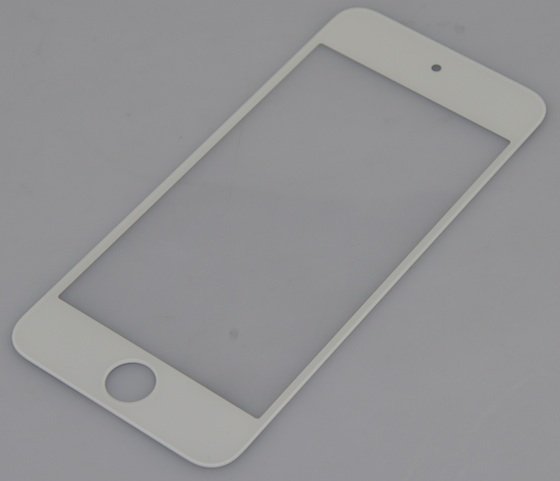
    Next iPod Touch Panel Leaked

    Next iPod Touch Panel Leaked

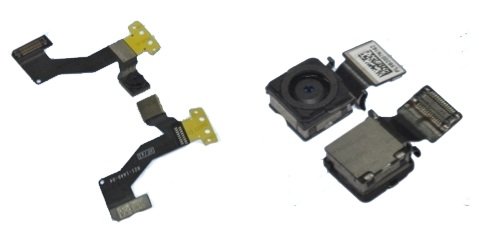
    Adding to the rumors, MacRumors and BadGizmo have posted the front panel for the next alleged iPod touch along with the camera sensor for the next iPhone. Interestingly, according to this, the front panel for the iPod measures 4.1-inches diagonally:

    "iPhone 5" front camera (left) and rear camera (right)

    "iPhone 5" front camera (left) and rear camera (right)

    BothThe Wall Street Journal and Reuters have stated previously that the next iPhone will be “at least 4-inches.”

    Other rumors suggest that Apple is about to introduce an all new smaller dock connector. Stay tuned