Blog

×××
  • Download Firefox 12 for Windows, Mac And Linux


    Download Firefox 12 for Windows, Mac And Linux

    Download Firefox 12 for Windows, Mac And Linux

    Mozilla has now finally outed the next version of their popular internet browser, Firefox 12 has subtle differences from the previous release, some are listed below:

    • Windows: Firefox is now easier to update with one less prompt (User Account Control)
    • Page Source now has line numbers
    • Line breaks are now supported in the title attribute
    • Improvements to “Find in Page” to center search result
    • URLs pasted into the download manager window are now automatically downloaded
    • The column-fill CSS property has been implemented
    • Support for the text-align-last CSS property has been added
    • Experimental support for ECMAScript 6 Map and Set objects has been implemented
    • Fixed where WebGL performance may be degraded on some OS X hardware

    Download Firefox 12 for Windows, Mac And Linux links:

    • Download Firefox 12 for Windows
    • Download Firefox 12 for Mac
    • Download Firefox 12 for Linux
  • How to Unlock Any Jailbroken iPhone on Any Firmware and Baseband Using SAM


    How to Unlock Any Jailbroken iPhone on Any Firmware and Baseband Using SAM

    How to Unlock Any Jailbroken iPhone on Any Firmware and Baseband Using SAM

    Unlocking the iPhone 4S, and the iPhone 4 has just got easy using a new unlock which been discovered that actually works for all iPhones and all firmware versions.

    The method can be performed on any jailbroken iOS device using SAM package unlock. Here is a full tutorial that shows how to unlock any iPhone on iOS 5 or higher (running any baseband) using the SAM jailbreak package:

    Step 1: Add the following repo to your Cydia sources: repo.bingner.com and then install SAM.

    Step 2: Open SAM, go to Utilities, and tap Deactivate.

    Step 3: Go back to the SAM main menu, and tap More Information. Under SIM Details copy your IMSI number.

    Step 4: Remove your SIM, and replace it with the SIM you wish to use.

    Step 5: With SAM enabled, tap Method, and select By Country and Carrier. Go back a menu, and select the correct country and then the correct carrier for your SIM card.

    Step 6: Go back to More Information, and tap Spoof Real SIM to SAM. Next under SAM Details, delete the current IMSI number, and replace it with the one you copied in step 3.

    Step 7: On the SAM main menu go to Utilities, and tap Attempt Activation. Your device should respring if done correctly.

    Step 8: Open SAM and disable SAM. Close SAM.

    Step 9: Open iTunes and plug in your device to your computer. You may have to unplug it and plug it in a few times. Be patient. You should receive a message stating that it failed to activate your device, but that’s a good thing, click ok. Be patient, and eventually you will see the carrier logo for your new SIM.

    Note: From here on out you can freely switch between your original SIM and your new SIM. All you need to do is plug in the device and repeat step 9 to activate your desired SIM.

    It’s recommended saving your Activation Ticket for each SIM that you use, as they might come in handy in the future. These can be found at: /var/Root/ibrary/Lockdown and you can access this easily with iFile or via SSH.

    [via iDB]

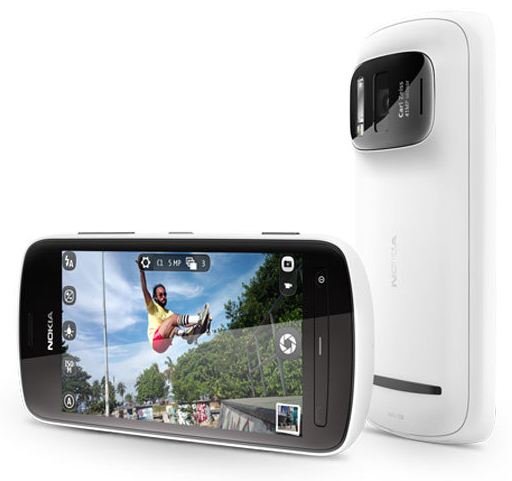
  • Nokia Ad Shot Entirely Using Nokia 41-megapixel PureView Camera


    Nokia 808 41-megapixel PureView Camera

    Nokia 808 41-megapixel PureView Camera

    Nokia is showing off its 41-megapixel PureView camera in a new ad that it says was shot entirely using its Nokia 808. The footage gives a good quality video and still images with some zooming and panning techniques. Watch this video below and tell us what you think:

  • Creative TNT Ad; Push the Red Button to Add Drama


    Push the Red Button to Add Drama

    Push the Red Button to Add Drama

    To launch the high quality TV channel TNT in Belgium, the crew placed a big red push button right in the middle of street in an average Flemish town. Above that button is a big arrow that says, “Push To Add Drama.” and they invited people to use the button, and then they waited.

    Find out what happened when someone pushed that button:

    This is quite a creative ad for TNT that is worth checking out.