
Google has run a sting operation that it says proves Bing has been watching what people search for on Google, the sites they select from Google’s results, then uses that information to improve Bing’s own search listings. Bing doesn’t deny this.
As a result of the apparent monitoring, Bing’s relevancy is potentially improving (or getting worse) on the back of Google’s own work. Google likens it to the digital equivalent of Bing leaning over during an exam and copying off of Google’s test.
“I’ve spent my career in pursuit of a good search engine,†says Amit Singhal, a Google Fellow who oversees the search engine’s ranking algorithm. “I’ve got no problem with a competitor developing an innovative algorithm. But copying is not innovation, in my book.â€
Bing doesn’t deny Google’s claim. Indeed, the statement that Stefan Weitz, director of Microsoft’s Bing search engine, emailed me yesterday as I worked on this article seems to confirm the allegation:
As you might imagine, we use multiple signals and approaches when we think about ranking, but like the rest of the players in this industry, we’re not going to go deep and detailed in how we do it. Clearly, the overarching goal is to do a better job determining the intent of the search, so we can guess at the best and most relevant answer to a given query.
Opt-in programs like the [Bing] toolbar help us with clickstream data, one of many input signals we and other search engines use to help rank sites. This “Google experiment†seems like a hack to confuse and manipulate some of these signals.
Later today, I’ll likely have a more detailed response from Bing. Microsoft wanted to talk further after a search event it is hosting today. More about that event, and how I came to be reporting on Google’s findings just before it began, comes at the end of this story. But first, here’s how Google’s investigation unfolded.
Postscript: Bing: Why Google’s Wrong In Its Accusations is the follow-up story from talking with Bing. Please be sure to read it after this. You’ll also find another link to it at the end of this article.
Hey, Does This Seem Odd To You?
Around late May of last year, Google told me it began noticing that Bing seemed to be doing exceptionally well at returning the same sites that Google would list, when someone would enter unusual misspellings.
For example, consider a search for torsoraphy, which causes Google to return this:
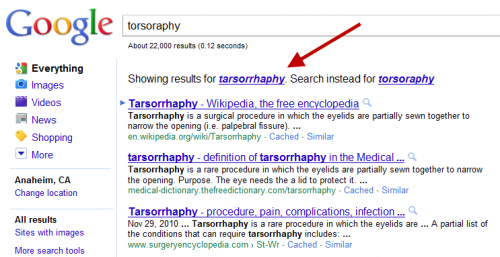
In the example above, Google’s searched for the correct spelling — tarsorrhaphy — even though torsoraphy was entered. Notice the top listing for the corrected spelling is a page about the medical procedure at Wikipedia.
Over at Bing, the misspelling is NOT corrected — but somehow, Bing manages to list the same Wikipedia page at the top of its results as Google does for its corrected spelling results:
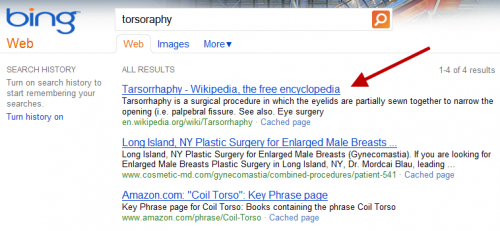
Got it? Despite the word being misspelled — and the misspelling not being corrected — Bing still manages to get the right page from Wikipedia at the top of its results, one of four total pages it finds from across the web. How did it do that?
It’s a point of pride to Google that it believes it has the best spelling correction system of any search engine. Google even claims that it can even correct misspellings that have never been searched on before. Engineers on the spelling correction team closely watch to see if they’re besting competitors on unusual terms.
So when misspellings on Bing for unusual words — such as above — started generating the same results as with Google, red flags went up among the engineers.
Google: Is Bing Copying Us?
More red flags went up in October 2010, when Google told me it noticed a marked rise in two key competitive metrics. Across a wide range of searches, Bing was showing a much greater overlap with Google’s top 10 results than in preceding months. In addition, there was an increase in the percentage of times both Google and Bing listed exactly the same page in the number one spot.
By no means did Bing have exactly the same search results as Google. There were plenty of queries where the listings had major differences. However, the increases were indicative that Bing had made some change to its search algorithm which was causing its results to be more Google-like.
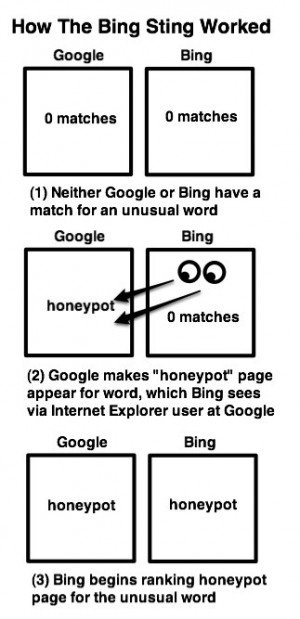 Now Google began to strongly suspect that Bing might be somehow copying its results, in particular by watching what people were searching for at Google. There didn’t seem to be any other way it could be coming up with such similar matches to Google, especially in cases where spelling corrections were happening.
Google thought Microsoft’s Internet Explorer browser was part of the equation. Somehow, IE users might have been sending back data of what they were doing on Google to Bing. In particular, Google told me it suspected either the Suggested Sites feature in IE or the Bing toolbar might be doing this.
To Sting A Bing
To verify its suspicions, Google set up a sting operation. For the first time in its history, Google crafted one-time code that would allow it to manually rank a page for a certain term (code that will soon be removed, as described further below). It then created about 100 of what it calls “synthetic†searches, queries that few people, if anyone, would ever enter into Google.
These searches returned no matches on Google or Bing — or a tiny number of poor quality matches, in a few cases — before the experiment went live. With the code enabled, Google placed a honeypot page to show up at the top of each synthetic search.
The only reason these pages appeared on Google was because Google forced them to be there. There was nothing that made them naturally relevant for these searches. If they started to appeared at Bing after Google, that would mean that Bing took Google’s bait and copied its results.
This all happened in December. When the experiment was ready, about 20 Google engineers were told to run the test queries from laptops at home, using Internet Explorer, with Suggested Sites and the Bing Toolbar both enabled. They were also told to click on the top results. They started on December 17. By December 31, some of the results started appearing on Bing.
Here’s an example, which is still working as I write this, hiybbprqag at Google:

and the same exact match at Bing:

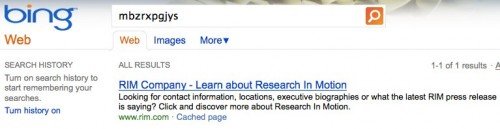
Here’s another, for mbzrxpgjys at Google:
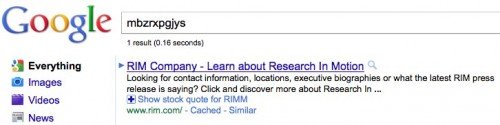
and the same match at Bing:
Here’s one more, this time for indoswiftjobinproduction, at Google:

And at Bing:

To be clear, before the test began, these queries found either nothing or a few poor quality results on Google or Bing. Then Google made a manual change, so that a specific page would appear at the top of these searches, even though the site had nothing to do with the search. Two weeks after that, some of these pages began to appear on Bing for these searches.
It strongly suggests that Bing was copying Google’s results, by watching what some people do at Google via Internet Explorer.
[source & more info at searchengineland]